For survival horror in a dark room, a headset is a good choice if you can pick out quiet sounds clearly and find the sound comfortable on your PC or console. Compare the available audio settings in a familiar scene; a label such as 7.1 does not automatically mean that the sound will be clearest for you. Choose a wired headset if you want to avoid charging, or a wireless model if freedom of movement matters more. For late-night or longer sessions, also consider the fit, sound leakage and volume.
Which choice is right for you?
Players who want to pinpoint sounds
You want to pick out whispers, footsteps and other cues, and hear which direction they’re coming from. SteelSeries recommends trying the game’s headphone setting for horror games; on PS5, PlayStation says you can choose a 3D audio profile or one of the presets.
Night-time players with housemates
You play while others are resting and don’t want game audio to carry through the room on speakers. At your usual listening volume, test how much sound can be heard outside the ear cups. The World Health Organization notes that both sound level and listening time matter.
Players who enjoy long sessions
You wear your headset for long stretches and want to know whether the ear cushions, headband and any cable or battery will suit you. When assessing headphones, the Consumers’ Association of the Netherlands considers wearing comfort, including use with glasses; try the fit yourself if possible.
What should you look for in a survival horror headset?
| What to consider |
What to look for |
Who is this important for? |
| Quiet sounds and direction |
In the same scene, compare the game’s headphone setting with stereo and any spatial audio options, at roughly the same volume. |
I want to pick out and pinpoint footsteps and other quiet cues. Around 36% of consumers give sound and direction the highest priority. |
| Quiet play |
Test how much sound others can hear outside the headset, and keep the listening volume at a manageable level. |
When I play late, I don’t want game audio to carry through the room. Around 29% of consumers put quiet play first. |
| Comfort during long sessions |
When trying on a headset, check for pressure points and warmth, and see how it feels with glasses. For wireless models, check the battery life for the connection mode you’ve chosen. |
I want a headset that stays comfortable over longer periods. Around 21% of consumers prioritise wearing comfort and uninterrupted use. |
| Connection and freedom of movement |
Check the exact model variant, connection or receiver, and which features work on your platform. |
I want to know whether the headset works with my PC or console, and whether a cable will get in the way where I play. Around 14% of consumers make device compatibility their top priority. |
Things to watch out for when buying
-
Assuming a 7.1 or 3D label guarantees better positional audio
The game, platform and profile settings all affect how sound is played. On PS5, PlayStation lets you compare settings, including stereo and 3D audio.
Compare the modes in the same game scene and at roughly the same volume before letting an audio feature make the decision for you.
-
Confusing headset compatibility with compatibility of every feature
HyperX says the wired Cloud III has several connection options, but that its included DTS licence does not work on Xbox.
Check the connection, microphone and audio features you want separately for your device and the exact headset variant.
-
Assuming the longest stated battery life is guaranteed play time
HyperX gives different maximum battery life figures for the Cloud III S Wireless on 2.4 GHz and Bluetooth. Battery life therefore depends on the mode you choose.
Check the figure for the connection you’ll actually use, and charge the headset before a long session.
If you need to charge while playing, it could interrupt a long session.
-
Confusing an extended warranty with your statutory rights
The Dutch government says that a commercial warranty is in addition to your statutory rights; the Netherlands has no fixed statutory warranty period for all products.
Before buying additional cover, check what extra protection it provides, separately from your statutory rights.
Brands to compare
HyperX
The wired Cloud III and wireless Cloud III S Wireless are different models. Choose based on whether you want a cable, the connection you need and your preferred wireless mode.
- HyperX lists 3.5 mm, USB-A and USB-C connections for the wired Cloud III. For the Cloud III S Wireless, HyperX gives maximum battery life figures for each mode: 120 hours over 2.4 GHz and 200 hours over Bluetooth.
- HyperX says the wired Cloud III’s DTS licence works on PC, but not on Xbox. The stated battery life for the Cloud III S Wireless is a maximum and varies by mode.
SteelSeries
The Arctis Nova 7P is designed for players who want to combine game audio via a USB receiver with phone audio via Bluetooth on a supported platform.
- SteelSeries lists PS4, PS5, PC, Switch and tablet as compatible with the receiver, and describes using Bluetooth audio at the same time.
- Check whether you’re choosing the 7, 7P or 7X variant, and which connection your device supports.
Logitech G
The G435 is a wireless option for anyone considering LIGHTSPEED or Bluetooth.
- Logitech G lists LIGHTSPEED use on PC, Mac, PS4 and PS5, with a maximum battery life of 18 hours.
- Don’t assume every connection mode works on every listed platform; check that the combination you want is compatible with your device.
PlayStation
The PULSE 3D is designed for use with PS5 and offers controls and equaliser settings via the console.
- PlayStation describes the PULSE 3D as tuned for PS5 3D audio.
- PlayStation also says that other PS5-compatible headsets can use 3D audio. So you don’t necessarily need the PULSE 3D to try the feature.
Trust
The GXT 491 Fayzo is worth comparing if you’re looking for a detachable microphone and simultaneous audio over 2.4 GHz and Bluetooth.
- Trust lists a maximum play time of 22 hours and virtual 7.1 audio.
- Those specifications alone don’t prove that you’ll be better at pinpointing sounds in horror games; compare the audio with your game’s settings.
Gaming headsets for your gaming needs
Below you’ll find wired options for PC and various consoles, as well as wireless models with a USB receiver. Check which connections and features work on your platform for each model.
 No image available
Razer Kraken V3 X gaming headset, black
A wired USB option for PC or PS4 players who don’t need a wireless connection.
Razer lists 40 mm drivers and a weight of 285 g. The description mentions 7.1 Surround Sound for Windows; the headset connects via USB.
View at Joybuy
 No image available
HyperX Cloud III S Wireless gaming headset
A good fit for anyone who wants to play without a cable and choose their connection mode.
HyperX lists up to 120 hours over 2.4 GHz and 200 hours over Bluetooth; these are maximum figures, not guaranteed battery life. The product description mentions DTS Spatial Audio for PC, a detachable microphone, and memory foam ear cushions and headband.
View at Joybuy
 No image available
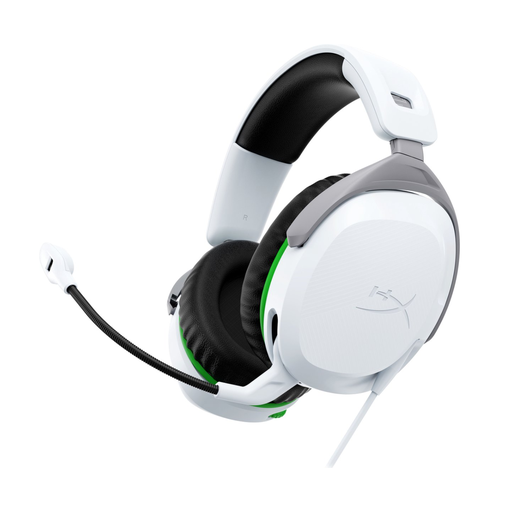
HyperX CloudX Stinger II, white, for Xbox Series X|S and Xbox One
A wired option for Xbox players looking for a 3.5 mm connection.
The product description mentions memory foam ear cushions, a weight of 275 g and a flip-to-mute microphone.
View at Joybuy
 No image available
HyperX Cloud Stinger II, white, for PS5 and PS4
A wired option for PS5 or PS4 players looking for a 3.5 mm connection.
The product description mentions memory foam ear cushions, a weight of 275 g and swivelling ear cups. The microphone can be flipped up to mute it.
View at Joybuy
 No image available
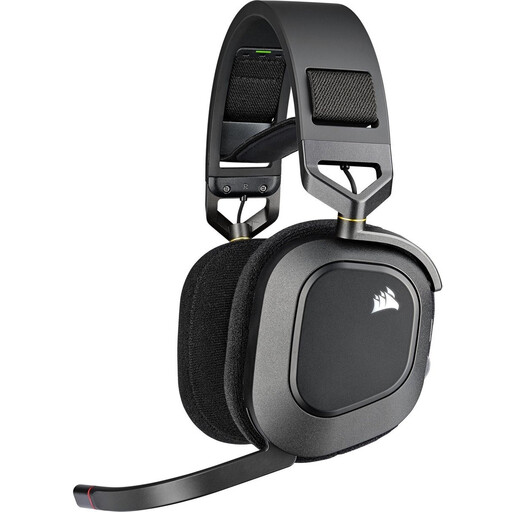
Corsair HS80 RGB Wireless gaming headset, Carbon
A wireless option for PC or PlayStation players using a USB receiver.
Corsair lists up to 20 hours of battery life. The product description mentions Dolby Atmos for PC, a floating headband and breathable fabric memory foam ear cushions.
View at Joybuy
Frequently asked questions
Do you need a PULSE 3D for 3D audio on PS5?
No. PlayStation says other PS5-compatible headsets can also use 3D audio with compatible PS5 games. Set an audio profile or preset on the console, then compare the sound with stereo.
How do you set up a headset for survival horror?
Try the headphone setting if the game offers one, then compare it with other audio modes in the same scene. Keep the volume roughly the same; don’t turn it up extra high to hear quiet cues.
How can you keep a headset comfortable during long sessions?
Check the fit and pressure points, including if you wear glasses, and take listening breaks. The World Health Organization notes that both sound level and listening time matter, so keep the volume at a manageable level.
What can you do if a headset bought online doesn’t work properly?
The Dutch government says that a product must be fit for purpose and that the seller must provide a solution if there’s a problem. Many distance purchases also come with a 14-day cooling-off period; check which terms and exceptions apply to your purchase.


