Who is this choice for?

Players looking for platform compatibility

You want to know first whether the controller works with your console or PC and your survival horror game; extra features come afterwards. Check the platform specifications from manufacturers such as Xbox, PlayStation and Nintendo, and look at your game’s controller support, for example via Steam.

Players short on desk space

You want to avoid a cable running across your keyboard or mouse, or you’d rather have a fixed USB connection without needing to recharge. Connection options vary by model, as manufacturers such as Xbox, 8BitDo and GameSir specify.

Players who want tactile feedback

You’re looking for vibrations or adaptive triggers in supported scenes, but want to know in advance what the game and connection require. PlayStation lists support in selected PC games; 8BitDo, for example, specifies rumble for the Ultimate 2C Wireless.

What should you look for?

What to consider What should you check? Who is this most important for?
Platform and game Check your exact console or PC, and whether your game supports the controller and the features you want. If I want to avoid buying a controller that doesn’t work with my system or game, I check both before purchasing. Around 33% of consumers prioritise platform and game compatibility.
Cable space and connection Check whether you need a receiver or a free USB port, and where any cable will run across your desk. If I share my desk with a keyboard or mouse, I want to leave room for my hands and know where a receiver or cable will go. Around 27% of consumers prioritise cable space and connection.
Feedback and controls Check whether your game supports vibration, haptics or adaptive triggers, and whether USB is required. If I’m looking for tactile feedback or customisable controls, I want to be able to use them in my game. Around 20% of consumers prioritise feedback and controls.
Power and ease of use Check the power type, what’s included and whether you have a free USB port or place to charge it. If I want to reduce charging breaks or the need for loose batteries, I compare the power options and connections on each model. Around 20% of consumers prioritise power and ease of use.

Avoiding common buying mistakes

  • Assuming ‘wireless’ means Bluetooth on Windows

    According to 8BitDo, the 8BitDo Ultimate 2C Wireless uses 2.4 GHz or USB on Windows; Bluetooth is listed for Android. The receiver may therefore take up a USB port.

    Check which connections are available for each model and platform, and whether you have the required port free.

    Make room for the receiver if you want to use the wireless connection on Windows.

  • Expecting haptics or adaptive triggers to work in every PC game

    PlayStation says these features only work on PC in certain supported games and may require a USB connection.

    Check your game first, along with the connection needed for the features you want to use.

    With a wired connection, route the USB cable so it doesn’t get in the way of your keyboard, mouse or desk edge.

  • Confusing the two Nintendo Switch Pro Controllers

    Nintendo confirms that the original Switch Pro Controller can be used wirelessly with Switch 2. The Switch 2 Pro Controller has different features, including an audio jack, and is designed exclusively for Switch 2.

    Compare the full model name and check which features you need before choosing a version.

  • Assuming an extended warranty is your only protection

    According to ACM ConsuWijzer, you have statutory rights in addition to any retailer’s or manufacturer’s warranty. If a product doesn’t perform as you could reasonably expect with normal use, the retailer must provide an appropriate solution.

    Check your statutory rights first, then decide whether extra cover would be useful for you.

    An extended warranty may be an additional purchase; don’t assume you need one to have statutory protection.

Brands to compare

Xbox

The Xbox Wireless Controller is worth considering if you use an Xbox console or Windows PC.

  • Xbox lists Bluetooth and button mapping as features of its wireless controller.
  • Check game support and the power type for the specific version. Brand compatibility doesn’t guarantee that every feature will work in every game.

PlayStation

The DualSense is worth considering for PS5 and for PC games that support the features you want.

  • PlayStation lists haptics and adaptive triggers for selected PC games.
  • These features may require a USB connection on PC. The manufacturer’s description is not an independent assessment of their effect in survival horror games.

8BitDo

According to 8BitDo, the Ultimate 2C Wireless connects to Windows via a 2.4GHz receiver or USB, and to Android via Bluetooth.

  • Customisable extra bumpers and Hall Effect sticks are specifications of the Ultimate 2C Wireless.
  • Don’t assume it connects to Windows via Bluetooth. The stated battery life isn’t a guarantee for every set-up.

GameSir

The G7 SE is a wired option for the Xbox consoles and Windows 10/11 listed by GameSir.

  • GameSir specifies Hall Effect sticks, a headset jack and a detachable 3 m cable for the G7 SE.
  • Consider how you’ll route the cable across a small desk. These specifications apply to the G7 SE, not every GameSir model.

Nintendo

The original Switch Pro Controller and the Switch 2 Pro Controller are designed for different needs within the Switch family.

  • Nintendo confirms that the original Pro Controller can be used wirelessly with Switch 2.
  • The Switch 2 Pro Controller includes an audio jack and, according to Nintendo, is designed exclusively for Switch 2. Check which model is being offered.

Joybuy products

These Joybuy products cover Xbox and Windows set-ups, PC and Switch use, and Switch 2. Always check specific compatibility and connection requirements for your own console or PC and survival horror game.

Xbox Wireless Controller Robot White

Xbox Wireless Controller Robot White

A good fit for an Xbox or Windows set-up if you’re looking for a wireless controller; also check your game’s support.

The product description lists Bluetooth, USB-C, button mapping and a headset jack.

View at Joybuy
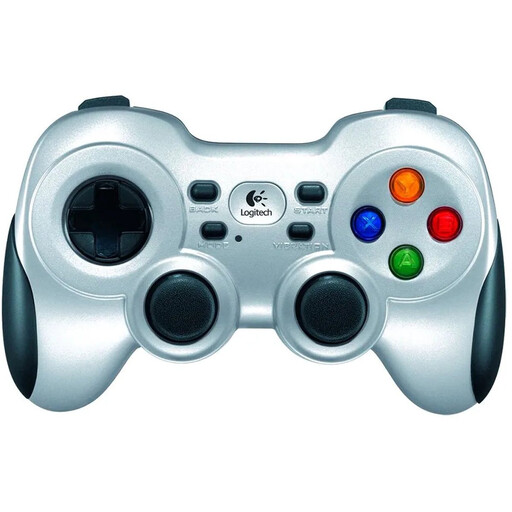
Logitech F710 Wireless Gaming Controller for PC Silver

Logitech F710 Wireless Gaming Controller for PC Silver

This PC controller could suit you if you’re looking for a wireless connection and vibration; check your game supports it.

The description lists a 2.4GHz connection with a nano receiver, dual vibration and two AA batteries. Keep a USB port free for the receiver.

View at Joybuy

BEITONG KP70 Haptic Feedback Elite Wireless Controller

BEITONG KP70 Haptic Feedback Elite Wireless Controller

An option to compare if you play on PC or Nintendo Switch and want tactile feedback; check how it works with your specific game.

The product information lists customisable buttons, several connection types and vibration motors. Check which connections and features work with your platform.

View at Joybuy

GameSir Cyclone 2 White-Bundle Edition

GameSir Cyclone 2 White-Bundle Edition

This version is listed for PC and Switch, making it worth considering if you’re looking for a wireless option; check your game’s support.

The description lists a 2.4GHz receiver and rumble. The product name mentions TMR sticks, a 1000 Hz polling rate and a charging dock; check which features matter for your use.

View at Joybuy

Nintendo Switch 2 Official Pro Controller Black

Nintendo Switch 2 Official Pro Controller Black

Designed for playing on Nintendo Switch 2; Nintendo says this model is only for Switch 2.

The product description lists HD Rumble and Bluetooth. Check whether your game supports the features you want.

View at Joybuy

Frequently asked questions

Will every controller work with my survival horror game on PC?

No. A controller being compatible with Windows doesn’t guarantee that your game supports it. Check the information for your specific title; Steam offers filters for supported controller types, and PlayStation advises checking with the game or publisher for DualSense support.

Can I connect the 8BitDo Ultimate 2C Wireless to Windows via Bluetooth?

For this version, 8BitDo lists a 2.4GHz receiver or cable for Windows; Bluetooth is listed for Android. Before buying, check that you have a USB port free for the receiver.

How can I use a wired controller at a small desk?

Plan where the cable and USB connection will go in advance, so the cable doesn’t get in the way of your other controls. GameSir specifies a detachable 3 m cable for the G7 SE; route it along a suitable path.

Should I buy an extended warranty if my controller breaks?

No, a paid extended warranty isn’t your only protection. According to ACM ConsuWijzer, you have statutory rights alongside any retailer’s or manufacturer’s warranty if the product doesn’t perform as you could reasonably expect with normal use; the retailer must provide an appropriate solution.

Can I return a controller bought online in the Netherlands?

For online purchases, you generally have 14 days to change your mind after the product is delivered, according to ACM ConsuWijzer, although some exceptions apply. Also check the retailer’s information about trying out and returning the product.
