Start by checking your console or PC, then make sure your chosen controller and the features you want to use work with your particular game. Next, compare the grip, how you can keep playing when it needs charging, and whether extra feedback or customisable buttons would be useful. No single controller suits every platform and player.
Who is this buying guide for?
Players with one dedicated console
First, check that the controller works with your PS5, Xbox or Switch, and that the game supports the features you want to use. Compatibility and feature requirements mentioned here are based on information from PlayStation, Microsoft and Nintendo.
Players who game for long stretches
Grip and button reach are personal, so don’t rely on the manufacturer’s description alone. Also consider how charging, batteries or a cable might affect your gaming session and where you sit.
Players who want to customise the controls
Extra buttons or profiles are most useful if you’re actually going to use them. Check which settings are available for each controller and platform.
What should you look for?
First, check compatibility with your system and game. Then compare the grip, power options and any extra features.
| What to consider |
What should you check? |
Who should consider this? |
| Platform and game |
Check compatibility with your console or operating system, and whether the specific game supports the controller. |
When I buy a controller, I want to be sure it works with my system and that my game supports the features I want. Around 33% of consumers prioritise compatibility with their platform and game. |
| Grip during long sessions |
Consider the shape, grip and button reach; try them out yourself if possible. |
When I play for a long time, I want to be able to hold the controller comfortably and reach the buttons easily. Around 27% of consumers prioritise grip and ease of use during a long session. |
| Power and cable |
Check the charging options and included accessories. If it’s a wired controller, measure the distance to your system. |
When I want to keep playing for a long time, I want to know whether charging or the cable length will restrict where I can sit. Around 20% of consumers focus on power and cable options to avoid interruptions. |
| In-game feedback |
Check whether haptic feedback or adaptive triggers are available in each game, and whether a particular connection is required. |
When I want to feel extra feedback, I want to know whether my game actually supports these features. Around 13% of consumers prioritise supported haptic or trigger effects. |
| Customisable controls |
Check which buttons or profiles can be customised on the exact model and platform you’ve chosen. |
When I want to customise my controls, I want to know whether the model has the buttons or profiles I need. Around 7% of consumers prioritise a custom button layout or adjustable controls. |
Avoid common buying mistakes
-
Assuming all features work on PC
With DualSense, haptic feedback and adaptive triggers depend on support from the game. On other devices, advanced features may require a USB connection.
Check the support and connection requirements for your particular game before choosing a controller for these features.
-
Assuming the stated battery life is guaranteed
Nintendo quotes around 40 hours for a fully charged Switch Pro Controller, but battery life may be shorter depending on the software and features used. For the standard Xbox Wireless Controller, Microsoft describes a separate rechargeable battery pack with a cable.
Check the power options and what’s included with the exact version, and charge the controller before you start playing.
-
Not checking the cable length against where you sit
PowerA says the Enhanced Wired Controller has a detachable 3 m cable. That length will only work if the cable can reach your system from where you play.
Measure the distance from your controller to your console or PC before choosing a wired model.
-
Confusing the manufacturer’s warranty with your statutory rights
According to the Netherlands Authority for Consumers and Markets, there is no fixed term for the statutory guarantee in the Netherlands. What you can reasonably expect from the product under normal use is a factor. The seller is responsible for the statutory guarantee.
Keep your proof of purchase and contact the seller if there’s a fault. Consider any additional manufacturer’s warranty separately.
Brands to consider
PlayStation
Worth considering if you play on PS5 and want to use controller features supported by your game.
- Sony lists haptic feedback and adaptive triggers for supported games.
- Replacement stick modules for the DualSense Edge are sold separately. Advanced features may require a USB connection on other devices.
Xbox
A wireless controller option if you’re looking for support for Xbox consoles or Windows PCs.
- Microsoft lists features including Bluetooth, a textured grip and button mapping.
- Consider the power options. A description of the grip can’t tell you whether the controller will feel comfortable in your hands.
Nintendo
The Switch Pro Controller is an option for Nintendo Switch. Nintendo also lists wireless pairing with Switch 2.
- Nintendo quotes around 40 hours of battery life for a fully charged Switch Pro Controller.
- Battery life may vary depending on the software and features used. The Switch Pro Controller is a different model from the Switch 2 Pro Controller.
PowerA
The Enhanced Wired Controller is a wired option for Xbox Series X|S, Xbox One and Windows.
- PowerA lists a detachable 3 m cable and two assignable buttons for this model.
- The cable limits where you can sit. These features apply to this model and not automatically to every controller from the brand.
8BitDo
According to the manufacturer, the Ultimate 2 Wireless is designed for use with Windows and Android.
- 8BitDo lists extra buttons, customisation software, TMR sticks and a charging dock.
- The stated compatibility doesn’t confirm use with PS5, Xbox or Switch. The manufacturer’s claims about precision and latency aren’t independent measurements for your game.
Controllers at Joybuy
This selection includes controllers for PS4 and PC, PS5, Nintendo Switch, and Xbox or Windows, with both wired and wireless options. Check each model’s compatibility with your system and game.
 Image unavailable
Wireless Dualshock game controller for PS4 and PC
An option to consider if you want to play wirelessly on PS4 or PC. Check that your game and system support this controller.
The product description lists a built-in rechargeable battery, a touchpad, a 6-axis gyroscope and dual vibration motors.
View at Joybuy
 Image unavailable
PS5 DualSense Wireless Controller V3 - Cosmic Red
Ideal if you play on PS5 and want to use haptic feedback or adaptive triggers in games that support these features.
The product description lists a built-in rechargeable battery and a USB-C connection. Advanced features may require a USB connection on other devices.
View at Joybuy
 Image unavailable
Nintendo Switch Pro Controller - Black
An option for Nintendo Switch. Nintendo also confirms that the Switch Pro Controller can pair wirelessly with Switch 2.
The product description lists motion controls and HD Rumble. Nintendo quotes around 40 hours of battery life after a full charge, depending on the software and features used.
View at Joybuy
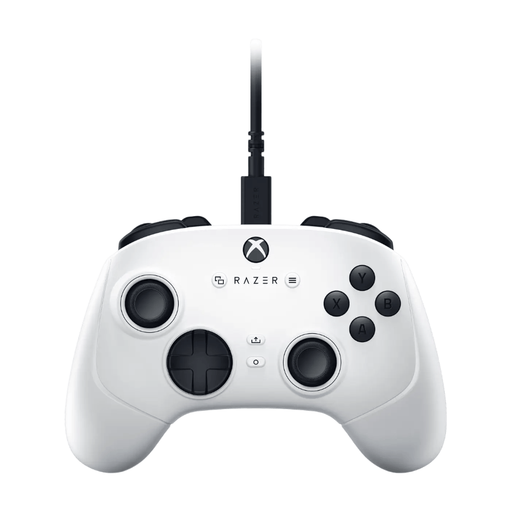 Image unavailable
Razer Wolverine V3 Tournament Edition - White
A wired option for Xbox or Windows, provided the cable is long enough for where you play.
The product description lists four rear paddles, six assignable buttons and a detachable 3 m cable.
View at Joybuy
 Image unavailable
GameSir T7 Wired Xbox Controller - Blue
Stated compatibility includes Xbox Series X|S, Xbox One, Windows 10/11 and Steam. Also check that your particular game supports it.
The product description lists Hall Effect sticks and triggers, a wired connection, and a textured finish on the grips, bumpers and triggers. The controller also has a 3.5 mm jack.
View at Joybuy
Frequently asked questions
Do DualSense haptic feedback and adaptive triggers work automatically in every survival horror game on PC?
No. According to Sony, the game must support these features, and a USB connection may be required. Check support for your particular game.
Can you use a Switch Pro Controller with a Switch 2?
Yes. Nintendo says you can pair the Switch Pro Controller wirelessly with a Switch 2. Follow Nintendo’s pairing instructions.
Do you need an extra battery or charging cable for a long session?
It depends on the model and what’s included in the box. Microsoft describes a separate rechargeable battery pack with a cable for the standard Xbox Wireless Controller. PowerA lists a detachable 3 m cable for the Enhanced Wired Controller. Check what’s included with the exact version.
Are you always entitled to exactly two years’ statutory guarantee on a controller in the Netherlands?
No. According to the Netherlands Authority for Consumers and Markets, there is no fixed term for the statutory guarantee. What you can reasonably expect from the product under normal use is what matters. The seller is responsible for the statutory guarantee.
Can you return a controller bought online if it doesn’t feel comfortable in your hands?
For online consumer purchases, you generally have a statutory cooling-off period of up to 14 days after delivery. Check the applicable terms for trying and returning the product. This is separate from your rights if the product is faulty.


