What should you look for when choosing?
First, check that the game you want is available for your chosen version. Then consider how much space you have and whether you want to play on a monitor or a built-in screen.
| What to consider |
What to check before buying |
Who is this important for? |
| Game availability |
Check the exact title, platform version and release date; an announcement doesn’t mean the game is already playable. |
If I want to play a specific horror game, I first check that the right version is available. Around 28% of consumers prioritise game availability. |
| Space on and around your desk |
Compare the console’s dimensions with the space available, and allow for an external screen and cables. According to Microsoft, the 512 GB Xbox Series S measures 6,5 × 15,1 × 27,5 cm. |
If my desk has limited space, a handheld or a compact console for a screen I already own is a major consideration. Around 28% of consumers give desk space top priority. |
| Screen choice |
Decide whether you want a built-in screen or plan to use an existing monitor. Screen resolution and technology alone don’t tell you how a specific game will perform. |
If I want to play without a monitor, I look at the built-in screen; for a fixed setup, I consider the monitor I already own. Around 17% of consumers say screen use is their main concern. |
| Cost of the complete setup |
Include everything you need for your use, such as a screen, compatible storage or digital versions of games. Nintendo specifies microSD Express for expanding game storage on Switch 2. |
If I want to know the cost of my complete setup in advance, I compare the console, screen and any extras. Around 16% of consumers prioritise total spending. |
| Existing games and physical media |
Check whether your chosen console has a disc drive and whether your individual Steam games are compatible with Steam Deck. |
If I want to keep playing games I already own, I look for the right disc version or check each title in my Steam library. Around 11% of consumers give existing games top priority. |
Joybuy products
This selection includes a PS5 with a disc drive for a fixed setup and handhelds with a built-in screen, including Switch 2 and portable gaming PCs.
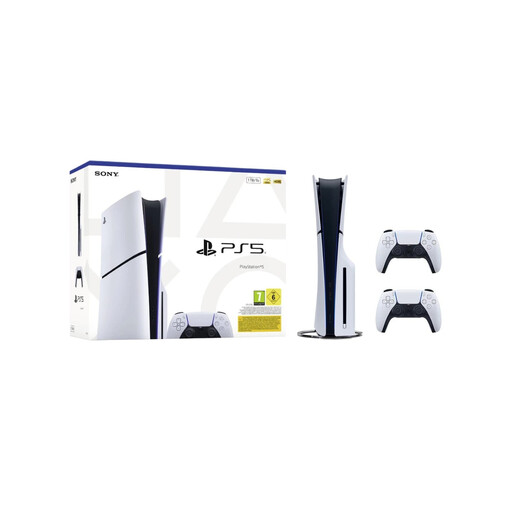 Image unavailable
Sony PlayStation 5 Slim Disc Edition 1TB bundle with 2 white DualSense wireless controllers, EU version
A good fit for a fixed setup with an external screen and for playing physical PS5 games.
Disc Edition; the bundle includes two white DualSense wireless controllers. Konami confirms that SILENT HILL 2 is available for PS5.
View at Joybuy
 Image unavailable
Lenovo Legion Go 8ASP2
A handheld gaming PC for playing without needing a permanent spot for a console on your desk.
The product description lists SteamOS, a 1 TB SSD and a microSD card reader. Check compatibility separately for the PC games you want to play.
View at Joybuy
 Image unavailable
Lenovo Legion Go S 8APU1 (83N6001TMH)
A handheld gaming PC with built-in controls for playing without needing a permanent spot for a console.
The product description lists Hall effect joysticks, a touchpad and two USB4 ports. Check that each game you want works on your chosen version.
View at Joybuy
 Image unavailable
Asus ROG Xbox Ally, 16GB RAM, 512GB SSD, white
A portable gaming console with a built-in screen for a workspace without a separate monitor.
The product description lists Windows 11 Home, a 7-inch FHD touchscreen and 512GB of storage. According to the product description, the charger is sold separately.
View at Joybuy
 Image unavailable
Nintendo Switch 2 Console (EU)
Handheld and tabletop modes let you play without a separate monitor; Nintendo describes tabletop mode as using the built-in stand.
Nintendo specifies a 7,9-inch LCD screen. Check that the game you want is available for Switch 2.
View at Joybuy
Frequently asked questions
Can I use a Switch 2 on a table without a monitor?
Yes. Nintendo describes a tabletop mode where you flip out the stand and use the built-in screen. Just check that the game you want to play is available for Switch 2.
Can I use my regular microSD card for Switch 2 game storage?
Nintendo specifies microSD Express for expanding game storage. According to Nintendo, other microSD standards can be used to copy screenshots and videos from a Switch, but they’re not the same as microSD Express for game storage.
Will every Steam horror game work on Steam Deck without adjustments?
No. Valve uses the categories Verified, Playable, Unsupported and Unknown. Check each title’s status; the Steam page lists Resident Evil 4 as Verified.
Do I need to buy an extended warranty if my console breaks in the Netherlands?
No, not to have statutory rights. According to the Dutch government, you’re entitled to a product that works properly, and you should contact the seller if there’s a problem. Consider separately whether any additional cover offers terms you need.
Is a PEGI age rating a legal access restriction for every horror game?
PEGI describes its age rating as a recommended minimum age based on the content, and as a guide for buyers and parents. On its own, it doesn’t establish a general legal access restriction for every game.


