
Player with a set list of games
You mainly want to know whether the survival horror games on your list can be played on the console. So check the exact game and console version before letting general hardware specifications determine your choice.


Start by checking that the exact versions of the horror games you want are available for the console. Then choose between a home console with or without a disc drive and a system with a built-in screen. A disc drive matters if you want to play compatible physical games, while desk space, storage and how you like to play can also influence your choice.
You mainly want to know whether the survival horror games on your list can be played on the console. So check the exact game and console version before letting general hardware specifications determine your choice.
You share your home office with other equipment and want to know whether a home console will fit in the available space, or whether playing on a built-in screen would better suit your setup.
You want to play compatible game discs. Check whether the console has a disc drive, and whether a physical Switch 2 game is actually a game card with the game on it or a Game-Key Card that requires a download.
| What to consider | What should you check? | Who should give this more thought? |
|---|---|---|
| Game availability | Check the exact console version for each game you want. | I want to play my favourite horror games, so I’d rather choose based on the titles on my list. Around 31% of consumers give game availability top priority. |
| Space and how you play | Measure the available space and decide whether you want to use an external or built-in screen. | If my desk has limited space, I want to know in advance how the console will fit in my home office and what I’ll play on. Around 25% of consumers prioritise their desk setup. |
| Physical or digital games | Check whether the model has a disc drive and whether a physical Switch 2 game requires a download. | I want to be able to play compatible discs, or buy and download games digitally only. Around 19% of consumers choose mainly based on game format. |
| Screen and sound | Check the connections and compatibility with your screen and audio setup, as well as the information for each game. | If compatibility with my monitor or audio setup is a deciding factor, I want to make sure it works with the console and the games I play. Around 13% of consumers give screen and sound top priority. |
| Costs after purchase | Check the storage capacity and which games, add-ons or services you’ll actually need. | I want to factor in storage, digital games and any services I might need after buying the console. Around 12% of consumers focus mainly on ongoing costs and use. |
A listing for a specific game version doesn’t confirm that every game in the same series is available on the same system.
Before buying, check the platform listed for every game on your list.
The PS5 Digital Edition and the Xbox Series S compared here don’t have a disc drive, so they can’t read compatible game discs.
Compare the exact console model with the format of the games you own or want to buy.
Nintendo describes a Game-Key Card as a key for downloading the full game over the internet.
For each specific game, check whether it comes on a standard game card or a Game-Key Card.
A Game-Key Card may require a download, so make sure you have enough available storage space.
A console’s maximum video output doesn’t tell you, on its own, what resolution a specific horror game uses.
Check screen compatibility and information about the game you want separately.
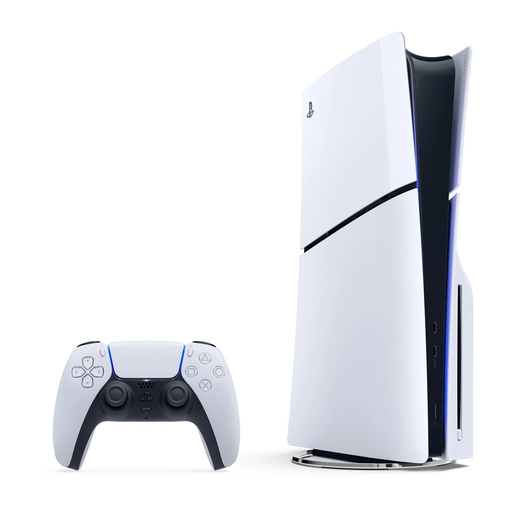
PlayStation 5 models are worth considering if you want to play an available PS5 version of a game, such as Silent Hill 2, which PlayStation lists for PS5. Within the range, you can choose between a model with a disc drive and the Digital Edition.
Xbox Series X and Series S are options to consider when the game you want has a compatible Xbox Series X|S version. Capcom lists these consoles for Resident Evil Requiem.
Nintendo Switch 2 is worth considering if you want to switch between a connected screen and the built-in screen. Nintendo lists a Switch 2 version of Resident Evil Requiem.
This selection includes home consoles and handheld gaming systems for different setups. Check that each model is compatible with the games and versions you want.
 No image available
An option if you want to play a PS5 version of Silent Hill 2 and use compatible physical games.
1 TB of storage and an Ultra HD Blu-ray disc drive. Sony recommends leaving at least 10 cm of free space around the PS5 and advises against placing it in a narrow or cramped space.
 No image available
A digital PS5 model to consider if the games you want are available as digital PS5 versions and you don’t want to use discs.
825 GB of storage. This model doesn’t have a disc drive; games are bought and downloaded digitally. Sony recommends leaving at least 10 cm of free space around the PS5 and advises against placing it in a narrow or cramped space.
 No image available
An option if you want to play a compatible Switch 2 game and use the built-in screen too.
Built-in 7.9-inch screen with 1080p resolution. Internal storage is 256 GB, some of which is reserved for the system. Nintendo lists Resident Evil Requiem as a Switch 2 game.
 No image available
A portable model to consider if you want to play on a built-in screen. Check that it’s compatible with the exact games you want to play.
Windows 11 Home, 1 TB of storage and an 8.8-inch OLED screen.
 No image available
A handheld gaming console to consider if you want to play on a built-in screen. Before buying, check that the games you want to play are compatible with this model.
8-inch touchscreen, 1 TB of storage and Wi-Fi 7. Charger not included.
No, 4K isn’t a general requirement when choosing a console. Nintendo lists up to 4K output via HDMI in TV mode for Switch 2, and 1920 × 1080 for the built-in screen; Microsoft lists various gaming resolutions for the Series X and Series S models compared here. Check your screen’s connections and the information for the specific game.
Sony advises against placing the PS5 in a narrow or cramped space and recommends leaving at least 10 cm of clearance around it without blocking the air vents. This advice applies to the PS5 and isn’t a general guideline for all consoles.
According to the Netherlands Authority for Consumers and Markets, the seller is responsible for the statutory guarantee if a product is faulty. For online purchases, you generally have a statutory cooling-off period of up to 14 days after delivery, with exceptions for certain products or actions. Check which terms apply to games and digital content.
No. The Dutch government describes age ratings for computer games as age recommendations. Nintendo lists Resident Evil Requiem as PEGI 18; also check the content and any parental control settings if children will be using the console.