
Vandaag of morgen in huis

Kwaliteit gegarandeerd

Welkomstaanbiedingen ontgrendelen: GRATIS bezorging | Tot 80% korting | Gratis 30 dagen JoyPlus-proefperiode
Download de app
A lightweight laptop for work, study and use on the go might seem like an easy choice on paper. But small differences in processor, screen, operating system and memory can make a big difference. With the Microsoft Surface Laptop 7 13.8-inch in particular, it’s worth looking beyond terms such as Copilot+, AI laptop and premium design.
Before you buy, watch out for these three pitfalls:
The model featured here has a 12-core Qualcomm Snapdragon X Elite processor, an integrated Qualcomm Adreno GPU and an NPU with a stated capacity of up to 45 TOPS. TOPS stands for trillion operations per second and is a technical measure of certain AI calculations.
This makes the laptop suitable for productivity, video calls, multitasking and applications that support on-device AI processing. How well it works in practice depends on Windows, updates and the software you use. So check in advance that your business programmes, study apps and peripherals are compatible with Windows 11 on ARM.
The term Microsoft Copilot+ laptop refers to a Windows laptop with specific hardware for AI features. The availability and performance of these features may vary by region, software version and account.
For a laptop for work and study, 16 GB of LPDDR5X memory is a practical starting point if you work with browser windows, documents, video calls and spreadsheets at the same time. Memory isn’t a substitute for storage: this model has a 512 GB SSD for that.
An SSD usually opens programmes and files quickly, but 512 GB isn’t unlimited. Large photo libraries, videos and local project files can take up a lot of space. If you store a lot of files, you may need cloud storage or an external SSD.
The Surface Laptop touchscreen has a 13.8-inch PixelSense Flow display with a resolution of 2304 × 1536 pixels, a 3:2 aspect ratio and a dynamic refresh rate of up to 120 Hz. The 3:2 aspect ratio is especially useful for documents, websites and long spreadsheets, as it gives you relatively more vertical space.
With a stated weight of 1.34 kg, this model is a good fit if you regularly travel between the office, lecture theatre, home workspace and client sites. If you mainly use your laptop at a desk with multiple monitors, check in advance that the available USB4 ports and your adapter or dock will meet your needs.
This model comes with Windows 11 Pro, Wi-Fi 7, Bluetooth 5.4, a Full HD webcam and a 54Wh battery. The laptop uses the included Microsoft adapter or a compatible USB-C Power Delivery charger. Don’t use an incompatible charger.
Choosing between a Surface Laptop, MacBook or HP laptop isn’t just about processor performance. The operating system, software you use and how you want to interact with your device are just as important.
For example, the MacBook Neo has an Apple A18 Pro chip, macOS, 8 GB of memory and either 256 GB or 512 GB of SSD storage, depending on the model. Its screen isn’t touch-sensitive. This could suit people who already use an iPhone and other Apple devices, but may be less suitable if you need Windows 11 Pro, touchscreen controls or specific Windows software.
According to the product specifications, the 13-inch Apple MacBook Pro with M2 chip has 24 GB of memory and 256 GB of storage in the model mentioned. It has a Retina display without touchscreen functionality and runs macOS. With older models, always check software support, ports and battery condition.
According to the product information, the HP OmniBook 7 AeroNGAI 13.3-inch has 16 GB RAM, a 512 GB SSD, an AMD Ryzen AI 5 processor and Windows 11 Home. The laptop includes ports such as HDMI and USB-A. Please note: the supplied product information contains conflicting details about the included charger. Check what’s included with the current offer before ordering.
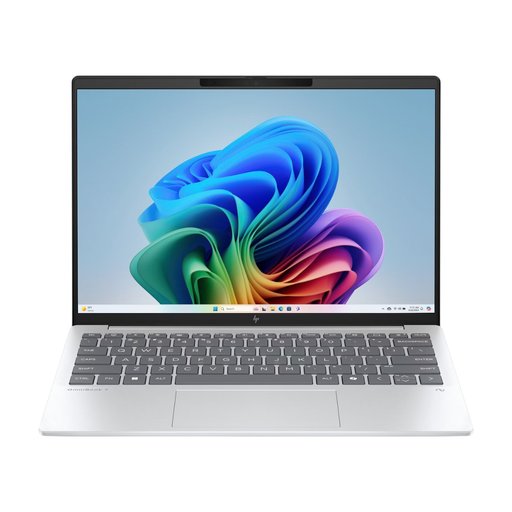
Why it suits this profile: A compact Windows laptop with 16 GB RAM and a 512 GB SSD for study, office work and everyday multitasking.
The product specifications clearly state the RAM, SSD, ports and Windows 11 Home. However, check the conflicting information about the charger.
16 GB RAM, 512 GB SSD, 13.3-inch IPS screen and multiple USB and HDMI ports.
Why it suits this profile: For professionals looking for Windows 11 Pro, touchscreen controls, a 3:2 screen and portable performance in one device.
You can check the main claims against the stated 12-core processor, 16 GB RAM, 512 GB SSD, screen resolution and Windows 11 Pro.
13.8-inch touchscreen, 2304 × 1536 resolution, Wi-Fi 7, USB4 and a weight of 1.34 kg.
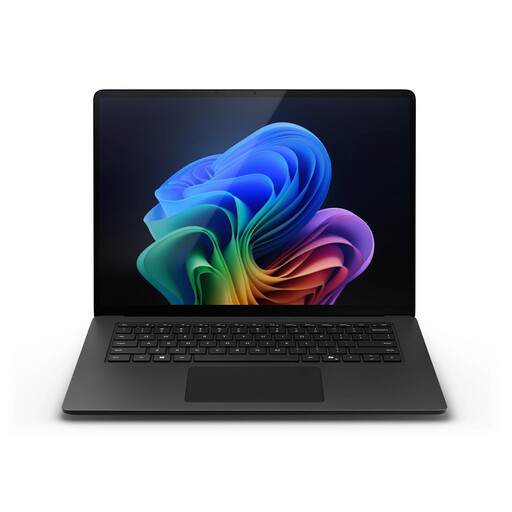
Why it suits this profile: An alternative in the same Surface range if a 13.8-inch touchscreen, Windows 11 Pro and a portable design are important to you.
The product specifications clearly show whether it has a Snapdragon X Plus or X Elite processor. Compare the processor with the software you use, rather than relying on the marketing name alone.
10-core Snapdragon X Plus, 16 GB LPDDR5X, 512 GB SSD, 120Hz screen and Full HD webcam.
We’ve put together a complete, up-to-date list of products that meet these strict selection criteria and current European safety regulations.
Yes. The combination of 16 GB RAM, a 512 GB SSD, Windows 11 Pro and a 3:2 touchscreen is well suited to documents, online meetings, browsing and multitasking. If you use specialist software, check that it’s compatible with Windows on ARM.
Yes. The model has a 13.8-inch PixelSense Flow touchscreen with a resolution of 2304 × 1536 pixels and a refresh rate of up to 120 Hz. A touchscreen does use more power when you use the laptop intensively, though. Actual battery life depends on brightness, software and settings.
As well as the purchase price, you’ll need to consider accessories, cloud storage, software licences and possibly an extra USB-C charger or docking station. Copilot+ features may also depend on Windows updates, account settings and available software. So look beyond the processor and consider the total cost of your working setup.
