
PC player looking for peace of mind
You play a superhero game on a laptop or PC and want to know in advance which controller and features the specific game supports.


First, check that both your device and the specific game support the controller. A familiar layout is no use if the combination doesn’t work. Choose a wired controller if you have a practical route for the cable and don’t want to manage batteries, or go wireless if you’d rather sit further from the screen. Extra feedback or buttons are most relevant when your game and connection support those features.
You play a superhero game on a laptop or PC and want to know in advance which controller and features the specific game supports.
You switch between your desk and another seat, and want to choose a connection that suits the distance from the screen and gives you a practical cable route.
You’re considering haptic feedback or customisable controls and want to check whether your game and connection support those features.
Start with your device and game, then compare the connections and features that suit your playing space and style.
A good fit if: you play at a desk and have a safe route for the cable to your device.
Keep in mind: the cable limits where you can sit. PowerA lists a 10 ft cable for one of its wired controllers, while GameSir lists a detachable 3 m USB-C cable for the G7 SE.
A good fit if: you want to play from another spot in the room and the controller’s connection is compatible with your device.
Keep in mind: you’ll need to manage batteries or charging. Also check which features are available in each game.
A good fit if: you want to use haptic feedback or customisable controls, and your game and connection support them.
Keep in mind: extra features aren’t available in every game or with every connection. According to developer Nixxes, you need a USB connection to use the full range of DualSense features in Marvel’s Spider-Man Remastered on PC.
| What to consider | What should you check? | Who is this important for? |
|---|---|---|
| Compatibility | Check your exact device and whether the specific game supports the controller. | I want to know in advance whether my device and game support the controller; otherwise, extra features won’t be much use to me. Around 36% of consumers put compatibility with their device and game first. |
| Freedom of movement | Measure the planned cable route or check which wireless connections your device supports. | If I play from another spot in the room, I don’t want to be restricted by an awkward cable route. Freedom of movement is the top concern for around 29% of consumers. |
| Feedback and controls | Check that the feature you want is available for each game and connection type. | I only want to choose extra feedback or customisable controls if I can use them in my game. Around 21% of consumers prioritise support for these kinds of gaming features. |
| Running costs and requirements | Check the power source, included accessories and what you need for wired use. | I want to know in advance which batteries, cables or other essentials I’ll need for my choice. Around 14% of consumers prioritise running costs and requirements. |
On PC, DualSense haptic feedback depends on game support and a USB connection. For Marvel’s Spider-Man Remastered, the developer specifies USB for the full range of features.
Check which features are available in each game and whether the required cable is included.
If a suitable cable isn’t included, you may need to buy one separately.
The 8BitDo Ultimate 2C Wireless lists 2.4 GHz or USB for Windows and Bluetooth for Android. That Bluetooth specification doesn’t automatically apply to Windows.
Check the connection options for the exact model and your device, and make sure you have a suitable port available.
Customisable sticks and interchangeable components are features of the Xbox Elite Series 2, not the standard Xbox Wireless Controller.
Start with your device and game, and only choose extra controls if you actually want to customise and use them.
The standard Xbox Wireless Controller is an option for Xbox and Windows PCs, while the Elite Series 2 is a separate range for customisable controls.
DualSense is relevant for PS5 and compatible PC games if you want to use supported in-game features.
The Ultimate 2C Wireless is an option for Windows PC and Android, with connection options that vary by platform.
PowerA makes Xbox-licensed wired controllers. According to the manufacturer, the Wired Controller mentioned here also works with Windows 10/11.
According to GameSir, the wired G7 SE is designed for Xbox and Windows 10/11.
These options include controllers for PS5, Xbox and Windows PC, for PS4 and PC, and for Switch and PC. Before buying, check that both the exact model and the game are compatible with your device.
 No image available
An option for PS5 players looking for haptic feedback or adaptive triggers. Check which features the game supports.
The product description lists PS5 compatibility, Bluetooth or USB-C, haptic feedback, adaptive triggers, a microphone and built-in speakers.
 No image available
A wireless option for Xbox or Windows PC players who want to sit elsewhere in the room.
The product description lists Xbox Series X|S, Xbox One and Windows 10/11 compatibility, Xbox Wireless and Bluetooth, and two AA batteries included. The USB-C cable for wired use is sold separately.
 No image available
An option for PS4 or PC players. Check compatibility with your specific game and device.
The product description lists PS4, PS4 Slim, PS4 Pro and PC compatibility, a wireless range of up to 10 m, a touchpad and a gyroscope. You’ll need the included USB cable for the initial pairing.
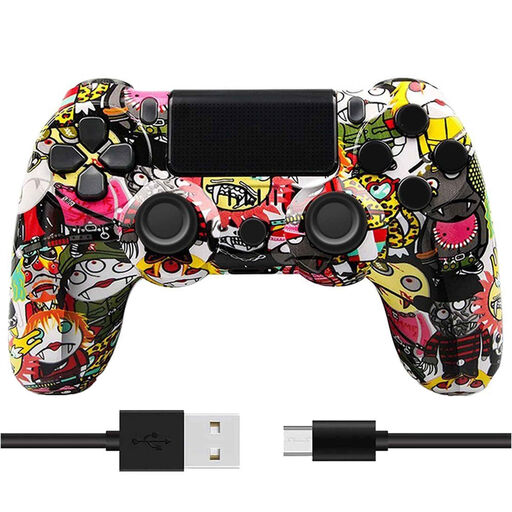 No image available
A wireless option for PS4 players who want vibration feedback.
The product description lists Bluetooth, dual vibration motors, analogue sticks and a rechargeable battery. Check that the stated PS4 compatibility suits your game and device.
 No image available
An option for Switch or PC players looking for motion controls or vibration feedback.
The product description lists a wireless connection, dual vibration motors and a gyroscope. Check which features are available for each device and game.
No. Check support for the specific game as well as your device. Steam lists full controller support for Marvel’s Spider-Man Remastered, including Xbox and PlayStation controllers. That doesn’t tell you anything about other titles.
PlayStation describes connection via USB or Bluetooth. For Bluetooth, hold down the Create and PS buttons until the light bar flashes, then select the controller from the Bluetooth list. Which features work depends on the game and connection.
Milieu Centraal advises putting empty batteries in a separate battery recycling bin, and taking small electrical appliances with a battery or plug to an electrical recycling point.
According to the Dutch government, when you buy from a business at a distance, you’re often entitled to a 14-day cooling-off period. This doesn’t apply to purchases from private sellers under that definition. You also have rights to a repair or replacement if a product is faulty. Check who the seller is and which terms apply to your order.