
Console player with a favourite superhero game
First wants a controller that works with their console and game, then decides between standard controls and extra features.


Start with your device, then check that your game supports the controller features you want. PS5, Xbox, Switch and PC controllers aren’t automatically interchangeable. Choose lighting only if you like it, and consider grip, power and whether you’ll need a cable. RGB lighting doesn’t necessarily make button symbols easier to see.
First wants a controller that works with their console and game, then decides between standard controls and extra features.
Wants help finding the buttons or creating the right lighting atmosphere, but would like to choose between RGB effects and less distracting light.
Compares connections, extra buttons and game support rather than judging a controller by its shape alone.
First, check that the controller works with your device and game. Then consider lighting, controls and power based on how you play.
| What to consider | What should you check? | Who is this important for? |
|---|---|---|
| Compatibility | Check the exact console model or operating system, game version and supported connection. | I want to know first whether my controller works with my device and in my game. Around 33% of consumers give compatibility with their device and game the highest priority. |
| Lighting and orientation | Check exactly what lights up and whether the brightness or lighting effects can be adjusted. | In a dark room, I want to decide how much light there is around the screen. Around 27% of consumers prioritise lighting or reducing distracting light. |
| Grip and buttons | Compare the position of the sticks, triggers and extra buttons; try the grip if possible. | For action games, I want a comfortable grip and easy access to the action buttons. Around 20% of consumers prioritise grip and access to the buttons. |
| Power and freedom of movement | Check whether batteries, a charging cable or receiver are included, and whether a cable is long enough for where you sit. | I want to know whether I’ll need to manage a cable while playing or charge the controller. Around 13% of consumers choose power or freedom of movement as their main consideration. |
| Customisable buttons | Check which buttons can be remapped and which devices support the settings. | If I’d rather assign certain actions to different buttons, the setting needs to work with my system and game. Around 7% of consumers name customisable controls as their highest priority. |
Lighting zones don’t automatically make the symbols on the action buttons easier to see.
Check the images and product specifications to see where the lighting is and whether you can adjust it.
Support can vary by device, game and connection. For example, PlayStation says haptic feedback on PC requires a USB connection and depends on game support.
Before you order, check that both the basic controls and the features you care about work with your device and game.
Nintendo says the Switch 2 Pro Controller doesn’t work with the original Switch. The models also differ in their buttons and connections.
Compare the full model name with your console before making a choice.
A relevant choice for PS5 players who want to use DualSense features in supported games. If you play on PC, check the connection and game support.
A wireless controller to consider for Xbox consoles and supported Windows PCs.
Whether you need a Switch Pro Controller or a Switch 2 Pro Controller depends on your console.
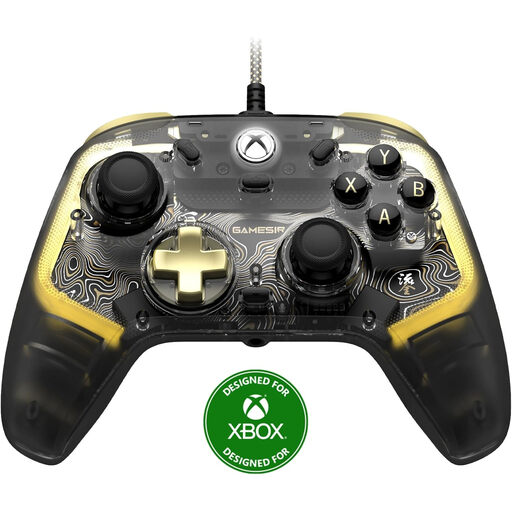
The wired Advantage controller with Lumectra is an Xbox and Windows option if you’re looking for customisable RGB zones.
The Ultimate 2C Wireless is an option for Windows and Android, with connection types varying by platform.
This selection includes controllers for PlayStation, Xbox, Nintendo Switch and Xbox or Windows gaming, including wired RGB options.
 No image available
An option for PS5 players who want to use DualSense features in their games. According to PlayStation, haptic feedback and adaptive triggers depend on game support.
 No image available
A wireless option for Xbox Series X|S, Xbox One and Windows 10/11. The standard Xbox model uses batteries, so check which power option suits your gaming sessions.
 No image available
A wired option for Xbox Series X|S, Xbox One and Windows 10/11. Bear the cable in mind when considering the distance between where you sit and your device.
 No image available
A wired RGB option for Xbox Series X/S, Xbox One and Windows 10/11. RGB lighting on the controller doesn’t automatically make the button symbols easier to see.
 No image available
A wireless controller for the original Nintendo Switch. Nintendo lists battery life of around 40 hours, depending on the software and features used.
No. Check support for the exact model. Nintendo says the Switch 2 Pro Controller doesn’t work with the original Switch; 8BitDo lists Windows and Android support for the Ultimate 2C Wireless. Also check that your game supports the features you want.
Not necessarily: lighting on a controller doesn’t prove that the button symbols themselves light up. Check which parts are illuminated and whether you can adjust the brightness or effects.
Nintendo explains that you can sync it via USB while it’s attached to the dock, or by using the SYNC button from the controller menu. The system must be switched on; syncing won’t work when it’s off or in sleep mode.
First, check the connection, battery level and any changed button settings. Nintendo and Xbox provide steps for testing controller issues on specific models. If the product is faulty, contact the seller to arrange a remedy under your statutory rights.
For online purchases covered by the statutory cooling-off period, ACM ConsuWijzer states that you have 14 days from delivery. If a product is faulty, the seller must resolve the issue; your statutory rights are separate from any manufacturer’s warranty.