What should you look for when choosing?
First, check that the system and game are compatible. Then choose the connection and features that suit the space and controls you need at your desk.
| What to consider |
What should you check? |
Who is this important for? |
| System and game compatibility |
Check support for your system and controller support for the specific game. |
If I want to play a superhero game on my own PC or console, I want to know before buying whether the combination will work. Around 36% of consumers put compatibility first. |
| Cables and desk space |
Measure the available space and check where the USB port is; find out which wireless connection the model uses. |
At a small desk, I want to keep using my mouse and keyboard without a cable getting in the way. Around 29% of consumers prioritise desk layout and the connection. |
| Controls and extra features |
Check whether the game supports the features you want and, for haptics on PC, which connection is required. |
If I want to use extra buttons or haptic feedback, the feature needs to suit my game and the way I play. Around 21% of consumers focus mainly on these control features. |
| Power and maintenance |
Check what power source the exact model uses and what is included. |
I want to know in advance whether my choice requires charging, batteries or a wired connection. Around 14% of consumers focus mainly on power and maintenance. |
Joybuy products
This Joybuy selection includes controllers for PS5 and Nintendo Switch systems. Check which controller support and connection options apply to your specific game and system.
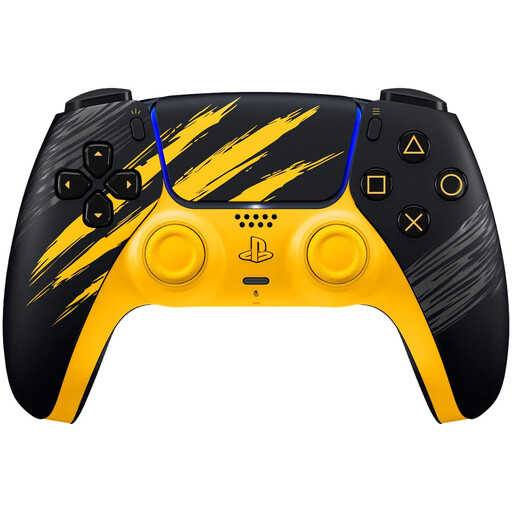 Image unavailable
PlayStation DualSense Wireless Controller – Marvel’s Wolverine Battle Yellow Limited Edition
An option if you want to play on PS5 and value haptic feedback and adaptive triggers. If you’re using it on PC, check whether your game supports the features you want and which connection is required.
View at Joybuy
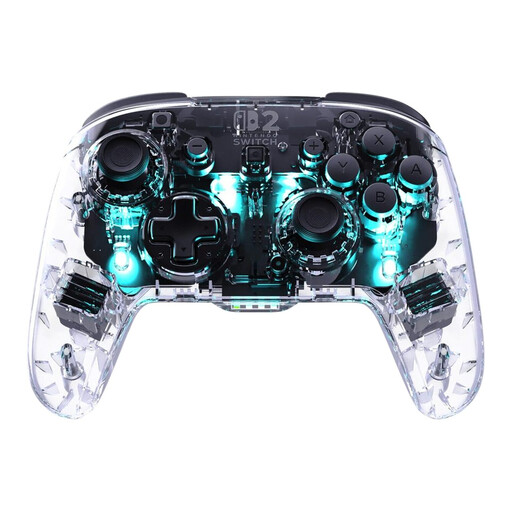 Image unavailable
Turtle Beach Afterglow Wave Wireless Controller – Nintendo Switch 2, Switch, Switch Lite and Switch OLED
An option if you’re looking for a wireless controller for one of the listed Switch systems. Check whether your game supports controllers and whether Bluetooth suits your gaming setup.
The product name lists Bluetooth and compatibility with Nintendo Switch 2, Switch, Switch Lite and Switch OLED.
View at Joybuy
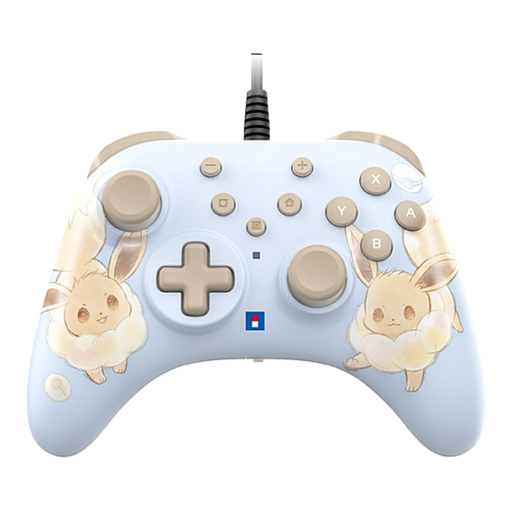 Image unavailable
Hori Wired Controller Horipad Turbo for Switch and Switch 2 – Pokémon Eevee Cottage Core Edition
A wired option if you play on Switch or Switch 2 and want programmable rear buttons. Bear in mind that you’ll need to find a route for the cable across your desk.
The product description says that a USB cable is not included.
View at Joybuy
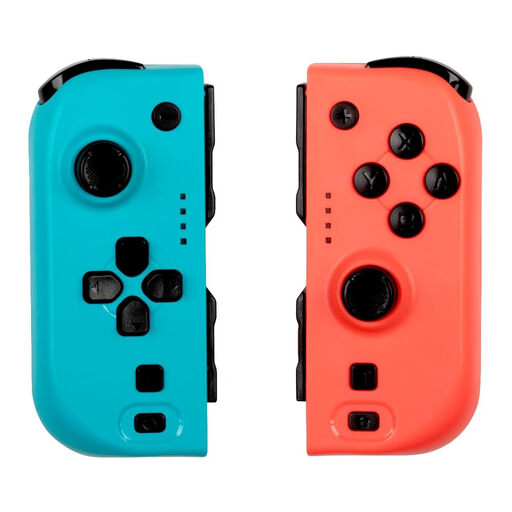 Image unavailable
KONIX Nintendo Switch and Switch OLED JoyPad Controller Pair – Blue and Red
A pair of controllers if you want to play together on one of the listed Switch systems. Check whether the game in question supports local multiplayer with controllers.
The product name lists compatibility with Nintendo Switch 2 and battery life of up to 8 hours.
View at Joybuy
 Image unavailable
PS5 DualSense Wireless Controller V3 – Cosmic Red
A PS5 controller if you value haptic feedback and adaptive triggers. For PC games, check separately whether the features you want are supported and whether USB is required.
The product name describes a wireless controller; the product description lists Bluetooth and USB-C.
View at Joybuy
Frequently asked questions
Will every PC controller work with my superhero game?
No. Check controller support for your specific game and compare it with the operating system and connection listed for the model. The Steam page for Marvel’s Spider-Man 2 lists support for Xbox and PlayStation controllers; that doesn’t automatically tell you anything about other games.
How do I connect an Xbox controller to a Windows PC?
Microsoft explains how to pair it via Bluetooth: switch on the controller, press and hold the pairing button, then add the controller through Windows Bluetooth settings. First, check that your PC has Bluetooth and that your version of Windows is supported.
Do all DualSense effects work in Spider-Man Remastered on PC via Bluetooth?
No. According to the publisher, a wired USB connection is required for the full DualSense feature set in Marvel’s Spider-Man Remastered. Check the requirements for other games separately.
What are my rights when buying a controller online in the Netherlands?
The Government of the Netherlands states that you have 14 days to change your mind when buying at a distance. You’re also protected by statutory rights if a product is faulty; the Government of the Netherlands says there is no fixed statutory warranty period in the Netherlands. Paid additional cover is separate from these statutory rights.
Can I put flat controller batteries in the general waste?
No. The Government of the Netherlands says that flat batteries must not go in the bin and lists shops that sell batteries, among other places, as drop-off points.


