
Vandaag of morgen in huis

Kwaliteit gegarandeerd

Welkomstaanbiedingen ontgrendelen: GRATIS bezorging | Tot 80% korting | Gratis 30 dagen JoyPlus-proefperiode
Download de app
A stylus pen may seem straightforward at first glance: choose a pen, connect it to your tablet or laptop and start writing. In practice, things often go wrong with compatibility, the battery or features that only work with certain devices. For example, an inexpensive touchscreen pen may respond to a screen but offer neither pressure sensitivity nor palm rejection.
For students, artists, teachers and business users, these are the main pitfalls to watch out for:
First, check the exact model of your tablet, laptop, projector or graphics tablet. Then look at the supported technology:
A pen for a tablet is therefore not automatically suitable as a pen for a laptop. Also check whether pairing is required. Some models work straight away, while others need to be connected via Bluetooth or a companion app.
For simple navigation or tapping buttons, a touchscreen pen with a fine tip is sufficient. If you draw or make handwritten notes, you will benefit more from:
These features only work when both the stylus and the device support them. According to Dell’s product information, the PN5122W and PN7522W, for example, offer 4,096 pressure levels. This makes them particularly interesting for compatible Dell laptops and 2-in-1 devices.
Pay attention to the difference between a digital pen with a built-in battery, a model with a replaceable battery and a battery-free stylus.
A USB-C stylus is convenient if you already use a USB-C charger. According to the product information, the Logitech Crayon has a USB-C connection and a stated battery life of up to 6.5 hours. According to the product specifications, the Dell Pro Plus Active Pen uses an AAAA battery, with a stated lifespan of up to 12 months.
A magnetic charging mechanism can be practical for everyday use. The Apple Pencil models in this selection pair and charge magnetically with a compatible iPad. According to the product description, a Wacom Pro Pen 3 works without a battery via EMR, but only with certain Wacom devices.

Why it suits this profile: This iPad stylus is designed for writing, drawing and everyday use without Bluetooth pairing. That keeps setup straightforward for students and beginners.
Compatibility is clearly specified for iPad models and the pen charges via USB-C. Do check that your iPad meets the stated requirements.
USB-C charging, tilt recognition, palm rejection and a stated battery life of up to 6.5 hours according to the product information.
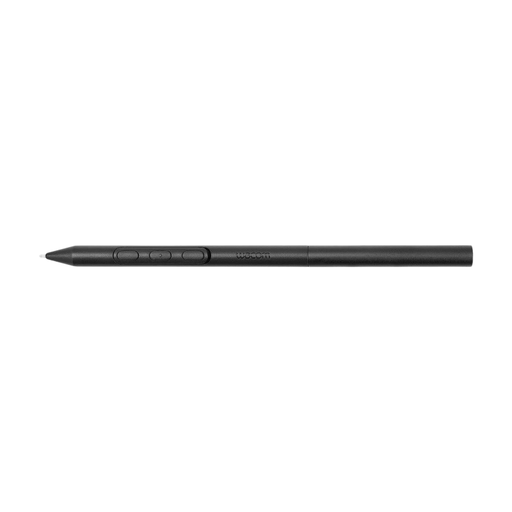
Why it suits this profile: For creative professionals and artists, the shape of the pen matters. According to Wacom, this model offers adjustable weight, grip, balance and pen buttons.
The battery-free EMR design means you do not need to stop and charge while drawing. The pen is, however, limited to selected Wacom devices.
Adjustable grip and balance, battery-free EMR technology and compatibility with specific Wacom graphics tablets.

Why it suits this profile: This active stylus is designed for compatible Dell 2-in-1 devices and is suitable for intensive writing, drawing and business use.
The list of compatible Dell models lets you check compatibility in advance. Do not buy this model for a laptop without supported pen input.
4,096 pressure levels, programmable buttons, Bluetooth and, according to Dell, up to 40 days of battery life per charge.
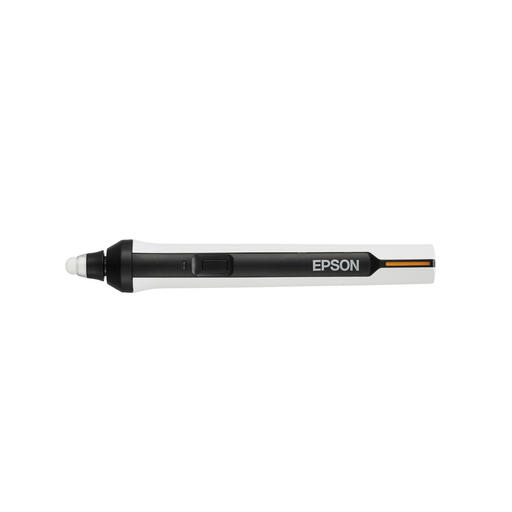
Why it suits this profile: This is not an ordinary tablet pen, but an interactive pen for selected Epson projectors in classrooms and meeting rooms.
The product description names specific BrightLink models and specifies the use of AA batteries. This makes it clear in advance that the pen is not intended for every touchscreen.
IR control, annotation support and compatibility with multiple Epson projectors.
We have put together a complete, up-to-date list of products that fully meet these strict selection criteria and the applicable European safety regulations.
No. A simple capacitive touchscreen writing pen may work with many devices, but active features such as pressure sensitivity, palm rejection and tilt recognition depend on the device. Always check the brand, model and operating system.
It varies by model. Some pens work for a few hours per charge, while models with AAAA or AA batteries can, according to the product information, operate for several months. Switch off an active stylus when you are not using it and check whether a charging cable or battery is included.
An Apple Pencil is a specific iPad stylus with features that depend on the iPad model. Another touchscreen pen may provide basic input, but it will not necessarily offer the same pairing, pressure sensitivity or magnetic charging function. Always check the compatibility list before ordering.
