
Vandaag of morgen in huis

Kwaliteit gegarandeerd

Welkomstaanbiedingen ontgrendelen: GRATIS bezorging | Tot 80% korting | Gratis 30 dagen JoyPlus-proefperiode
Download de app
A stylus pen can make taking notes, sketching and navigating on a touchscreen much more enjoyable. However, a universal tablet pen isn't automatically suitable for every iPad, laptop or graphics tablet. For example, a pen designed for an iPad won't necessarily work on a Samsung tablet or a Windows laptop.
The biggest purchasing mistakes usually happen because of three common pitfalls:
That's why you should always check the exact model of your device first. Only then should you start looking for an Apple Pencil, Samsung S Pen, Dell Active Pen, Wacom Pro Pen, HP stylus pen or Acer stylus pen.
An active stylus uses a specific technology, such as AES, USI, MPP or EMR. These standards are not interchangeable. This means a Dell Active Pen for a 2-in-1 laptop might be unsuitable for an iPad, even if both devices have a touchscreen.
When checking the product information, pay attention to:
A standard touchscreen pen with a rubber or metal tip is mainly intended for simple navigation. For drawing and handwritten notes, you'll usually need an active stylus.
Pressure sensitivity determines how the line responds to the force you apply when writing or drawing. According to the product descriptions from brands like Dell, Acer, Wacom and Microsoft, certain models support 4,096 pressure levels. This can be useful for shading, brush strokes and precise sketches.
Also look out for:
Brands often describe features like 'pixel-perfect precision', 'zero lag' or a 'natural writing experience'. You should treat this as information from the product description or, when explicitly stated, as based on the brand's own research. The final experience also depends on your device, the app you're using and your settings.
A twelve-month battery life from an AAAA battery is not the same as 96 hours of active use from a built-in rechargeable battery. Therefore, you should check the power source and charging method.
Keep pens with removable batteries out of the reach of young children. Always follow the instructions regarding battery type, polarity and disposal.

Why it fits this profile: This digital pen is aimed at iPad users who want to write, draw and take notes without needing to pair via Bluetooth. The USB-C connection is compatible with many modern charging setups.
The product description specifies compatibility with iPad models from 2018 onwards and iOS 12.2 or later. Check your exact model before you order.
USB-C charging, tilt recognition, palm rejection and a stated battery life of up to 6.5 hours.
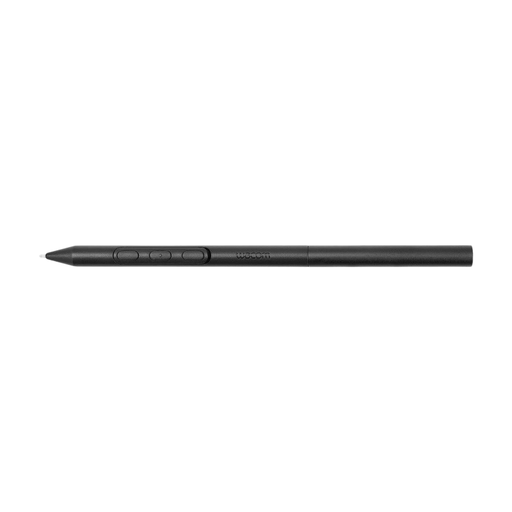
Why it fits this profile: For illustrators and designers, the customisable design can be very practical. According to the product information, the weight, grip thickness, buttons and balance point are all adjustable.
The pen is not intended to be a universal stylus. Its stated compatibility is limited to specific Wacom devices, allowing you to check for a match beforehand.
Battery-free EMR technology and customisable grip, balance and buttons for compatible Wacom tablets.
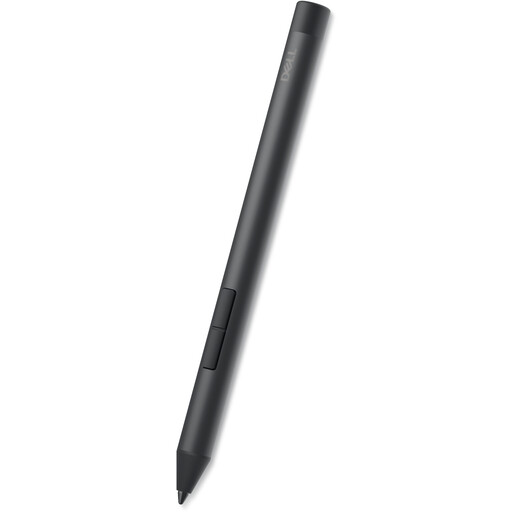
Why it fits this profile: This laptop pen is designed for several Dell Inspiron and Latitude 2-in-1 models. It uses an AAAA battery and, according to the product information, can be used straight away with compatible devices.
The compatible Inspiron, Latitude and XPS models are specifically listed. This prevents you from buying based on the generic term 'Dell stylus'.
4,096 pressure levels, tilt function, side buttons and a stated battery life of up to twelve months.
We've put together a complete, up-to-date list of products that fully meet these strict selection criteria and comply with current European safety regulations.
A pen for an iPad must match the specific generation and size of your iPad. For instance, the Apple Pencil Pro is listed for specific iPad Pro, iPad Air and iPad mini models. The second-generation Apple Pencil has a different compatibility list. So, don't just look for an 'Apple Pencil'; check the exact Pencil model and your specific iPad.
The same applies to Samsung. According to the product information, the Samsung S Pen EJ-PX510 is suitable for the Galaxy Tab S9 FE and FE+. An S Pen for a different Galaxy Tab series might function differently or have a different connection.
With an HP stylus pen or Acer stylus pen, you need to check the supported MPP, AES or USI version. For an Epson interactive pen, it's not your touchscreen that matters, but the precise projector model. For example, the ELPPN04A is paired with specific Epson projectors, while the ELPPN05B uses AA batteries for certain BrightLink models.
No. A simple capacitive pen can often register basic touches, but features like pressure sensitivity, palm rejection and tilt recognition require compatible hardware and software. Always check the list of supported devices.
That varies by model. Product information might state up to twelve months for a pen with an AAAA battery, up to 96 hours for a rechargeable model, or up to 6.5 hours for a USB-C stylus. The actual battery life depends on usage, settings and storage.
Not always. For simple notes, a basic pen might be sufficient. For drawing, handwriting conversion or professional use, features like compatibility, palm rejection, pressure sensitivity and a suitable nib are more important than the price alone.
