
Vandaag of morgen in huis

Kwaliteit gegarandeerd

Welkomstaanbiedingen ontgrendelen: GRATIS bezorging | Tot 80% korting | Gratis 30 dagen JoyPlus-proefperiode
Download de app
A stylus pen can make writing, drawing and navigating on a tablet or laptop considerably easier. However, things often go wrong at the point of purchase. A pen that is advertised as suitable for several devices will not automatically work with your touchscreen. Features such as pressure sensitivity, palm rejection and low latency only make a difference when your device supports the same technology.
Joybuy Product Recommendation Officer helps you by comparing the most important specifications and practical considerations. This helps you avoid a poor purchase and choose an active stylus that suits the way you use it.
A digital pen for iPad will not simply work on a Windows laptop. Protocols can also vary within the same brand. For example, Apple Pencil models are linked to specific iPad generations. A Surface Pen is designed for compatible Microsoft Surface devices, while a Dell Active Pen is intended for certain Dell 2-in-1 models.
Before buying, check:
A general touchscreen pen for a capacitive screen may be suitable for simple navigation, but it does not always offer the same features as an active stylus.
4096 pressure levels can be useful for drawing and shading, but only if the device and the app you use support pressure sensitivity. For notes or presentations, reliable point tracking, palm rejection and a comfortable grip may be more valuable.
Tilt sensitivity is not essential for every user either. This feature can affect line width or shading when using a drawing pen for a tablet. For business notes, good compatibility is often more important than a long list of features.
A stylus pen may use an AAAA battery, a built-in lithium battery or wireless charging via a magnetic holder. You will notice the difference in everyday use.
Pay attention to:
The stated usage time is a product specification and may depend on how the pen is used and on the device settings.
A pen for iPad, such as an Apple Pencil or Logitech Crayon, should be checked against the official list of supported iPad models. An Apple Pencil USB-C supports several iPad Air, iPad Pro and iPad mini models, among others. The 2nd-generation Apple Pencil uses magnetic attachment for pairing and charging on compatible iPads.
For Windows devices, MPP and AES are among the relevant standards. The Dell PN5122W uses AES and, according to the product information, is suitable for specific Inspiron, Latitude and XPS 2-in-1 models. An HP MPP 1.51 stylus is aimed at compatible HP laptops and Microsoft devices.
These features are worth considering for drawing and writing:
If you mainly use the pen for navigation or presentations, these features are less decisive. For a graphics drawing display or creative software, they are more important.
A USB-C stylus is practical if you already use a suitable cable. Magnetic attachment helps prevent you from misplacing the pen, but it does not always mean that charging is supported. With a battery-powered model, check whether the battery is included.
A projector pen works differently again. The Epson Interactive Pen ELPPN04A uses an IR interface and is designed for specific interactive Epson projectors. It is not a universal tablet pen. Always check the projector model and calibration instructions.

Why it suits this profile: This tablet pen is designed for iPad models from a certain generation onwards and, according to the product information, works without pairing. This makes it practical for students, simple note-taking and everyday use.
The compatibility information lists the iPad models and iOS requirements. Check this list before ordering rather than relying solely on the term ‘universal’.
USB-C charging, palm rejection, tilt support and a stated battery life of up to 6.5 hours.
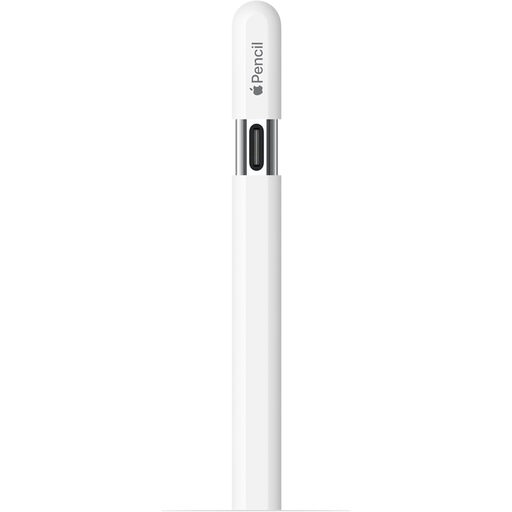
Why it suits this profile: For iPad users who write, sketch and annotate documents, this pen offers a clear connection to the Apple ecosystem. According to the product information, it also supports hover on selected iPads.
The compatible iPad models are specified, allowing you to compare your tablet’s model number in advance.
USB-C connection, magnetic attachment, tilt sensitivity and palm rejection support according to the product specifications.
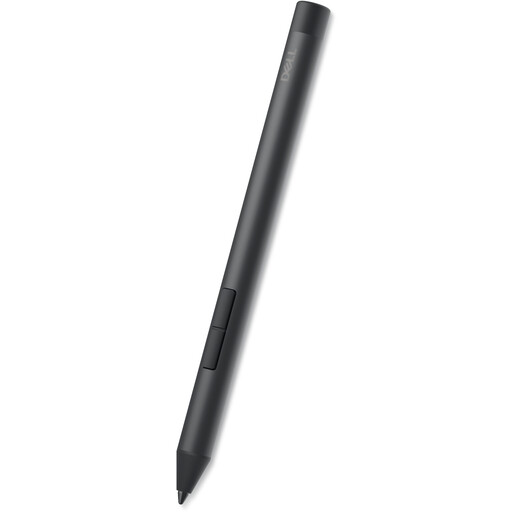
Why it suits this profile: This Dell Active Pen is compatible with specific Dell laptops and 2-in-1 models. It is well suited to professionals and business users who regularly write, sketch or use shortcuts.
The list of compatible Inspiron, Latitude and XPS models reduces the risk of buying an unsupported stylus for a laptop.
4096 pressure levels, tilt function, side buttons and, according to Dell, AAAA battery life of up to 12 months.
We have compiled a complete, up-to-date list of products that fully meet these strict selection criteria and the applicable European safety regulations.
No. A simple capacitive touchscreen pen will often work on devices that support touch input, but active features such as pressure sensitivity, palm rejection and tilt require suitable hardware and software. Always check the manufacturer’s compatibility list.
It varies from model to model. According to the product information, the Dell PN5122W uses an AAAA battery with a stated lifespan of up to 12 months. The Logitech Crayon offers up to 6.5 hours of use per charge. A Samsung S Pen for compatible Galaxy Tab models can be charged magnetically. Do not just look at capacity; consider how frequently you will use it as well.
No. An Apple Pencil is designed for selected iPads and offers features that depend on the iPad model and software. A universal pen for iOS and Android can be useful for basic tasks, but may not offer full support for pressure sensitivity, palm rejection or tilt sensitivity.
