
Vandaag of morgen in huis

Kwaliteit gegarandeerd

Welkomstaanbiedingen ontgrendelen: GRATIS bezorging | Tot 80% korting | Gratis 30 dagen JoyPlus-proefperiode
Download de app
A stylus pen can make taking notes, sketching and giving presentations much more practical. However, not every digital pen is suitable for every tablet or touchscreen laptop. A pen that works with an iPad will not automatically work with a Microsoft Surface, Acer laptop or Epson projector.
The biggest purchasing mistakes usually result from three misunderstandings:
Always start with the exact model of your device. Then check which technology it supports:
An active stylus usually uses its own communication technology. A simple touchscreen pen, on the other hand, often works only with a capacitive screen and offers fewer features. So do not check just the brand: also verify the specific model and supported standard.
For simple navigation or signing documents, a basic pen may be enough. For drawing and taking notes, these features are more important:
Bear in mind that the device’s software must support these features. A pressure-sensitive pen will not automatically produce pressure-sensitive lines in every app.
An active stylus can run on a separate AAAA or AA battery, or have a built-in lithium battery. A replaceable battery is practical when you are out and about, but you will need to carry a spare. USB-C charging is convenient if you write or draw every day.
According to the stated product specifications, the Dell Pro Plus Active Pen PN5122W runs for up to twelve months on an AAAA battery. The Acer ASA410 also uses an AAAA battery, which, according to the product information, lasts for up to 96 hours. The Logitech Crayon has a built-in battery and a stated runtime of up to 6.5 hours per charge. Treat these figures as a guide: usage intensity and settings affect the actual runtime.
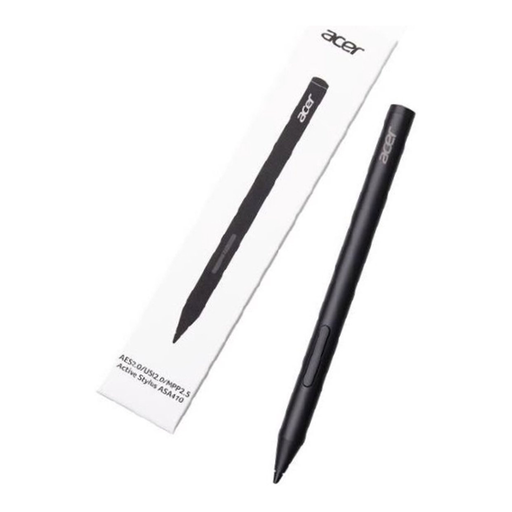
Why it suits this profile: Weighing 16.5 grams, this lightweight Acer stylus is designed for writing, simple sketching and everyday study use with compatible Acer devices.
The supported AES 2.0, USI 2.0 and MPP2.5 standards are clearly stated. This means you can check compatibility before buying.
4096 pressure levels, a weight of 16.5 grams and, according to the product information, up to 96 hours of battery life. AAAA batteries are not included.
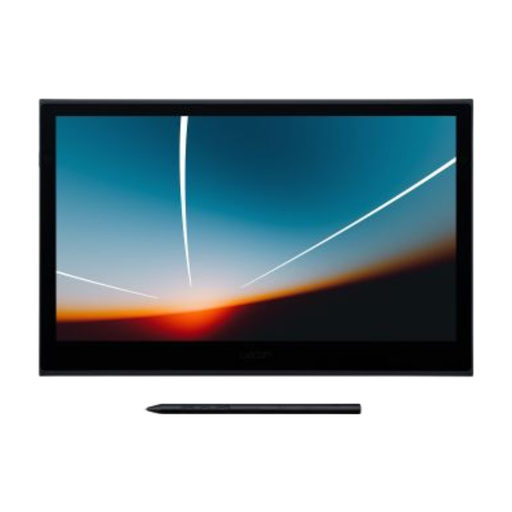
Why it suits this profile: For illustrators, designers and creative professionals, this pen display provides a dedicated workspace with pen and touch input.
The pen is included and offers 8192 pressure levels. You will not need to search for a separate Wacom pen that is compatible with the display later on.
13.3-inch Full HD OLED screen, an active area of 294 × 165 mm and USB-C for data and power.

Why it suits this profile: This digital pen is designed for users of compatible Dell 2-in-1 devices who value shortcut buttons and regular use.
The compatible Dell models and Bluetooth requirements must be checked in advance. This prevents you from buying based on the brand alone.
4096 pressure levels, programmable buttons, Bluetooth and, according to the product information, up to 40 days of battery life with fast charging.
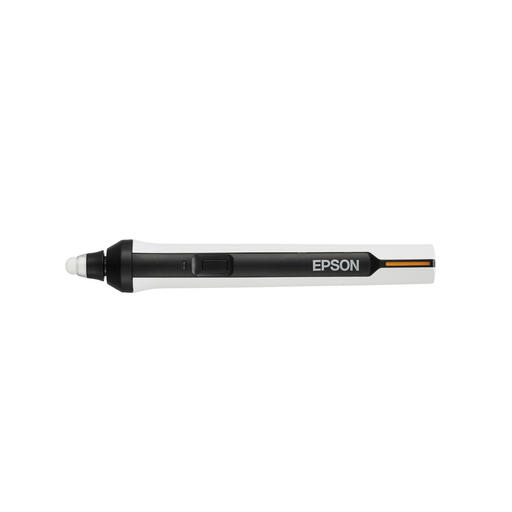
Why it suits this profile: This Epson interactive pen is designed for annotations and control with compatible interactive projectors in classrooms and meeting rooms.
The list of compatible Epson BrightLink models makes it clear that this is not a general tablet pen, but a projector accessory.
IR interface, AA battery power and support for writing and navigating on compatible projectors.
We have put together a complete, up-to-date list of products that fully meet these strict selection criteria and the applicable European safety regulations.
No. A simple capacitive pen can simulate touch input, but may not offer palm rejection, pressure sensitivity or tilt detection. For features such as magnetic attachment and charging, you need a compatible Apple Pencil or a suitable Logitech Crayon. Check the exact iPad model and the required iPadOS support.
It varies by model and usage. A pen with an AAAA battery can last for months when taking notes regularly, while a built-in battery may need recharging after just a few hours. Check whether the stated runtime refers to active use, standby time or a complete charging cycle.
For simple navigation, a touchscreen pen is often sufficient. For more accurate writing, drawing or using palm rejection, an active stylus is usually more suitable. Check beforehand that your tablet, laptop or pen display supports the relevant pen standard.
