
Vandaag of morgen in huis

Kwaliteit gegarandeerd

Welkomstaanbiedingen ontgrendelen: GRATIS bezorging | Tot 80% korting | Gratis 30 dagen JoyPlus-proefperiode
Download de app
A stylus pen can be useful for taking notes, sketching, annotating PDFs and navigating a touchscreen precisely. However, not every tablet pen works with every device. For example, an inexpensive universal stylus may be fine for tapping, but lack features such as pressure sensitivity, palm rejection or tilt recognition.
The biggest buying mistakes usually come down to three pitfalls:
First, note down the exact model of your device. Don’t just check the brand: look at the model name and generation too. A pen for iPad, for example, will not automatically work with every iPad. The same applies to a Samsung S Pen, Surface Pen, Dell Active Pen or Acer stylus pen.
Pay attention to the technology used:
Also check whether pairing is required. Some pens work straight away, while others require Bluetooth or a companion app.
For writing and simple navigation, a touchscreen pen without advanced sensors may be sufficient. If you want to draw, shade or write by hand, a pressure-sensitive pen is a better choice.
4096 pressure levels means that the pen can detect different levels of pressure. According to the product descriptions from several manufacturers, this supports more detailed drawing and writing. However, actual performance also depends on the screen, software and app being used.
Also look out for:
A lightweight pen is comfortable during longer lectures, meetings or drawing sessions. So compare the weight, but also consider how the pen is charged.
Common options include:
Brands usually quote battery life under specific usage conditions. Treat claims such as “up to 96 hours” or “up to 40 days” as product specifications, not guaranteed usage times in every situation. Also check whether a battery or charging cable is included.
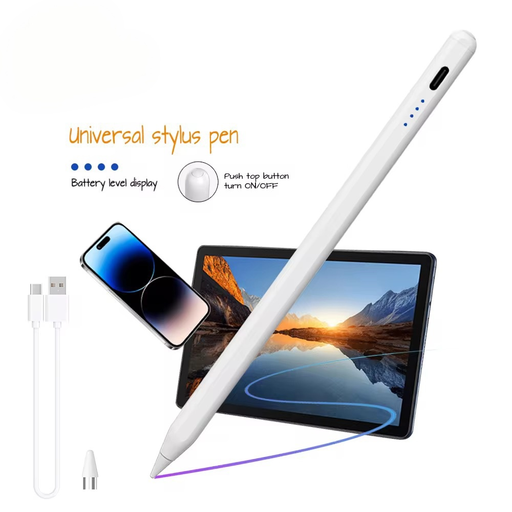
Why it suits this profile: This active stylus is designed for users who want to write, navigate and try simple sketches on a compatible iOS or Android device with a capacitive screen.
The product information clearly states that a capacitive screen is required. This means you can check in advance whether your tablet or phone is suitable, rather than relying solely on the word “universal”.
140 mAh built-in lithium battery and support for iOS and Android, according to the product description. The manual states that an app and pairing are required for use.
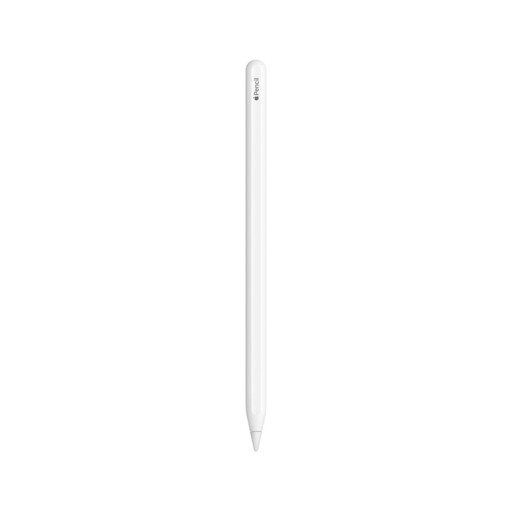
Why it suits this profile: A natural choice for iPad users who draw, write and annotate PDFs within the Apple ecosystem, and value magnetic storage and charging.
The stated compatibility list names specific iPad models. Check this list before ordering; this pen is not intended to be a universal tablet pen.
According to Apple’s product information, the pen features a touch surface with double-tap functionality, plus magnetic pairing, storage and charging on compatible iPads.

Why it suits this profile: This digital pen is designed for users of compatible Dell 2-in-1 devices who frequently write, draw or use shortcuts at work or while studying.
The product information mentions Bluetooth, programmable buttons and specific Dell models. This makes it clear from the outset that compatibility matters more than a general MPP or active pen listing.
According to Dell, the model offers 4096 pressure levels, up to 40 days of battery life and fast charging of up to 80% in 20 minutes. Actual battery life depends on usage.
We’ve put together a complete, up-to-date list of products that fully meet these strict selection criteria and the applicable European safety regulations.
No. An active stylus often uses a specific technology, such as AES, MPP, USI or Apple Pencil technology. A capacitive touchscreen pen generally works with a wider range of devices, but may not offer pressure levels, palm rejection or tilt recognition. Always check the exact device model.
Its lifespan depends on the battery, nib, casing and frequency of use. A replaceable AAAA battery means you don’t have to recharge the pen, while USB-C models can be recharged. Replace a worn nib in good time and store the pen somewhere dry, protected from drops.
Not always. For simple note-taking and navigation, an affordable tablet pen may be sufficient. For drawing, intensive writing or professional use, pressure sensitivity, palm rejection, tilt sensitivity and good compatibility are more important than the purchase price alone. So start by checking which features your device actually supports.
