For a study group sharing one laptop, choose a speakerphone whose stated microphone range covers the seating area and whose USB connection is compatible with the laptop. A wired model means you don't have to charge it, but limits where you can place it. A wireless model gives you more flexibility, but you'll need to consider charging and device compatibility. Jabra and Yealink publish range figures for specific models, but these don't guarantee that everyone will be heard clearly around your kitchen table.
Who is this choice relevant to?
Study group sharing one laptop
When several people are sitting around the same table, compare the stated microphone range with the distance to the furthest participant. Jabra gives the Speak2 40 a range of up to 2.3 m; Yealink gives the CP700 a range of 1.5 m.
Student who wants to connect quickly
If you usually use one laptop, check that the USB connection is compatible and that your meeting app is using the microphone and speaker you want. Microsoft Support explains how to select these devices in Teams.
Group that moves between locations
If you move the speakerphone between tables or devices, weigh the flexibility of wireless placement against charging and the stated range. Jabra and Yealink list different battery life and range figures for their models.
What should you look for?
Wired USB speakerphone
Choose this when: your group joins from one laptop and you can place the speakerphone somewhere suitable with its cable connected.
Trade-off: you won't need to charge a battery, but the cable limits where you can place it. Jabra gives the Speak2 40 an integrated cable of around 80 cm; Anker confirms that the PowerConf S330 has no battery or Bluetooth.
Wireless speakerphone with USB option
Choose this when: you want to move the speakerphone around or can't always place it near a USB port.
Trade-off: you'll need to consider range, device connectivity and charging. Jabra gives the Speak2 55 a wireless battery life of up to 12 hours; Yealink gives the CP700 up to 9 hours of talk time. These figures are provided by the manufacturers.
| What to consider |
What should you check? |
Who is this important for? |
| Making sure everyone around the table can be heard |
Measure the distance to the furthest speaker and compare it with the stated range of the exact model. |
When several of us are sitting around the table, I want the furthest speaker to be able to take part too; around 36% of consumers put group coverage first. |
| Connecting to a laptop |
Check whether it uses USB-A or USB-C, where the cable will sit, and how to select the microphone and speaker in your meeting app. |
I want to join from one laptop without connection issues; for around 29% of consumers, an easy laptop connection is the top priority. |
| Moving between locations |
Check Bluetooth and USB support, the stated battery life and which adapter is included with the version you choose. |
When I move between tables or devices, I want to be able to move the speakerphone too; around 21% of consumers put portability first. |
| Calls with interruptions |
Compare the listed features for simultaneous speech and echo cancellation, and test the setup in the kind of conversation you usually have. |
When we interrupt each other during a discussion, I want to be able to compare features that support the flow of conversation; around 14% of consumers put this first. |
Common buying mistakes
-
Assuming the stated microphone range guarantees clear speech
Jabra and Yealink's figures apply to their specific models, not every table layout or level of background noise. Compare the stated range with the furthest seat, then check how clearly everyone can be heard with your group in the place where you plan to use the speakerphone.
-
Choosing a wired model when you need Bluetooth
Anker confirms that the PowerConf S330 has neither Bluetooth nor a built-in battery, and advises against connecting it to a smartphone. Before buying, decide whether you'll join via USB on a laptop or need a wireless connection.
-
Assuming every version of the CP700 includes a Bluetooth dongle
Yealink lists the BT50 dongle as optional. Check what's included with the version you're buying and whether the device you want to connect supports the connection you need.
Some setups may require a separate BT50 dongle; check whether it's included with the version you've chosen.
-
Confusing the manufacturer's warranty with your statutory rights
ACM ConsuWijzer states that statutory rights exist alongside any shorter warranty offered by the seller or manufacturer. Check the warranty terms, and consider any fault in light of your statutory rights against the seller too.
Brands worth comparing
Jabra
The Speak2 40 and Speak2 55 are different models you can compare to weigh up wired and wireless use.
- For the Speak2 40, Jabra specifies four microphones, full-duplex audio, USB-A and USB-C, and a microphone range of up to 2.3 m. For the Speak2 55, Jabra gives a wireless battery life of up to 12 hours.
- The Speak2 40 has an integrated cable of around 80 cm. Teams certification for the Speak2 55 depends on the version. These are manufacturer specifications, not an independent comparison.
AnkerWork
The PowerConf S330 is a wired USB speakerphone worth comparing for laptop use.
- For the S330, Anker lists four microphones, full-duplex audio and a USB-C to USB-A adapter.
- Anker confirms that this model has neither a built-in battery nor Bluetooth, and advises against connecting it to a smartphone. Its stated range is not an independent measurement.
Yealink
The CP700 is a model to compare for USB and Bluetooth use when your group moves between locations or devices.
- Yealink specifies two omnidirectional microphones, a pickup range of 1.5 m and up to 9 hours of talk time.
- Yealink lists the BT50 dongle as optional. Check what's included with the version you've chosen; the stated specifications come from the manufacturer.
Speakerphones at Joybuy
These speakerphones are worth considering if you want to join a group call from the kitchen table. For each model, check that its stated USB or Bluetooth connection is compatible with your device and meeting app.
 No image available
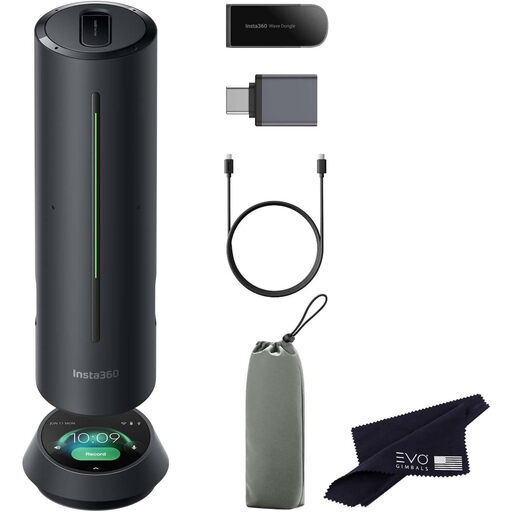
Insta360 Wave AI, Bluetooth, black
Worth considering if you're looking for a Bluetooth speakerphone; check beforehand that it connects to your device and works with your meeting app.
Connection stated in the product name: Bluetooth.
View at Joybuy
 No image available
Insta360 Wave AI, Bluetooth, white
Worth considering if you're looking for a Bluetooth speakerphone; check beforehand that it connects to your device and works with your meeting app.
Connection stated in the product name: Bluetooth.
View at Joybuy
 No image available
Jabra Speak 510 MS, Bluetooth, USB-A
A good option to consider if you're weighing up Bluetooth or a USB connection for joining from a laptop; check which connection works with your device and meeting app.
The product name lists Bluetooth and USB-A (USB 2.0).
View at Joybuy
 No image available
Jabra Speak2 55 MS Teams, Dark Grey
Worth considering if you want flexible wireless placement as well as USB use. Jabra gives the Speak2 55 a wireless battery life of up to 12 hours; Teams certification depends on the version.
Connection according to Jabra: USB or wireless.
View at Joybuy
Frequently asked questions
Where should you place the speakerphone when everyone is sitting around the table?
Place the speakerphone where the furthest speaker is within its stated microphone range. Jabra gives the Speak2 40 a maximum range of 2.3 m and Yealink gives the CP700 a range of 1.5 m; check how clearly everyone can be heard in your own setup too.
Why can't the group hear you after you connect the speakerphone?
Select the speakerphone as your microphone and speaker in the meeting app, and check your device or browser's microphone permissions. Microsoft Support explains these steps for Teams; other apps may work differently.
Does a USB speakerphone need to be charged?
It depends on the model: Anker confirms that the PowerConf S330 has no built-in battery, while Jabra gives the wireless Speak2 55 a battery life of up to 12 hours. Follow the product instructions for use and care too.
What are your rights if you change your mind about or find a fault with a speakerphone bought online?
ACM ConsuWijzer says that, for a standard online consumer purchase, you will generally have a statutory cooling-off period of up to 14 days after delivery, with some exceptions. Your statutory rights are separate from a manufacturer's warranty; if there is a fault, the right solution depends on your rights and the circumstances.
Does the Yealink CP700 always come with a Bluetooth dongle?
No. Yealink lists the BT50 dongle as optional. Check what's included with the version you've chosen and whether your computer supports the connection you need.


