
Volunteer sound mixer
You mix voices from a fixed position and want to assess what needs changing in the speech mix. Thomann Netherlands describes nearfield monitors as speakers often used to check audio during recording and studio work.


For checking voices from a fixed mixing position, a nearfield studio monitor is a good fit. If the speaker needs to hear themselves on stage, look into a stage monitor designed for that purpose. When choosing a studio monitor, check the listening position, connections and how many speakers are included. Position a stage monitor so that open microphones do not pick it up directly.
You mix voices from a fixed position and want to assess what needs changing in the speech mix. Thomann Netherlands describes nearfield monitors as speakers often used to check audio during recording and studio work.
You need to position and connect the monitors using the space and equipment available at the event. Genelec points out that both room acoustics and speaker placement affect what you hear at the listening position.
You arrange foldback sound for speakers and need to account for open microphones. Shure explains how sound from speakers picked up by a microphone can cause feedback.
First, decide who needs to hear the sound: you at the mixing desk or the speaker on stage. The listening position determines which type of monitor to compare.
| What to consider | What to look for | Who is this important for? |
|---|---|---|
| Checking voices at the mixing desk | Decide where you will listen and check whether the monitors can be positioned there. | I want to assess the nuances of the speech mix from my fixed mixing position; around 40% of consumers say this is their main need. |
| Positioning in a small or changing room | Measure the available space and consider how the room and speaker placement affect what you hear. | If I mix in a different or cramped space at each event, I want to know whether the monitors will fit practically; around 30% of consumers say positioning is their main consideration. |
| Connections and number of speakers | Compare the available output with the inputs on the exact model, and check whether the box contains one speaker or a pair. | I want to connect the monitor to my existing equipment and know how many speakers I’ll receive; around 20% of consumers give connections and box contents top priority. |
| Foldback sound on stage | Decide whether the speaker needs their own monitor mix and where the monitor can be positioned in relation to the microphone. | When the speaker needs to hear themselves on stage, I want to plan a suitable foldback set-up; around 10% of consumers say this is their main selection criterion. |
A nearfield monitor is designed for listening from a position by the mixing desk. A speaker for foldback on stage serves a different purpose. If it is close to a microphone, sound from it can also cause feedback.
Before choosing, mark out the mixing position, the speaker’s position and the microphone, then decide who needs to hear the monitor.
Yamaha states that the HS5 is packaged individually. So, an order for one speaker will not give you a pair.
Check what’s included with the exact listing and work out how many speakers your set-up needs.
The room and speaker placement affect what you hear at the listening position. Product specifications alone cannot tell you how a monitor will work in your venue.
Check that you can position the monitors where you intend to use them before comparing models.
The HS5 is an active nearfield monitor for listening from a position by the mixing desk. Yamaha also lists models in the DHR range for floor monitoring; these are designed for different uses.
The 8010A is a compact active monitor worth considering when space at the listening position is limited.
ADAM Audio describes the T5V as a nearfield monitor for small control rooms, making it an option to compare for a fixed, compact mixing position.
The 305P MkII is an active studio monitor for listening from a position at the mixing desk.
The FMX10 is an active coaxial floor monitor for the separate need of providing foldback sound on stage.
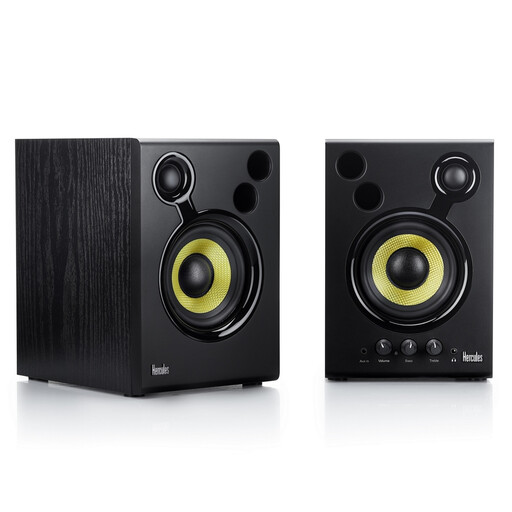
This Joybuy selection is an active speaker set for checking and refining a mix; it does not automatically replace a stage monitor for the speaker.
 No image available
This active speaker set could be a good fit for checking and refining a mix.
The set includes two speakers with built-in amplification and RCA and 3.5mm connections. Compare these inputs with the outputs on your equipment.
According to the product description, leave at least 10 cm of space behind the bass ports to allow air to circulate.
A nearfield studio monitor and a stage monitor are designed for different listening positions. Choose a nearfield monitor for listening from the mixing position; look into a stage monitor if the speaker needs foldback sound.
Avoid having the microphone pick up the monitor’s sound directly. Shure recommends placing a floor monitor in front of the performer and aiming it towards the back of the microphone. Adjust the set-up to suit the microphone and room.
Compare the output on your mixing desk or audio interface with the input on the exact model, and plan the listening position. Yamaha lists XLR and TRS inputs for the HS5 and packages this model individually; Genelec lists one analogue XLR input for the 8010A. The room and positioning affect what you hear.
Consumer purchases in the Netherlands are covered by the legal guarantee of conformity: you are entitled to a product that is fit for purpose. According to Business.gov.nl, a fault may entitle you to a repair or replacement; how it is dealt with depends on the purchase and circumstances. If an association or organisation made the purchase, first check whether it bought the product as a consumer.
Electrical and electronic equipment sold in the Netherlands must meet the applicable European product safety requirements. Business.gov.nl mentions rules covering low voltage, electromagnetic compatibility and hazardous substances, among others. Check the conformity information for the exact product on offer; model specifications alone do not prove that a particular item for sale meets these requirements.