
Producer with a crowded desk
You mix using two screens and want to position both speakers freely and at the same height. Genelec recommends a symmetrical stereo arrangement around your listening position.


Start with a stereo pair that you can position freely and symmetrically to the left and right of your screens, aimed at your listening position. Genelec recommends an equilateral triangle arrangement for stereo monitoring. A compact desktop set may suit a cramped desk and offer direct USB-C audio, while separate nearfield monitors need space and the right outputs. Frequency limits alone won’t predict how the bass will sound in your room.
You mix using two screens and want to position both speakers freely and at the same height. Genelec recommends a symmetrical stereo arrangement around your listening position.
You want to know how the bass sounds at your listening position. Your room, speaker placement and the measurement basis used for frequency specifications all play a part.
You want to use the outputs and cables you already have, and check in advance whether you’re buying one monitor or a complete stereo pair.
| What to consider | What to check before buying | Who is this important for? |
|---|---|---|
| Positioning beside two screens | Measure the available space on both sides and check the dimensions and any stand options. | If you have specific screens that leave little room, you’ll want to know whether both monitors will fit freely and symmetrically. Around 33% of consumers give placement top priority when making this choice. |
| Assessing kick and bass | Compare frequency limits only when they use the same dB measurement basis, and assess the setup at your listening position. | When balancing kick and bass, you shouldn’t rely solely on the lowest Hz figure. Around 27% of consumers give bass assessment top priority when making this choice. |
| Connecting to a computer or interface | Check the audio output on your computer or interface, the inputs on the exact model and the cables you’ll need. | If you want to connect your computer or existing interface, you’ll want to know which outputs and cables are compatible. Around 20% of consumers give connectivity top priority when making this choice. |
| Complete stereo pair | Check whether the box contains one speaker or a pair, and which cables are included. | If you’re putting together a stereo mixing setup, you’ll want to know in advance whether you need two monitors. Around 20% of consumers give a complete set top priority when making this choice. |
Some monitors are sold individually. One speaker won’t give you the stereo mixing setup you’re looking for.
Check what’s included in the box and which connections you’ll need before ordering.
You may need a second speaker and suitable audio cables to make up a pair.
Published limits may use different dB measurement bases, while your room and speaker placement also affect what you hear at your listening position.
Check the dB limit alongside the frequency range, and assess the bass in the context of your room and setup.
A screen can block a speaker and disrupt the left-to-right arrangement.
Measure both sides of your desk and, if needed, rearrange your screens or use a suitable stand so both monitors have a clear path and point towards the same listening position.
You may need to rearrange your desk or use suitable stands to position the speakers freely and symmetrically.
The D3V is a compact active desktop set with USB-C and balanced TRS inputs.
The LP-UNF is a desktop-focused stereo pair with USB-C and analogue inputs.
The 8010A is a compact active monitor with an XLR input, designed for use with a compatible analogue connection.
The HS5 is an active nearfield monitor sold individually, with balanced XLR and jack inputs.
The ROKIT 5 Generation Five is a single active 5-inch monitor with adjustment options.
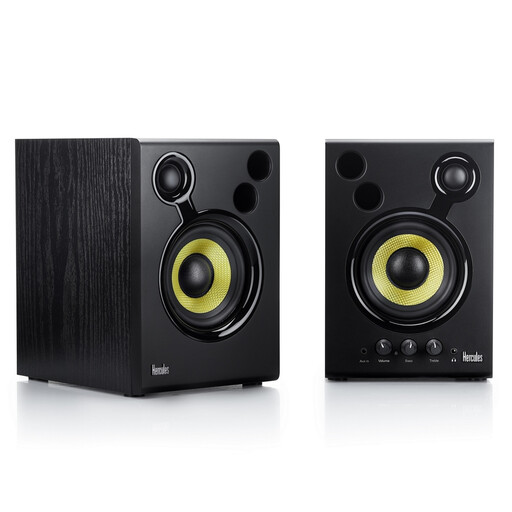
Active speakers for a desktop stereo mixing setup.
 No image available
The product description lists a set of two, making it suitable for a stereo mixing setup. Check whether the RCA or 3.5 mm connection is compatible with your audio source.
Aim both speakers at the same listening position and keep them at the same height and distance. For stereo monitoring, Genelec recommends an equilateral triangle with the listener at one point. Check whether you can achieve this outside your screens, and make sure neither screen blocks a speaker.
Don’t automatically lay them horizontally; follow the instructions for the exact model. Genelec Support explains that placing typical monitors horizontally can change their response as you move from side to side, whereas vertical placement may avoid this issue.
First, check that your setup is symmetrical, where the speakers are positioned and where you’re listening from. Use any placement settings as described in the model’s manual. Room reflections and resonances affect what you hear, and settings can’t guarantee a flat response in your room.
For eligible online consumer purchases, you’ll generally have a statutory 14-day cooling-off period after delivery, with some exceptions. You’re also covered by the legal guarantee if a product used normally doesn’t meet what you could reasonably expect; according to ACM ConsuWijzer, the retailer is your point of contact. A manufacturer’s warranty doesn’t replace this right.
A CE marking is required when the specific product falls under harmonised EU rules that require one. Your Europe, the European Union’s website, explains that the requirement depends on the product rules that apply, so check for the specific model.