
Mixers who work sitting and standing
You want to hear left and right equally clearly as your desk and ear height change. Genelec recommends placing a stereo pair at the same height and at equal distances from your listening position.


Start with a symmetrical stereo setup at the right listening height for both sitting and standing. Genelec recommends equal distances and a suitable height for a stereo pair. Then choose between a compact desktop set and two separate nearfield monitors, depending on the space and connections available. A quoted lower bass limit does not predict what you will hear in your room: MusicTech points out that manufacturers use different measurement tolerances, so compare frequency limits only when they’re measured on the same dB basis. Consider adding a calibrated subwoofer only if the main pair falls short at your listening position.
You want to hear left and right equally clearly as your desk and ear height change. Genelec recommends placing a stereo pair at the same height and at equal distances from your listening position.
You want to know how much low-frequency detail your monitor setup lets you assess at your listening position. ADAM Audio and Genelec stress that placement and room acoustics both affect how a subwoofer performs.
You’re looking for a stereo system that fits around your screen and connects to the audio output you have available. Also check whether the offer includes one monitor or a pair.
With a sit-stand desk, you need to be able to assess the stereo position at both working heights. Bass response, room settings and a complete connection setup will then help you decide which configuration is practical for you.
| What to consider | What should you check? | Who should pay particular attention? |
|---|---|---|
| Symmetrical placement | Check the height, direction, equal distance to the left and right, and space around your screen when sitting and standing. | When I switch between sitting and standing, I want to be able to position the left and right monitors equally at both listening heights. Around 29% of consumers prioritise symmetrical placement at the right listening height. |
| Kick and low bass | Compare frequency limits only when they’re measured on the same dB basis, and assess your mix at your listening position and on another playback system. | For a dance mix, I want to assess kick and low bass at my actual listening position, not just from a specification. Around 29% of consumers give bass control their highest priority. |
| Room acoustics | Check whether the exact model has room or boundary settings, and assess its response at your actual listening position. | When my desk and walls affect my listening position, I want to be able to adjust the setup accordingly. Around 24% of consumers prioritise room calibration. |
| Complete connection setup | Check how many speakers the offer includes and compare the inputs with the outputs on your computer or audio interface. | I want to get started with a complete stereo system and suitable connections, without mistaking a single monitor for a pair. Around 18% of consumers give completeness and connectivity their highest priority. |
Manufacturers may use different dB measurement limits, while your room also affects the bass you hear. MusicTech warns that frequency limits are therefore not always directly comparable.
Compare specifications only when they’re measured on the same basis, and assess the bass balance at your listening position. You may need to allow extra time to check the sound.
Yamaha lists the HS5 as one monitor per box, and KRK describes the ROKIT 5 Generation Five as a single monitor. ADAM Audio describes the D3V as a set, while PreSonus describes the Eris 3.5 2nd Gen as a pair.
Check what’s included in the exact offer and work out what you need for a complete stereo setup. You may need a second monitor and suitable cables.
For subwoofer integration with the D3V, ADAM Audio specifies an external audio interface with an analogue TRS connection. Genelec also explains how placement and phase can affect bass response.
Before buying, check the connection path and plan where to place the subwoofer, as well as the crossover and phase settings. Allow extra time for setup and calibration.
The D3V is a compact desktop set with USB-C. The T5V and T7V are separate active nearfield monitors for setups with more space and analogue connections.
The HS5 and HS7 are active analogue nearfield monitors for anyone with room for separate cabinets at their listening position.
The ROKIT 5 Generation Five is a single active 5-inch monitor with listening modes and placement adjustment options.
The 8030C is a single active nearfield monitor with manual room compensation.
The Eris 3.5 2nd Gen is an active analogue stereo set for anyone looking for a compact setup with a choice of connections.
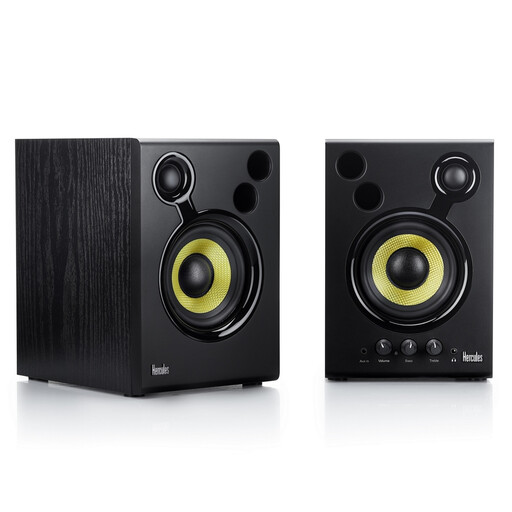
This Joybuy pick is an active stereo set for anyone who needs two speakers. Check that the connections and placement will suit your desk.
 No image available
This set could suit you if you’re looking for two active monitors and need RCA or 3.5 mm connections.
The product information lists two active 4-inch monitors. The placement instructions recommend an equilateral triangle, with your ears level with the midpoint between the tweeter and woofer. Leave at least 10 cm clear behind the bass ports.
Aim the monitors at your listening position, keeping the left and right speakers at equal heights and distances. Assess the setup separately at the desk heights you actually mix at; a fixed stand won’t automatically suit both positions.
No. Consider a subwoofer if you can’t adequately assess low frequencies with your main pair and can position and calibrate the subwoofer properly. Placement, crossover and phase all affect the result. For subwoofer integration with the D3V, ADAM Audio also specifies an external audio interface and an analogue TRS connection.
It varies by model: Yamaha lists one HS5 monitor per box, while PreSonus describes the Eris 3.5 2nd Gen and ADAM Audio describes the D3V as a pair. Compare the inputs on the exact model with the outputs on your computer or audio interface, and check what’s included in the offer.
For a consumer purchase in the Netherlands, the seller is responsible if a product doesn’t perform as you could reasonably expect under normal use, according to ACM ConsuWijzer. Online purchases generally come with a 14-day cooling-off period from delivery, subject to legal exceptions. ACM ConsuWijzer also provides information about this.
A CE mark is required only when the applicable harmonised EU rules specify it for the product, explains the European Union’s Your Europe website. The Dutch government recommends agreeing arrangements with your neighbours if noise could be a problem; this guidance doesn’t set a general permitted mixing-volume limit for every home.