What should you look for when choosing?
First, decide whether you can position two monitors symmetrically. Then compare their low-frequency response, intended listening volume and the connections on the exact model.
| Consideration |
What to look for when buying |
Who should weigh this up most carefully? |
| Stereo positioning and room effects |
Check whether a similar setup is possible on the left and right, and point both monitors towards the same listening position. |
If I want to assess transients on the left and right, I need to be able to position two monitors symmetrically around my listening position. Around 33% of consumers prioritise stereo positioning and room effects above all else. |
| Kick drums and low toms |
Check the dB condition given with the frequency limit and assess the low-frequency response at your intended listening position. |
If kick drums and low toms are crucial, I want to know what I can assess at my own listening position. Around 27% of consumers give low percussion top priority. |
| Transient detail at moderate volume |
Compare models at your intended listening volume; don’t treat manufacturers’ claims as proof of how a monitor will perform in your space. |
If I want to assess percussion transients at moderate volume, I don’t want to assume that turning it up will make the difference. Around 27% of consumers prioritise transient detail. |
| Space, connections and a complete pair |
Measure the space available and compare your source’s outputs with the monitor inputs; check how many speakers are included in the offer. |
If my desk has limited space, I want to be able to set up a stereo pair and connect it to my source. Around 13% of consumers prioritise fit and connectivity above all else. |
Joybuy product selection
This product selection is an active stereo set for anyone who wants to assess percussion in stereo. Check that the connections listed are compatible with your source, and allow for the space needed behind the bass ports.
 No image available
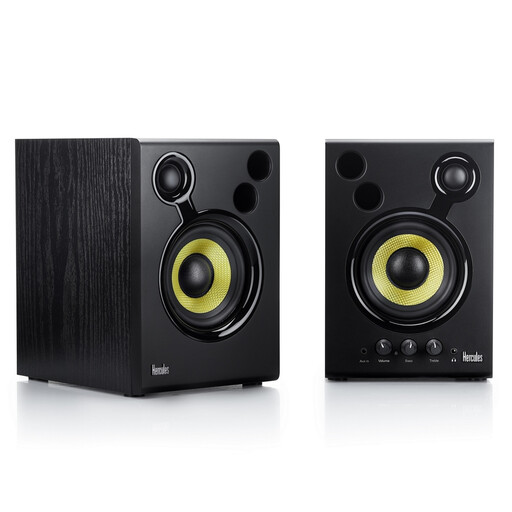
Hercules DJMonitor 42 Active monitor, Black
This active set with two speakers is a good fit if you want to set up a stereo pair to assess percussion positioning.
The product details list 4-inch woofers and a frequency range of 60–20,000 Hz. Don’t compare this range directly with figures measured under a different dB condition.
RCA and 3.5mm inputs are listed; check that they match the outputs on your source.
Leave at least 10 cm of clear space behind the bass ports, and don’t place the speakers in a damp environment or near water.
View at Joybuy
Frequently asked questions
How should you position two monitors to assess left-to-right placement?
Start with a symmetrical setup: place both monitors the same distance from your listening position, at the same height and facing towards it. Genelec recommends an equilateral triangle as the ideal arrangement for stereo. Then listen for any effect your desk and room may have on the sound.
Do you need a subwoofer to edit kick drums?
No, not necessarily. First, assess what you can hear from the stereo pair in your room at your listening position, and compare frequency limits only when they share the same measurement conditions. ADAM lists a compatible subwoofer as an upgrade option for the T5V, not as a general requirement.
Which connections and additional purchases should you check in advance?
Compare the outputs on your computer or audio interface with the inputs on the exact model, and check how many speakers are included. Yamaha lists XLR/TRS for the HS5 and one speaker per package; Kali lists USB-C, RCA and TRS among the inputs for the LP-UNF, which is described as a stereo pair. You may need to buy suitable cables separately.
What rights apply to an online consumer purchase in the Netherlands?
For eligible distance purchases from a business, you generally have a 14-day cooling-off period, subject to exceptions set out by the Dutch government. The ACM ConsuWijzer explains that the Netherlands doesn’t have a fixed, general two-year period for statutory guarantees: what you can reasonably expect from the product is what matters. If a product is faulty, contact the seller.
Does a CE mark prove that a monitor is suitable for percussion editing?
No. Where CE marking applies to electrical equipment, it relates to the required product compliance. Business.gov.nl explains that CE is not a quality mark, so it doesn’t prove that a monitor will perform well for percussion editing.


