
Speech mix creator
You want to assess pronunciation and the balance between voice, music and background noise. A monitor can help, but intelligibility also depends on the recording, processing and playback environment.


Choose a studio monitor that suits your listening space and connects to your audio source. Use it to assess both the voice and its balance with any music. A compact set can be practical on a small desk; if you buy monitors individually, check how many you’ll need. A monitor alone can’t guarantee an intelligible track: the recording, mix and final playback environment all matter too.
You want to assess pronunciation and the balance between voice, music and background noise. A monitor can help, but intelligibility also depends on the recording, processing and playback environment.
You’re short on space and want to position the speakers appropriately and as symmetrically as possible. Compact dimensions or room controls may therefore be relevant.
You want to know whether your interface’s outputs match the monitors’ inputs, and whether you’re buying an individual speaker or a complete pair.
Start with your listening space and the stereo setup you want. Then check your audio source’s outputs and decide which adjustment options are relevant to your room.
| What to consider | What should you look for? | Who is this important for? |
|---|---|---|
| Speech and balance | Compare the monitor type and any adjustment options. Listen to the full track through the playback setup you intend to use as well. | I mainly want to assess pronunciation and the balance between voice and any music; around 40% of consumers give speech assessment top priority. |
| Space and positioning | Measure the available space and check whether both monitors can be placed at a similar distance and height from your listening position. | At a small or temporary desk setup, I want to create two suitable listening positions; around 30% of consumers say positioning is their main consideration. |
| Connecting to your equipment | Note the outputs on your computer, mixer or interface, then compare them with the inputs and included cables for the exact version. | I want to connect my existing audio source without using the wrong connection or finding a cable is missing; around 20% of consumers put compatibility first. |
| Complete stereo setup | Check what’s in the box, then work out what you need for your intended setup. | I want to avoid buying just one speaker when I need stereo; around 10% of consumers make a complete set their top priority. |
The Yamaha HS5 and Genelec 8010A are sold individually, while the PreSonus Eris 3.5 2nd Gen version described here is a pair. So comparing product names alone isn’t enough to work out what’s included for a stereo setup.
You’ll need two individually sold monitors for a pair; check which cables are included too.
Check the contents of the exact product listing before deciding what you need for the complete setup.
Monitor frequency limits may be specified using different measurement methods. Speech intelligibility and mix balance also depend on the recording, processing and listening environment.
Compare the measurement conditions and assess the voice in the full track, including through the playback setup you’ll be mixing for.
With a stereo pair, reflections and uneven positioning of the left and right monitors can affect what you hear at the mixing position. An adjustment switch is no substitute for suitable positioning.
Depending on your workspace, you may need monitor stands or changes to your setup.
Plan a symmetrical listening position first, then use the adjustment options to suit the room you’re mixing in.
According to its product specifications, the Eris 3.5 2nd Gen is a compact set for a desk, with several line inputs.
The HS5 is an active nearfield monitor sold individually, for anyone putting together a pair with XLR or TRS connections.
ADAM Audio describes the T5V as a nearfield monitor for small control rooms.
The 8010A is a compact monitor sold individually, for limited workspace or a portable setup.
The ROKIT 5 Generation Five is an individual monitor with listening modes and adjustment options.
A Joybuy pick for a stereo mix at your listening position.
 No image available
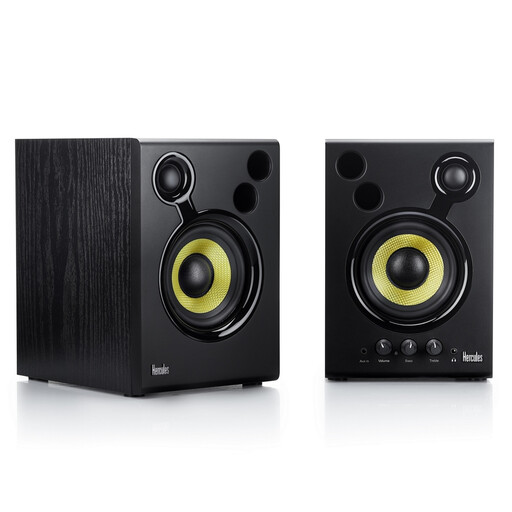
The product description lists a set of two and recommends an equilateral setup with the listener, which is well suited to assessing a stereo mix.
The listed connections are RCA and 3.5 mm; the set has volume control and bass and treble knobs.
According to the product warning, leave at least 10 cm clear behind the bass ports. Switch the speakers off before connecting or disconnecting audio cables.
The nearfield models in this selection are designed for listening at the mixing position. Choose a separate sound system for your audience; intelligibility there also depends on the playback environment.
Genelec recommends a symmetrical stereo setup, with both monitors aimed at the listening position. Then assess the response in your own room; an adjustment switch is no substitute for suitable positioning.
Above all, check whether the offer includes one monitor or a pair, and which cables are included. Yamaha lists one HS5 per box and Genelec one 8010A; the PreSonus Eris 3.5 2nd Gen version described here is a pair.
For an applicable distance purchase, you generally have a 14-day cooling-off period; the Dutch government lists some exceptions. You’re also entitled to a product that meets reasonable expectations. The Netherlands has no fixed statutory warranty period, and the retailer is your point of contact if a product is faulty.
No. According to Dutch government information, CE is not a quality mark; it relates to the manufacturer’s declaration that the product meets applicable EU rules. So it doesn’t tell you anything about sound quality.