
Student mixing film dialogue
Wants to assess dialogue, effects and music from a fixed listening position, and check how the mix sounds on the final playback system. Genelec offers advice on positioning monitors symmetrically.


For a soundtrack mix, you need two monitors that you can position symmetrically around your fixed listening position and connect to your computer or audio interface. A compact stereo pair may suit a small desk; two separate nearfields need space, suitable cables and a check of what’s included in the packaging. Genelec recommends symmetrical stereo positioning, but placement and room acoustics still affect what you hear. So check the finished mix on the playback system used at the screening, too.
Wants to assess dialogue, effects and music from a fixed listening position, and check how the mix sounds on the final playback system. Genelec offers advice on positioning monitors symmetrically.
Needs to fit two speakers beside the screen and wants to check in advance that the set and its connections will work with the available space and computer. For example, the ADAM Audio D3V is supplied as a pair and has USB-C and TRS inputs.
Wants to check the soundtrack on speakers while also being considerate of housemates or neighbours. The Dutch Government advises agreeing on noise levels and times; a monitor won’t resolve that separate issue.
A good fit if: you have limited space for two larger cabinets and want to connect a compatible computer. ADAM Audio supplies the D3V as a pair, with USB-C and balanced TRS inputs.
Bear in mind: check the available space, the connection between the speakers and your computer’s output. The 45 Hz lower limit quoted by ADAM Audio applies at −6 dB and, on its own, doesn’t tell you how the bass will sound from your listening position.
A good fit if: you can position two monitors symmetrically and your audio interface has suitable analogue outputs. The JBL 305P MkII and Yamaha HS5 have XLR/TRS connections.
Bear in mind: check that you have two monitors, cables and enough power sockets. Yamaha lists the HS5 as individually packaged; adjustment controls are no substitute for suitable positioning.
A good fit if: size is your main concern and your audio source has suitable analogue outputs. IK Multimedia describes the iLoud Micro Monitor as a stereo pair with analogue inputs.
Bear in mind: check the connections on the version being offered, and assess the bass and overall sound from your own listening position.
| What to consider | What should you check? | Who is this important for? |
|---|---|---|
| Assessing the mix | Check whether two monitors can be aimed at your listening position from the same distance and height. Genelec recommends a 60-degree angle between monitors for stereo; listen to the finished mix on the screening system, too. | I want to assess dialogue, effects and music from my usual listening position, and check the mix on the final playback system as well. Around 28% of consumers prioritise assessing the mix. |
| Desk space and room | Measure the space for both cabinets and any stands. Check your listening position and any placement controls on the exact model. | With limited space, I want to know in advance whether two monitors will fit symmetrically and how the room will affect what I hear. This is the main priority for around 22% of consumers. |
| Connectivity | Note the outputs on your computer or audio interface and compare them with the inputs on the version you’ve chosen. Check which cables you’ll need. | I want to connect my existing equipment without having to make unexpected changes to my entire signal chain. Around 17% of consumers prioritise connecting to their audio source. |
| Complete stereo pair | Check whether the offer includes one monitor or two, and remember to account for any cables, power supply and stands you may need. | I want to know whether my purchase will give me two speakers for stereo straight away. Around 17% of consumers make having a complete stereo system their main priority. |
| Shared home | Consider whether you can work on speakers in your chosen place and at your preferred times. If needed, agree arrangements with housemates or neighbours, and check how the film will ultimately be played back. | I want to mix on monitors without forgetting to agree noise levels with housemates or neighbours. This matters most to around 16% of consumers. |
The Yamaha HS5 is packaged individually, and KRK describes the ROKIT 5 Generation Five as a single monitor; ADAM Audio lists the D3V as a pair. With one monitor, you can’t check a soundtrack’s stereo image through two speakers.
Check what’s included in the specific offer before comparing two sets.
The D3V is an active desktop stereo pair for a compact setup.
The HS5 is an active nearfield for a two-speaker setup with suitable analogue outputs.
The 305P MkII is an active nearfield for an analogue mixing setup.
The ROKIT 5 Generation Five is a single active monitor with listening and EQ settings.
The manufacturer describes the iLoud Micro Monitor as a compact analogue stereo pair.
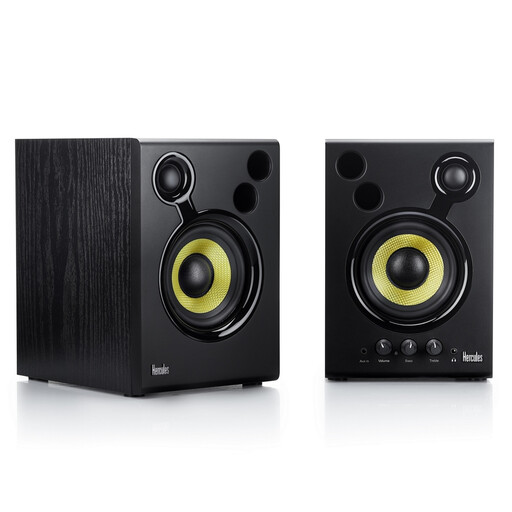
This Joybuy selection focuses on an active set of two monitors for mixing from a fixed listening position. Check in advance whether your computer or audio interface has an RCA or 3.5mm output.
 No image available
The described set includes two speakers and is designed for mixing from a fixed listening position; check that the connections are compatible with your audio source.
The listed inputs are RCA and 3.5 mm. The product information mentions volume, bass and treble controls.
According to the product information, leave at least 10 cm of space behind the bass ports. For the specific version, check for the CE marking and make sure the stated mains voltage is compatible with your connection.
Switch the monitors off before connecting or disconnecting audio cables.
You need two suitably positioned speakers to check a stereo image. Yamaha lists the HS5 as individually packaged; ADAM Audio describes the D3V as a pair.
Genelec recommends symmetrical stereo positioning, ideally with a 60-degree angle between the monitors and the listener at the point of an equilateral triangle. This guideline doesn’t mean the room will then be acoustically neutral.
For the specific version, check the CE marking and manual, and make sure the stated power supply is compatible with your connection. According to the Dutch Government, electronic devices placed on the EU market must meet the applicable safety requirements and carry a CE marking.
The information consulted from the Dutch Government doesn’t mention a general national cut-off time for playing music near neighbours. The Government advises agreeing on arrangements, such as when the music should stop; this doesn’t mean any volume or situation is acceptable.
Many distance purchases come with a 14-day cooling-off period, although terms and exceptions may apply. You’re also entitled to a product that meets reasonable expectations. According to the Dutch Government, statutory guarantees in the Netherlands don’t have a fixed duration; what you can expect also depends on the product.