
Drum editor with one spare plug socket
You want to use a stereo pair without needing two separate monitor plugs. Check how the complete pair is powered and connected.


With few spare plug sockets, a stereo set with one shared amplifier or power supply is more likely to suit your setup than two monitors powered separately. Check how the exact model connects as a pair. Then compare the low-frequency limit alongside its stated measurement level, and take your room into account: a specification alone cannot tell you how reliably you’ll hear the kick drum’s low end from your listening position.
You want to use a stereo pair without needing two separate monitor plugs. Check how the complete pair is powered and connected.
You make decisions about the low frequencies of kick drums and toms. Compare the measurement basis for the stated low-frequency limit, and listen in your own workspace.
Your choice depends on the outputs you already have. An active set may offer USB-C or analogue inputs; a passive set needs a suitable power amplifier.
Suitable if: you have only one plug socket available for your monitors. Yamaha says the HS4 uses one amplifier for both speakers; with the ADAM D3V, the power supply connects to the left speaker.
Bear in mind: having one power connection doesn’t automatically tell you how well the monitors reproduce deep kick drum bass. Compare frequency limits only alongside their measurement levels.
Suitable if: you have two suitable power connections and can position both speakers to suit your listening position.
Bear in mind: a stereo setup with two Genelec 8010A monitors requires two separately sold units, each with its own mains cable.
Suitable if: you already have a suitable stereo amplifier or want to position one away from your immediate workspace.
Bear in mind: the speakers themselves don’t need to be plugged into the mains, but the amplifier does. The Avantone Mixcube is designed as an additional reference monitor, not as your only monitor for deep kick drum bass.
| What to consider | What to check before buying | Who is this important to? |
|---|---|---|
| Power and stereo pair | Check how many speakers and power cables are included, and how many plug sockets the complete setup uses, including any amplifier or subwoofer. | If I only have one spare plug socket, I want to know whether I can connect the whole stereo pair to it. For around 33% of consumers, the number of plug sockets needed is the top priority. |
| Kick drum low end and drum detail | Compare frequency ranges alongside the stated dB point, and assess the bass from your intended listening position. | When I edit kick drums and toms, I want to know what the monitors reveal about the bass and how clearly they reproduce the attacks. Around 27% of consumers put this first. |
| Positioning and room | Measure the space available for both speakers and check which positioning controls the model offers. | If my desk has limited space, I want to position both monitors so I can achieve a useful stereo image from my listening position. This is the main concern for around 20% of consumers. |
| Connecting to your equipment | Make a note of the outputs on your computer, interface or amplifier, and compare them with the inputs on the exact set you’re considering. | If I already have an interface or amplifier, I want to connect it without using an unsuitable signal path. For around 20% of consumers, connecting to existing equipment is the top priority. |
Power requirements vary between complete sets. An active stereo set may use one amplifier for both speakers, while separate active monitors each have their own mains cable.
Before buying, map out the whole signal chain: speakers, power, any amplifier and the connections you’ll need.
A passive set needs a suitable external power amplifier and speaker cables.
A lower limit at −10 dB does not describe the same level as a limit at −3 or −6 dB. Your room’s acoustics also affect what you hear from your listening position.
Note the measurement point for each frequency limit, and make important decisions about the low end from your own listening position.
Genelec lists one monitor and one mains cable per 8010A package; you need two units for stereo.
Check the contents of the exact version you’re buying, and count how many power connections your setup will need.
You’ll need a second monitor for stereo; separately powered models also need a second suitable plug socket.
Avantone gives the passive Mixcube a frequency range of 200 Hz–10 kHz and positions it as a reference for devices with limited bass.
Use this type of monitor for its stated reference purpose, and assess lower frequencies with a setup designed for the job.
You may need an additional monitoring system to assess lower frequencies.
The HS4 is an active desktop set sold as a pair. Yamaha says one amplifier drives both speakers.
The D3V is a compact active stereo set with USB-C and balanced TRS connections.
The LP-UNF is a desktop stereo system with a range of inputs and positioning settings.
The 8010A is a compact active monitor sold individually, with an analogue XLR connection.
The passive Mixcube is designed as an additional reference monitor to check how a mix sounds on devices with limited bass.
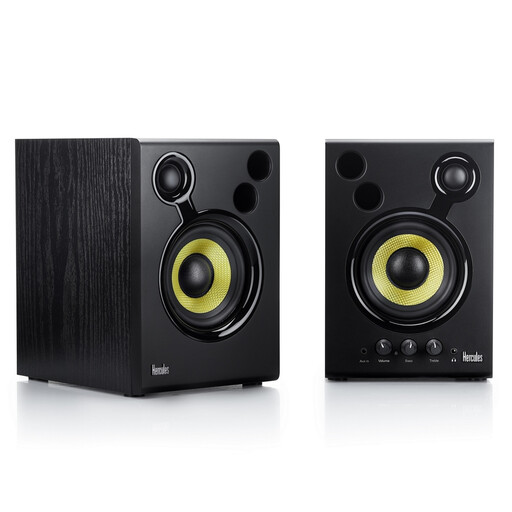
This selection focuses on an active set with two speakers for editing drum recordings in stereo, with analogue connection options.
 No image available
This active set includes two speakers and is designed for stereo editing. Check how many plug sockets the complete set needs in your workspace.
The listed connections are RCA and 3.5 mm. The set has volume control and bass and treble knobs.
The passive speakers themselves don’t need to be plugged into the mains, but they do need a suitable external power amplifier, which does require power. Also check the manufacturer’s recommendations for speaker cables and amplifier load.
Angle both monitors towards your listening position and position them as symmetrically as possible. Genelec describes an equilateral listening triangle as the ideal setup for music production, although your room will also affect what you hear. Keep electrical equipment free of dust, leave room for heat to escape, and follow the manual when connecting and cleaning it.
The Dutch Fire Service advises using undamaged, approved extension leads and not connecting extension leads to one another. Also make sure you stay within the permitted load for your power supply.
According to the Government of the Netherlands, you’re entitled to a product that works properly, but there is no fixed statutory guarantee period in the Netherlands. If a product is faulty, contact the seller; an additional manufacturer’s or retailer’s guarantee does not replace your statutory rights.
According to the Dutch government’s Business.gov.nl, the responsible economic operators must comply with the applicable European requirements for electrical safety and electromagnetic compatibility, and ensure the required CE marking and EU declaration of conformity are in place. Models with Bluetooth are also subject to the applicable requirements for radio equipment.