Choose monitors that you can position at a similar height and distance on either side of your two screens, angled towards your listening position. A compact desktop system is a good fit when desk space is limited; larger nearfields or a subwoofer are options if you want to assess more bass and have room to position and set them up properly. Compare stated frequency limits only when the measurement definitions also match, and check whether an offer includes one monitor or a stereo pair.
Who are these monitors for?
Producer with a crowded two-screen desk
You mix close to two screens and mainly need space for a left-right setup that gives you a usable stereo image. Genelec emphasises that similar reflections from both monitors help create an accurate stereo image.
Producer assessing kick and bass
You want to assess the bass in a dance track without treating frequency limits measured using different definitions as equivalent. Manufacturers’ stated figures are not the same as what you hear in your room.
Producer in a challenging room
You cannot position the monitors freely, so you need to consider their distance from the walls, reflections and room controls. Check which placement adjustments your chosen models offer, then assess the result from your listening position.
What should you look for when choosing?
Compact desktop system
Choose this if: two screens leave little room, but you can still position the speakers symmetrically.
Bear in mind: a compact design does not remove the effect your room has on bass. Kali states that the LP-UNF reaches 39 Hz at −10 dB, but gives 54 Hz as the lower limit of its range at ±3 dB.
Two separate nearfields
Choose this if: you have enough room beside the screens or suitable stands.
Bear in mind: the Yamaha HS7 and ADAM Audio T7V have different stated measurement limits: 43 Hz at −10 dB and 39 Hz at −6 dB respectively. These figures are not directly comparable and do not predict what you will hear in your room.
Monitors with a subwoofer
Consider this if: you also want to assess bass below the usable range of your main monitors, and you can position and set up the subwoofer in your room.
Bear in mind: check the placement, level, phase and crossover with your main monitors; a subwoofer will not automatically fix an unsuitable room layout.
Start with the available space and the symmetry of your setup. Then compare bass response and connections, and decide whether you need a complete stereo pair.
| Factor |
What should you look for? |
Who is this important for? |
| Stereo placement |
Measure the space beside your screens; check whether both monitors can be aimed at your listening position from a similar height and distance. |
When I mix behind two screens, I want to be able to create a similar setup on the left and right. Around 36% of consumers give stereo placement top priority. |
| Control over kick and bass |
Compare frequency ranges only when they use the same dB definition; decide whether your main monitors are suitable for the decisions you need to make when mixing. |
When mixing a dance track, I want to assess kick and bass without treating measurement figures as a guarantee of what I will hear in my room. Around 29% of consumers give bass assessment top priority. |
| Effect of your desk and room |
Check the available placement settings and whether you can position the monitors on a desk or near a wall. |
If I cannot position the monitors freely, I want to know what placement and adjustment options are possible in my room. Around 21% of consumers give room placement top priority. |
| Connections and complete pair |
Compare the inputs with the outputs on your equipment and check whether the offer includes one monitor or two. |
If I want to connect my existing equipment, the connection needs to be compatible, and I want to know whether I will get a complete stereo pair. Around 14% of consumers give connections and a complete pair top priority. |
Common pitfalls
-
Comparing frequency limits without checking the dB definition
A figure at −10 dB is not the same as one at −6 dB. So a lower frequency on paper does not prove that the bass will sound better or extend lower in your room.
Compare models using the same measurement basis, then assess the bass after setting them up in your own space.
-
Assuming one monitor makes a stereo pair
Some monitors are sold individually, while others are described as a stereo system. The number of speakers determines whether you can create a left-right setup straight away.
Before choosing, check how many speakers are included in the offer and which cables or stands you will need.
-
Expecting a subwoofer to quickly fix unclear bass
The subwoofer’s placement and setup with the main monitors affect the bass you hear.
First, improve the main setup. Add a subwoofer only if you can control its level, phase and crossover.
Brands to compare
Kali Audio
The LP-UNF is a compact desktop system; the LP-6 V2 and LP-8 V2 are individual monitors for different placement needs.
- According to Kali Audio, the LP-UNF has settings for different desk and wall positions, as well as USB-C and balanced TRS connections.
- The stated 39 Hz at −10 dB is not the same as the lower limit of 54 Hz at ±3 dB. Assess how much bass you need from your own listening position.
Yamaha
The active HS series includes the HS5 and HS7, both sold as individual nearfield monitors.
- Yamaha specifies balanced XLR and jack inputs, as well as ROOM CONTROL, for the HS7. The cabinet measures 210 × 332 × 284 mm.
- The stated limit of 43 Hz is at −10 dB and does not, on its own, predict how the bass will sound in your room.
ADAM Audio
The T5V and larger T7V are active nearfields for setups with space beside or behind the screens.
- ADAM Audio specifies a 7-inch woofer and 39 Hz at −6 dB for the T7V.
- The T7V has a rear-facing bass reflex port. Check there is enough clearance and space around your screens.
KRK
The ROKIT 5 Generation Five is an active 5-inch monitor sold individually, with adjustable sound modes.
- According to KRK, Mix, Focus and Create modes are available, along with 25 combinations of boundary and EQ settings.
- Adjustment options are not independent proof that a monitor will solve acoustic problems in your room.
Genelec
The 8030C is a compact active monitor sold individually, with room adjustment controls.
- Genelec specifies a cabinet width of 189 mm and 47 Hz at −6 dB for the 8030C.
- Genelec’s specifications and claims about stereo imaging do not necessarily predict the result between two screens in a particular room.
Joybuy products
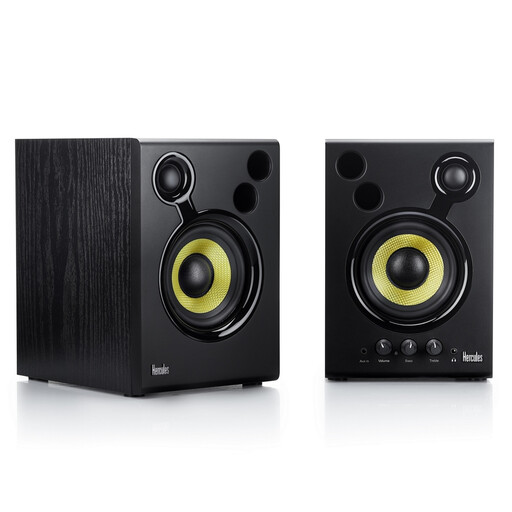
This Joybuy selection is an active stereo set for a two-screen desk setup.
 No image available
Hercules DJMonitor 42 active monitor, black
The set includes two active monitors, making it possible to create a left-right setup around two screens.
Stated frequency range: 60–20,000 Hz. Bear this in mind if you also want to assess deeper bass.
The product information lists RCA and 3.5 mm connections, along with separate bass and treble controls.
According to the product information, the rear-facing bass ports require at least 10 cm of clearance from the wall.
View at Joybuy
Frequently asked questions
Should your speakers go beside or behind your two screens?
Choose a position where both speakers can be aimed at your listening position from a similar distance and height. Genelec recommends a symmetrical stereo setup and suggests 60° between the monitors as a starting point; check whether this is practical on your desk.
Do you always need a subwoofer for a dance track?
No, not always. Consider a subwoofer if you want to assess bass below the usable range of your main monitors and can adjust its placement and connection. Check the level, phase and crossover with your main monitors.
What should you check about connections and the warranty?
Check whether the offer includes one monitor or a pair, and whether the inputs are compatible with your equipment. If you are a consumer buying in the Netherlands, your statutory right to a product that meets reasonable expectations is separate from any additional manufacturer’s warranty; Business.gov.nl explains that statutory rights take precedence over a commercial warranty.
What should you look for regarding electrical product safety in the Netherlands?
Check the product information and instructions for the specific model. For products covered by the relevant EU rules, CE marking is the manufacturer’s declaration of conformity, not an assessment of whether the monitor is suitable for your mix. The Dutch government warns that if you buy directly from outside the EU, you may not always know whether a product meets European safety requirements.


