What should you look for?
First, check whether you need a complete stereo pair and whether the connections are compatible with your computer, mixer or audio interface. Then consider whether two speakers will fit comfortably in your workspace, and check your mix on the playback system it is intended for.
| Consideration |
What should you check? |
Who is this important for? |
| Voices and mix balance |
Listen from a fixed position for speech, levels and noise; also check the mix on the intended playback system. |
I want to hear whether voices and any music are well balanced; around 36% of consumers put mix assessment first. |
| Complete stereo setup |
Check whether the box contains one monitor or a pair, and whether you need a separate amplifier. |
I want to put together a working stereo setup within my budget; around 29% of consumers say the total purchase cost is their top priority. |
| Space and positioning |
Measure whether both speakers and your listening position will fit comfortably on your desk; see if an approximately equilateral triangle is possible. |
I need to fit the speakers into a limited workspace; around 21% of consumers put placement space first. |
| Connections |
Compare the outputs on your source equipment with the inputs on your chosen model, and check which cables you’ll need. |
I want to use my existing computer, mixer or audio interface without unexpected connection problems; around 14% of consumers give ease of connection top priority. |
Speakers at Joybuy
This selection features active speakers for stereo playback. Before choosing them for a mixing setup, check that their connections are compatible with your source equipment.
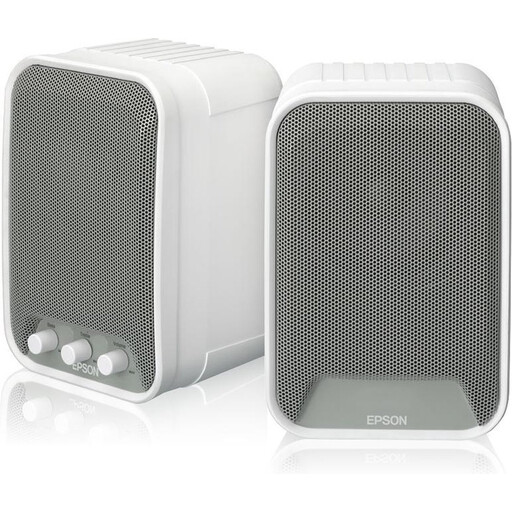 Image unavailable
Epson active speakers (2 × 15 W) – ELPSP02
Could suit anyone looking for an active stereo set to monitor a mix; check that the connections match your computer or audio interface.
2.0 channels; built-in amplifier; 2 × 15 W.
View at Joybuy
Frequently asked questions
Should you buy one studio monitor or a pair?
You need a left and right channel to assess a stereo mix. Check the packaging: PreSonus lists the Eris 3.5 2nd Gen as a pair, while Yamaha explicitly states that the HS5 is packaged individually.
How should you position the speakers for mixing?
Start by placing the two speakers and your listening position in an approximately equilateral triangle, with the tweeters around ear height. PreSonus recommends the triangle as a positioning guide; the best setup also depends on the space available.
Do you need to listen at a high volume to mix well?
High volume is no substitute for careful listening. The World Health Organization points out that the risk to your hearing depends on both volume and exposure time. Listen at a moderate level and take breaks. Ask the organiser or broadcaster about any delivery requirements.
What warranty and cooling-off period apply to a purchase in the Netherlands?
When you buy as a consumer, you’re entitled to a product that works as it should, and the seller is your point of contact. According to the Dutch government, there is no fixed statutory warranty period in the Netherlands. Online consumer purchases are generally covered by a 14-day cooling-off period; check the terms and any exceptions that apply to your purchase.
Can you play existing music during the exhibition?
Not necessarily: according to the Dutch government, you need permission from the rights holder to use copyright-protected music. Discuss with the organiser what music will be used and which rights are required for the specific screening or broadcast. Buying speakers doesn’t give you music rights.


