Choose monitors that you can position as a symmetrical stereo pair, aimed at your ears at your usual desk height. Check that positioning when you switch between sitting and standing, too. Then compare their dimensions, connections and any room settings. A compact size or room-correction features don’t remove the need for good positioning.
Who are these monitors for?
Choir recording editor
You assess the balance between voices and their stereo positioning, so you want to be able to set up two monitors symmetrically as a listening reference. Genelec’s positioning guidance recommends an equilateral listening triangle, with the monitors angled towards your listening position.
Sit-stand desk user
You alternate between sitting and standing, and want to check that the monitors remain aimed at your listening position at each desk height. Genelec’s positioning guidance is about the listening setup; it is not a specific test of sit-stand desks.
Editor with limited desk space
You’re looking for a setup beside your screen, so you compare the dimensions, tilting options and box contents of your chosen monitors. For example, Genelec publishes the dimensions and packaging information for the 8020D, while IK Multimedia lists an integrated tilting stand for the iLoud Micro Monitor Pro.
What to consider when choosing
First, check that a symmetrical stereo pair will fit at your listening position when you’re sitting and standing. Then compare the space required, connections and what’s included in the box.
| What matters |
What to check before buying |
Who prioritises this |
| Assessing voices and the stereo image |
Check that you can position two monitors at equal distances and facing the same way from your usual listening position. |
When I’m assessing choir voices and stereo positioning, I want to hear the left and right channels from comparable positions. Around 36% of consumers put this first. |
| Listening position at different desk heights |
At both working heights, check the distance, symmetry and direction of the monitors in relation to your ears. |
When I alternate between sitting and standing, I want to check my listening position at both desk heights. Around 29% of consumers put a practical listening position at different heights first. |
| Space around the screen |
Measure the available width and depth, then compare the dimensions and any tilting options for the exact models. |
With limited desk space, I want to know whether two monitors will fit beside the screen without compromising a symmetrical setup. Around 21% of consumers prioritise a compact setup above all else. |
| A complete setup with compatible connections |
Check how many monitors are included, the input types and whether you need any extra equipment for measurement. |
If I want to connect a working stereo setup, I want to know how many monitors are included and whether the inputs will work with my audio interface. Around 14% of consumers prioritise a complete setup with compatible connections. |
Pitfalls to avoid
-
Assuming one monitor is a stereo pair
Yamaha and Genelec list the HS5 and 8020D respectively as coming with one monitor per box. Packaging may vary, so the model name alone doesn’t always tell you how many speakers you’ll receive.
Check what’s included with the exact version and what else you need for a complete setup.
For a stereo pair, you’ll need a second monitor if the model is sold individually. Also check which cables are compatible with your connections.
-
Comparing frequency ranges without checking the measurement limit
The Yamaha HS5 has a specified range at both -10 dB and -3 dB; other models may list a range at, for example, -6 dB. These limits don’t provide the same basis for comparison.
Compare the measurement limit alongside the range, and assess the monitors in the listening position where you plan to use them.
-
Treating calibration as a substitute for positioning
A setting or measurement doesn’t replace carefully aiming and positioning two monitors symmetrically. For Neumann’s MA 1 procedure, the manufacturer lists additional equipment, including a measurement microphone and a suitable audio interface.
Plan the positioning first, then check what equipment and requirements apply to the correction process for the exact model.
Some measurement procedures require additional measurement equipment or a suitable interface.
-
Confusing the manufacturer’s warranty with your statutory rights
According to the Dutch Government, an additional warranty does not replace your statutory rights if a product is faulty. There is no fixed statutory warranty period in the Netherlands.
Check what extra cover is offered, and contact the retailer if there’s a fault.
Relevant brands to consider
Yamaha
The active HS series includes nearfield monitors; the HS5 is one model to compare for its connections and settings.
- Yamaha lists XLR and TRS inputs, as well as ROOM CONTROL and HIGH TRIM controls, for the HS5.
- Yamaha specifies that the HS5 is packaged individually, with a response of 74 Hz–24 kHz at -3 dB. Don’t compare this directly with a range specified at a different dB limit.
ADAM Audio
The active T5V is a standalone nearfield option for a compact workspace.
- ADAM Audio specifies a rear-facing bass-reflex port and a frequency range of 45 Hz–25 kHz at -6 dB for the T5V.
- These specifications don’t tell you how the monitor will sound in your room or on your desk.
Genelec
The compact 8020D is worth considering when the size of each monitor is a key factor.
- Genelec specifies dimensions of 242 × 148 × 142 mm, including the Iso-Pod.
- Genelec lists one monitor per box and a low-frequency response from 56 Hz at -6 dB; this specification doesn’t describe the response in your room.
IK Multimedia
The iLoud Micro Monitor Pro combines a small enclosure with an integrated tilting stand and ARC X calibration.
- According to IK Multimedia, the model has XLR and RCA audio inputs and an integrated tilting stand.
- IK Multimedia lists the measurement microphone with the pair version; check the exact version before assuming it’s included.
Neumann
The KH 80 DSP offers settings for placement on or away from a desk.
- Neumann describes a setting for free-standing placement and for small or medium-sized desks.
- For the MA 1 procedure, Neumann lists an MA 1 measurement microphone, a computer and a suitable audio interface, among other requirements.
Hercules
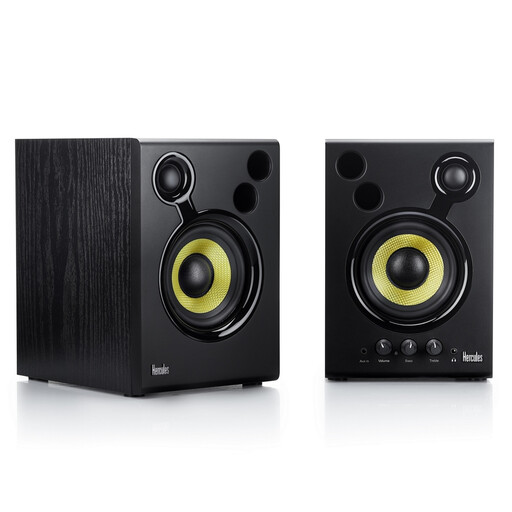
The DJMonitor 42 is an active set to consider if you want a pair with a straightforward RCA connection.
- Hercules specifies 4-inch woofers, an RCA main input, an additional 3.5 mm input, and bass and treble controls.
- Hercules also positions this model for DJ use; that doesn’t prove it’s equivalent to individual nearfield models for every critical choir mix.
Joybuy products
This product selection features an active set for anyone looking for a complete stereo pair with a straightforward RCA connection.
 No image available
Hercules DJMonitor 42, black
This active set of two speakers is an option if you’re looking for a stereo pair that you can aim towards your listening position.
The set has RCA and 3.5 mm connections, plus bass and treble controls.
According to the product instructions, leave at least 10 cm of clearance behind the bass ports. Switch off the monitors before connecting or disconnecting audio cables, and keep them away from water.
View on Joybuy
Frequently asked questions
Do the monitors need to move when I raise my desk?
At each working height, check that both monitors are still the same distance from your listening position and aimed at your ears. Genelec’s positioning guidance describes a symmetrical setup, but doesn’t specifically cover sit-stand desks.
Can room correction fix an awkward setup?
Start with positioning, then decide whether settings or measurements are needed. Genelec describes reflections from desks and rooms; Neumann’s MA 1 procedure also has specific equipment requirements.
Are monitors sold individually or as a pair?
It varies by model and version. Yamaha lists the HS5 and Genelec lists the 8020D as one monitor per box; IK Multimedia lists a measurement microphone with the pair version of the iLoud Micro Monitor Pro. Check exactly what’s included in the listing before putting together a stereo pair.
What warranty applies to a consumer purchase in the Netherlands?
According to the Dutch Government, consumers are entitled to a product that is fit for purpose, and there is no fixed statutory warranty period in the Netherlands. A manufacturer’s or additional warranty doesn’t replace those statutory rights; if there’s a fault, contact the retailer.
Can I return monitors after receiving them if I bought them online?
ACM ConsuWijzer states that online consumer purchases generally come with a cooling-off period of up to 14 days after delivery, with some exceptions. Check which terms apply to your specific purchase; a retailer’s promise and your statutory rights aren’t the same thing.


