Start with a stereo pair that you can position symmetrically, with a clear path for the sound and at a suitable listening height to the left and right of your two screens. Then decide how much bass extension you need. Compact nearfields may suit a smaller desk, while larger monitors or a subwoofer can require more space and careful positioning and room tuning. Only compare frequency limits when the stated measurement level, such as −3, −6 or −10 dB, is the same.
Who is this choice relevant to?
Bass editor who needs to assess the low end
You edit bass guitar tracks and want to know which parts of the low end your monitors reproduce. Always read a stated frequency limit alongside its measurement level; a limit on its own does not tell you how the bass will sound where you listen. Yamaha and ADAM Audio publish frequency specifications for individual models.
Producer with two screens on a small desk
You need to position your left and right speakers around two screens while also considering symmetry, listening height and a clear path for the sound. Genelec and Kali Audio provide guidance on monitor placement.
Home studio owner dealing with tricky room bass
You notice differences in bass response between listening positions and want to consider placement or room settings before choosing larger monitors or a subwoofer. Genelec explains how placement can affect a subwoofer’s output.
What should you look for?
First, measure the space around both screens and your listening position. Then choose the size and bass extension you need, and only after that consider whether you need a subwoofer or additional equipment.
| What to consider |
What to look for when buying |
Which consumers is this important for? |
| Bass extension for bass guitar |
Compare the frequency limit only at the same dB measurement level; check whether you can pair a subwoofer with the monitors. |
When I edit bass guitar tracks, I want to know which parts of the low end I can assess through the monitors. Consumers who prioritise bass extension are estimated to make up around 36% of this group. |
| Positioning around two screens |
Measure the available space and check whether a symmetrical setup is possible on the left and right, with the tweeters at a suitable listening height. |
With two screens on my desk, I want a clear stereo image without a screen blocking the sound. Consumers who focus mainly on placement are estimated to make up around 29% of this group. |
| How the room affects the bass |
Check the placement options and model-specific room settings; if you plan to use a subwoofer, consider how to adjust its phase and crossover. |
If the bass sounds different in different parts of my room, I want to consider placement and tuning first. Consumers who prioritise the effect of the room are estimated to make up around 21% of this group. |
| Complete set and connections |
Check whether the offer includes one monitor or a stereo pair, and whether the inputs match your audio outputs. |
I want to know in advance whether I have everything I need for left and right, along with the right connections. Consumers who prioritise a complete set and connections are estimated to make up around 14% of this group. |
Common buying mistakes
-
Checking the lowest frequency without looking at the measurement level
A frequency limit at −10 dB is not directly comparable with one at −3 dB. For example, Yamaha lists the HS5 at 54 Hz at −10 dB and 74 Hz at −3 dB.
For every stated frequency, check the dB measurement level and consider whether the information is relevant to the bass decisions you need to make.
If you then want to assess even lower bass, a suitable subwoofer may require extra placement and setup work.
-
Choosing a larger monitor or subwoofer before measuring your workspace
An asymmetrical setup or a listening position strongly affected by the room can influence how you assess stereo and bass. A larger monitor or subwoofer will not automatically solve the problem.
First, measure the screen positions, the available space for both speakers and your listening position. Then choose the size and decide whether a subwoofer will suit your setup.
Your chosen setup may require stands, changes to your workspace or additional room tuning.
-
Assuming one monitor is a complete stereo pair
Yamaha states that the HS5 is packaged individually; Genelec says the same about the 8030C. So check the pack size for the exact offer.
Check whether the offer includes one or two monitors, and see which cables and any stands you will need for left and right.
You may need a second monitor to create a stereo pair, as well as any extra cables or stands.
-
Confusing an older Kali LP-6 with the LP-6 V2
Kali Audio distinguishes the original LP-6 from its successor, the LP-6 V2.
Check the full model name and generation in the offer before comparing it with the manufacturer’s specifications.
Relevant brands
Yamaha
The active HS series includes models such as the HS5 and HS7, each with a different stated frequency limit.
- Yamaha lists the HS5 at 74 Hz at −3 dB and the HS7 at 55 Hz at −3 dB. Both models have XLR and TRS inputs and ROOM CONTROL.
- These frequency limits alone do not tell you how flat the bass will sound where you listen. The HS5 is packaged individually.
ADAM Audio
The T5V is an active nearfield monitor with a 5-inch woofer; ADAM Audio lists the T10S as a matching subwoofer option.
- ADAM Audio gives the T5V a rating of 45 Hz at −6 dB.
- The manufacturer specifies a rear bass-reflex port. Check the placement instructions for the space needed behind the monitor. The −6 dB limit is not directly comparable with Yamaha’s figures at −3 dB.
Kali Audio
The LP-6 V2 and LP-8 V2 are part of the second generation of the active Lone Pine range.
- Kali Audio publishes specifications and measurement data for the second generation.
- Kali Audio describes the original LP-6 as an older model that has since been replaced. So check that the full model name includes V2.
Genelec
The active 8030C has model-specific room settings; Genelec also provides information on placement and subwoofer integration.
- Genelec specifies a cabinet width of 189 mm and a rating of 47 Hz at −6 dB for the 8030C.
- The 8030C is packaged individually. Room settings do not replace suitable placement, and Genelec’s claims about mixes translating well are manufacturer claims.
KRK
The active ROKIT 5 Generation Five is a five-inch monitor with adjustable listening modes and boundary EQ.
- KRK lists Mix, Focus and Create modes, plus 25 combinations for EQ and boundary tuning.
- These features do not prove that the model automatically solves room problems or performs better for every bass editing task. The monitor is sold individually.
Joybuy product selection
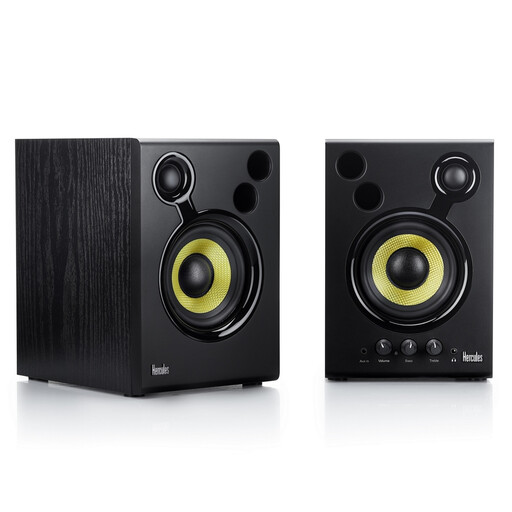
This Joybuy selection is an active set of two monitors for a stereo setup at a workstation with two screens.
 No image available
Hercules DJMonitor 42 Active Monitor, Black
The set includes two active monitors, so you can set up a stereo pair.
The product description lists 4-inch woofers, bass and treble controls, RCA and 3.5 mm connections, and a frequency range of 60–20,000 Hz.
According to the product description, leave at least 10 cm of space behind the bass ports. Do not place the speakers in a damp environment or close to water.
Joybuy
Frequently asked questions
Do the monitors need to sit right next to the screens?
No. A symmetrical stereo setup with a clear path for the sound, positioned relative to where you listen, matters more than the edge of the screen. For stereo, Genelec recommends a 60° angle between the monitors, directed towards the listening position; Kali Audio recommends avoiding objects between the speaker and listener. Measure up to see whether this is possible with both screens.
How do you set up a subwoofer for assessing bass?
Adjust its placement and integration with your main monitors, including the crossover frequency, level and phase. Genelec explains that placing a subwoofer against a wall or in a corner can increase its output, but this does not automatically produce the flattest response. Genelec’s stated standard crossover frequency of 85 Hz applies to Genelec systems and not automatically to other brands.
Do you need two monitors and an audio interface?
For stereo, you need two speaker channels. Whether you need an audio interface depends on the outputs of your existing equipment and the inputs on the monitors. Also check whether the offer includes one monitor or a pair. For example, Yamaha lists XLR and TRS inputs for the HS series and sells the HS5 individually.
What warranty and cancellation rights apply when buying online in the Netherlands?
When you buy as a consumer from a business, you are entitled to a legal guarantee if a product does not meet the expectations you can reasonably have of it. According to the Dutch government, the Netherlands has no fixed statutory guarantee period; what you can reasonably expect depends partly on the product. For applicable distance purchases, you generally have a 14-day cooling-off period; check the terms and any exceptions.
What safety rules apply to active monitors that plug into the mains?
CE marking is compulsory for electrical products covered by the relevant EU rules. The Netherlands Food and Consumer Product Safety Authority states that low-voltage rules apply to electrical equipment with a rated AC voltage of 50 V to 1000 V; other product safety rules may apply to equipment outside the scope of that directive. CE marking is a declaration of conformity by the manufacturer, not an independent listening test.


