If you record your spoken intro with a microphone switched on, or work in a shared space, start with wired, closed-back headphones. RTINGS.com recommends closed-back models to reduce the chance of sound leaking into the microphone. If you only edit afterwards in a quiet room, an open-back model may also be worth considering. In either case, fit, cable routing and connection type are key. Having two screens doesn’t, in itself, mean you need special headphones.
Who is this choice relevant to?
Voiceover artist who also edits
You record and edit intros at the same workstation. If you want to stop playback from reaching the microphone, consider a well-fitting pair of closed-back headphones and wired monitoring. RTINGS.com and De Podcast Specialist discuss this trade-off.
Editor in a shared space
You listen back to speech repeatedly and weigh up background noise, fit and comfort. A closed-back design may be worth considering, but fit varies from person to person.
Editor with a fixed dual-screen setup
You want the cable and plug to reach the audio output without getting in the way on your desk. Check the connection on your computer or audio interface, and look at the cable design of the specific model.
What should you look for when choosing?
Wired and closed-back
Suitable when: you record or edit with a microphone in the same room, or background noise distracts you.
Bear in mind: how much sound is blocked also depends on the fit. Compare the cable type, length and connection too.
Wired and open-back
Suitable when: you only edit afterwards in a quiet room and sound leakage isn’t a problem.
Bear in mind: an open-back design lets sound out and background noise in. De Podcast Specialist describes the listening experience as more spacious.
Bluetooth as an additional option
Suitable when: you want to listen back or mix wirelessly without live monitoring.
Bear in mind: Bluetooth can add latency during live monitoring. Apple gives this advice for Logic Pro; it doesn’t apply to every pair of headphones or use case.
| What to consider |
What should you check? |
Who is this important for? |
| Isolation when recording speech |
Check whether the design is closed-back and whether the ear cups fit snugly. |
If you record alongside an active microphone or want to reduce background noise, it’s important to avoid playback leaking into the recording unnecessarily. Around 33% of consumers say isolation is their top priority. |
| Comfort |
Check the pressure from the headband and ear cushions, and whether suitable replacement cushions are available. |
If you listen back repeatedly, you’ll want headphones that feel comfortable throughout your work sessions. Around 27% of consumers put comfort first. |
| Connection and cable routing |
Check the audio output, plug, any adapter you may need and the cable length for your desk. |
If you need to route the cable around two screens and to a fixed audio output, make sure it’s long enough without running across your workspace. Connection type is the main concern for around 20% of consumers. |
| Maintenance |
Check the full model number to see whether the cable and ear pads are replaceable, and whether suitable parts are available. |
If you mainly want to know which parts you can replace later, check the exact version and availability of spare parts in advance. Maintenance is the main concern for around 20% of consumers. |
Common pitfalls
-
Choosing an open-back model when recording beside an active microphone
An open-back design can let playback sound escape. RTINGS.com recommends a closed-back design to reduce the chance of the microphone picking it up.
First, decide whether you’ll be recording and monitoring at the same time. Then compare open-back and closed-back models.
If sound leakage makes it into the recording, correcting it could take extra editing time.
-
Assuming all DT 770 PRO versions have the same connection requirements
beyerdynamic distinguishes between the 32, 80 and 250 ohm versions according to their intended use; the 250 ohm version is intended for more powerful stationary sources.
Compare the full variant name with the headphone output you use, and check that the source is suitable for the version you choose.
-
Assuming a long cable will automatically be handy at a dual-screen desk
Sony lists a 3 m cable for the MDR-7506; other models have different cable designs. A long cable may need more careful management.
Measure the route to your audio output and check whether the cable on your chosen model is detachable.
A cable running across your workspace can get in the way, so take both screens into account when planning the route.
Brands to compare
Sennheiser
The HD 280 PRO and HD 480 PRO are closed-back models worth comparing for monitoring and voice editing.
- Sennheiser lists replaceable ear cushions and a coiled cable for the HD 280 PRO. The HD 480 PRO has a detachable cable that can be connected on either the left or right side.
- These features don’t prove that either model will be more comfortable for everyone. Check the fit and whether the cable can be routed as you need.
beyerdynamic
The closed-back DT 770 PRO is an option to consider if you work alongside a microphone.
- beyerdynamic lists replaceable ear cushions for the DT 770 PRO 80 ohm and distinguishes between the 32, 80 and 250 ohm versions according to their intended use.
- beyerdynamic recommends the 250 ohm version for more powerful stationary sources. So don’t treat the different versions as having identical connection requirements.
Audio-Technica
The ATH-M50x is worth comparing if you’re looking for wired studio headphones with a detachable cable.
- Audio-Technica lists a detachable cable and passive isolation for this model.
- These product features don’t tell you whether the sound or fit will suit your voice editing. Consider how they work for your own needs.
Sony
The MDR-7506 is a studio-focused option to compare if you’re considering headphones with a fixed cable.
- Sony Netherlands lists a 3 m cable and a weight of 230 g for the MDR-7506.
- Measure the cable route at your desk. The extra reach may be useful, but a long cable could also get in the way.
Joybuy products
This Joybuy selection includes headsets with wired and/or wireless connections. Check each version to make sure its connection, stereo configuration and performance for live monitoring suit your editing setup.
 No image available
Sennheiser MOMENTUM 4 Wireless, black
The supplied 3.5 mm audio cable may be useful if you want to listen back using a wired connection. Check that it’s compatible with your audio output.
The product description states that the headphones can be used passively without a battery and have active noise cancellation.
View at Joybuy
 No image available
Jabra Evolve2 75, USB-A MS Teams, black
This version is designed for use at a computer workstation. Before live monitoring, check that the connection method you choose works with your audio setup.
The product description mentions Bluetooth, connection to two devices, active noise cancellation and eight microphones.
View at Joybuy
 No image available
Jabra Evolve2 65, USB-A, black, mono
This version may suit you if you want to use the USB-A Bluetooth adapter mentioned. Check whether mono is right for the way you want to listen back to stereo speech.
The title identifies this model as mono. The product description mentions Bluetooth 5.0, a detachable cable and memory foam ear cushions.
View at Joybuy
 No image available
Jabra Evolve 30 II MS Stereo
The wired 3.5 mm connection may be useful for a fixed workstation. Check that it’s compatible with your audio output and measure the cable route.
The product description lists stereo sound, a USB controller and a 0.95 m cable. Bear this cable length in mind when measuring the distance to your connection.
View at Joybuy
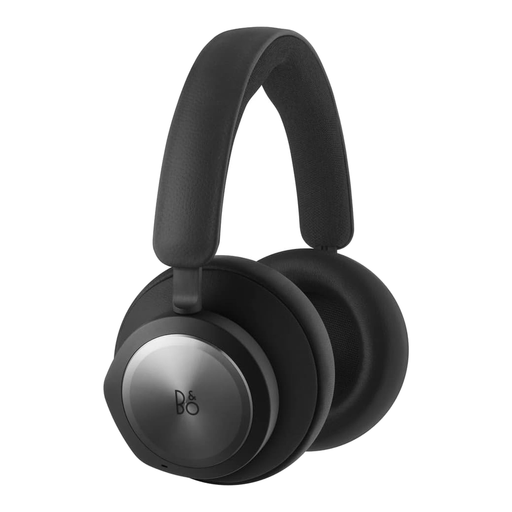 No image available
Bang & Olufsen Beocom Portal UC OE, black anthracite
The listed 3.5 mm connection may suit wired listening. Check that it’s compatible with your computer or audio interface.
The product description also mentions Bluetooth, active noise cancellation and memory foam ear cushions.
View at Joybuy
Frequently asked questions
Do you need special headphones for a dual-screen setup?
No. Your screens don’t determine which headphones or plug you need. Choose based on the audio output you actually use, and check that the cable route works at your desk.
Can you use Bluetooth headphones while recording?
Bluetooth may be an option for listening back without live monitoring, but Bluetooth audio can add latency during live monitoring. Apple mentions this for Logic Pro and recommends using Bluetooth there only for mixing or listening.
How can you keep your headphones usable as they wear?
Before buying, check whether parts for the exact model can be replaced. Sennheiser lists replaceable ear cushions for the HD 280 PRO, while Audio-Technica lists a detachable cable for the ATH-M50x. Check separately whether suitable replacement parts are available.
What rights do you have when buying online in the Netherlands?
For an eligible online purchase from a business, you generally have a 14-day cooling-off period, according to the Dutch government. You’re also entitled to a product that is fit for purpose. The Dutch government states that there is no fixed statutory guarantee period in the Netherlands and that you can contact the seller if something is faulty.
Is there a legal sound limit for your headphones while editing?
Dutch workplace regulations don’t set a fixed volume level for every editor or pair of headphones. Arboportaal states that an employer must provide hearing protection when exposure exceeds a daily dose of 80 dB(A). This applies to workplace noise exposure, not to one universal headphone setting.


