If a colleague is sitting next to you while you mix, wired, closed-back studio headphones are a sensible starting point. But closed-back doesn’t automatically mean no sound will leak out. RTINGS found that the beyerdynamic DT 770 PRO leaked too much sound at higher volumes for a quiet office. An open-back model could work for a separate listening session when you’re assessing the mix’s sense of space, provided the sound won’t disturb anyone else.
Who is this relevant to?
Mixing next to a colleague
You’re mixing at a shared desk and want your monitoring sound to disturb the person next to you as little as possible. Closed-back headphones are a starting point, but you should still check how much sound any closed-back model leaks. RTINGS reported sound leakage from the DT 770 PRO in a quiet office environment.
Mixing in a separate listening session
You can assess part of the mix elsewhere or without a colleague beside you, and want to focus on stereo placement and spaciousness. Open-back headphones are most practical when sound leakage won’t cause a nuisance; Sennheiser positions the HD 490 PRO as open-back studio headphones.
Spending long hours at your desk
You spend a long time working on the same demo or move between workspaces, so fit, storage and replaceable parts may all matter. Audio-Technica lists a foldable design and detachable cables for the ATH-M40x; Sennheiser specifies replaceable ear pads for the HD 280 PRO.
What should you look for when choosing?
Start by asking whether you need to consider a colleague while you’re mixing. Then think about how you want to listen to the mix and what will work for longer sessions.
| What to consider |
What should you check? |
Who is this most relevant to? |
| Sound reaching the person next to you |
Check the design and, at a safe, normal listening volume, assess whether a colleague can hear your mix. Don’t assume there’ll be no sound leakage just because a model is closed-back. |
When I’m working at a shared desk, I want to avoid disturbing my colleague with my monitoring sound. Around 36% of consumers put limiting disturbance to their neighbour first. |
| Balance and stereo imaging |
Consider whether you can listen separately if you’re thinking about open-back headphones. Don’t treat claims about accuracy as independent measurements. |
When I want to assess the balance and stereo placement of a jazz demo critically, I also need to consider sound leaking out. Around 29% of consumers prioritise assessing the mix. |
| Comfort and use at your workstation |
If possible, try the headphones with your glasses on and wear them for a reasonable length of time. Also check how the cable sits and whether parts can be replaced. |
For longer sessions, I want headphones that feel comfortable and are easy to put away. For around 21% of consumers, comfort and use at their workstation matter most. |
| Connection and parts |
Compare the connection on your audio interface with the plug and any adapter supplied with the exact model. Check whether the cable and ear pads can be replaced. |
If I want to connect my headphones to my own interface and replace parts when needed, I check each model individually. Around 14% of consumers put connection and maintenance ahead of other considerations. |
Common pitfalls
-
Assuming closed-back means quiet for your neighbour
RTINGS found that the closed-back beyerdynamic DT 770 PRO leaked too much sound for a quiet office environment. This finding applies to that model and isn’t a measurement of every closed-back pair of headphones.
Assess how much sound is audible at your normal, safe listening volume, rather than relying on the word ‘closed-back’ alone.
-
Choosing open-back headphones without considering the shared space
RTINGS describes significant leakage and little isolation with the open-back beyerdynamic DT 990 PRO. This information is specific to that model, but it highlights why open-back headphones need careful consideration at a shared desk.
Use open-back headphones for critical listening sessions when you can listen separately or when sound won’t be a problem for others.
-
Assuming a model variant or adapter based on the product family
Bax Music’s product listings include DT 770 PRO variants rated at 80 Ω and 250 Ω. Check the full model name, connection and what’s included before using the headphones with your interface.
You may need a suitable adapter, depending on the connection; if the cable wears out, a replacement may also be worth considering.
Brands to consider
beyerdynamic
The closed-back DT 770 PRO and open-back DT 900 PRO X represent different designs for monitoring and assessing a mix.
- beyerdynamic describes the DT 770 PRO as closed-back, with replaceable parts.
- RTINGS reported audible leakage from the DT 770 PRO at higher volumes in a quiet office environment. This assessment applies to this model and isn’t a general statement about the range.
Audio-Technica
The closed-back ATH-M40x could suit you if you’re looking for a foldable model with a detachable cable for use at a shared desk.
- Audio-Technica lists two detachable cables included with the ATH-M40x, along with its closed-back design.
- The description of a flat response comes from the manufacturer and isn’t independent confirmation of mix accuracy or low sound leakage.
Sony
The closed-back, foldable MDR-7506 is a compact wired monitoring option.
- Sony lists a carrying case and an adapter for 3.5 mm and 6.3 mm connections with the MDR-7506.
- Sony’s description of neutral monitoring is a manufacturer claim. Check for yourself whether the sound and cable suit your work.
Sennheiser
The closed-back HD 280 PRO is an option for monitoring at a shared desk; the open-back HD 490 PRO is better suited to listening sessions where leakage isn’t a concern.
- Sennheiser lists a foldable design and replaceable ear pads for the HD 280 PRO. For the HD 490 PRO, the brand specifies an open-back design and interchangeable pad sets.
- Claims about accuracy and comfort are the manufacturer’s descriptions. Open-back headphones aren’t necessarily suitable right next to a colleague.
AKG
The closed-back, foldable K371 could be worth considering if compact storage and a detachable cable are important to you.
- AKG specifies a closed-back over-ear design, a detachable cable and a nominal impedance of 32 Ω for the K371.
- AKG’s statements about isolation and neutral sound are manufacturer claims. The K371’s specifications don’t automatically apply to other AKG models.
Headphones at Joybuy
This Joybuy selection includes headphones with features relating to wired audio, comfort or use in a shared workspace. Check whether each model’s connection and sound suit your mixing set-up.
 No image available
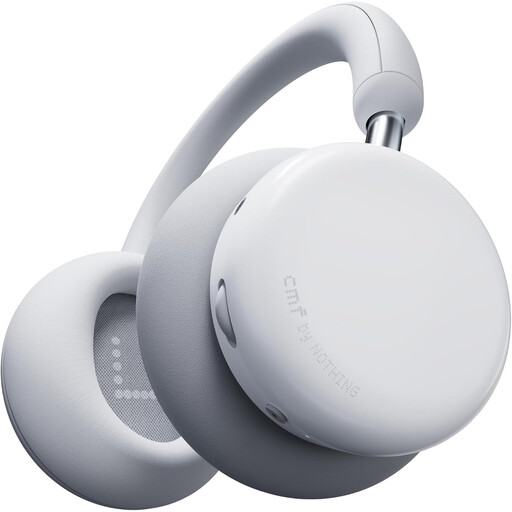
CMF by Nothing Headphone Pro Light Grey
The listed wired audio option may be useful if you also want to use a cable connection; check the sound with your own mix material.
The product description mentions LDAC, 40 mm drivers and adjustable bass and treble sliders.
View at Joybuy
 No image available
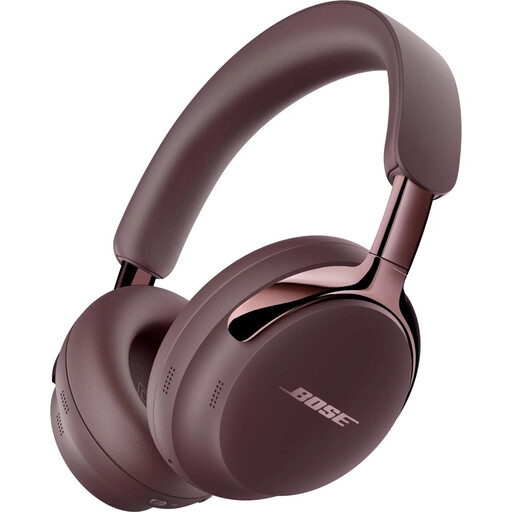
Bose QuietComfort Ultra Headphones (2nd Gen) Cherry Chocolate
The detachable cable may be useful if you need a wired connection; check beforehand that it’s compatible with your audio interface.
The description lists USB-C and 3.5 mm connections, active noise cancellation and a foldable design. The model is supplied without a charger and, according to the description, doesn’t support PD fast charging.
View at Joybuy
 No image available
Sonos ACE Over-Ear Bluetooth Headset Black
The listed closed-back over-ear design and wired audio options are worth checking if you want to use headphones next to a colleague.
The product information lists USB-C and 3.5 mm cables in the box, soft memory foam ear pads and an adjustable headband.
View at Joybuy
 No image available
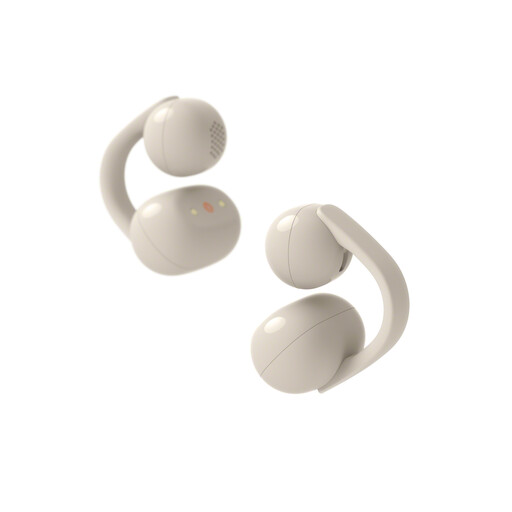
Sony WFLC900C.CE7
The open-ear design lets in ambient sound; bear this in mind if you’re assessing a mix in a shared space.
The description mentions stereo sound, a 10-band EQ and a privacy mode that helps limit sound leakage. Check whether these features suit the way you plan to use them.
View at Joybuy
 No image available
Bose QuietComfort SC Headphones Black
The product description mentions soft ear pads and a headband for longer listening sessions; also check that the connections suit your set-up.
The description lists noise cancellation and Quiet and Aware modes.
View at Joybuy
Frequently asked questions
Can I use closed-back headphones next to a colleague without giving it a second thought?
No. A closed-back design doesn’t guarantee that your colleague won’t hear anything. RTINGS found that the beyerdynamic DT 770 PRO leaked too much sound for a quiet office environment, particularly at higher volumes. Adjust your listening volume and workspace based on how much sound is actually audible.
Which connection should I check before use?
Compare the output on your audio interface with the plug on the exact headphone model. For example, Sony lists an adapter for 3.5 mm and 6.3 mm connections with the MDR-7506; don’t assume another model comes with the same accessories.
How can I keep my headphones in good working order with frequent use?
Check which parts can be replaced for each model. Audio-Technica lists detachable cables for the ATH-M40x, while Sennheiser lists replaceable ear pads for the HD 280 PRO. These model specifications don’t tell you whether parts will be available in future.
How can I stop myself turning the volume up while mixing?
Keep the volume low and take breaks, particularly if background noise is tempting you to listen louder. The World Health Organization links safe listening to both volume and duration: as an example, it gives an average of 80 dB for up to 40 hours per week and 90 dB for four hours per week. This doesn’t mean that a particular volume setting on your equipment is safe.
What are my rights in the Netherlands if I buy online and the fit isn’t right or the product is faulty?
For online consumer purchases, you generally have a statutory cooling-off period of up to 14 days after delivery. Check the applicable exceptions and conditions for trying out and returning the product. Faulty products are also covered by the statutory guarantee. The Dutch government says there is no fixed, general statutory guarantee period in the Netherlands and that the seller must offer an appropriate solution. The cooling-off period and guarantee are separate rights.


