What should you look for?
At a shared desk, consider isolation and fit first, then assess the sound and practical connections. Audio-Technica describes reduced sound leakage as a potential benefit of a closed-back design, but the seal also depends on how the ear pads fit around your ears.
| What to consider |
What to look for |
Who it matters most to |
| Isolation and sound leakage |
Compare closed-back earcups and check that the pads fit around your ears. Listen to a quiet, familiar passage without turning up the volume. |
When I’m working alongside colleagues, I want to hear subtle details without my playback disturbing them. Around 36% of consumers give isolation and sound leakage top priority. |
| Percussion detail |
At the same comfortable volume, listen to transients, quiet taps and bass in a familiar passage; compare the exact models. |
When editing, I want to assess timing and quiet passages without having to listen at a higher volume. Around 29% of consumers prioritise being able to assess percussion detail. |
| Fit for long sessions |
If possible, try the headphones during a representative listening session. Check whether suitable replacement pads are available for the exact version. |
When I’m editing for long periods, I want to know whether the fit will stay comfortable and whether worn parts can be replaced. Around 21% of consumers say fit and comfort are their main consideration. |
| Connection, cable and maintenance |
Check the output on your computer or audio interface, the plug or adapter, cable routing, and the exact model or impedance variant. |
For my workspace, I want to know in advance whether the connection will work and how to replace a worn cable. Around 14% of consumers prioritise connections and maintenance. |
Joybuy products
This Joybuy selection includes over-ear headphones and a gaming headset whose product information mentions noise cancelling or a wired listening option. For editing percussion, also check the fit, the sound of the exact model and how it connects to your own equipment.
 No image available
Sennheiser MOMENTUM 4 Wireless
May be worth considering if you want to listen over a wired connection at a shared desk; noise cancelling alone doesn’t prove that subtle percussion details will be reproduced accurately.
The product information lists a 3.5 mm audio cable included, an app with EQ and noise cancelling.
View at Joybuy
 No image available
Bose QuietComfort Ultra
Could be interesting if you want to compare noise cancelling for a shared desk; also check the sound of the exact model for your percussion work.
The product information lists Bluetooth, an audio cable for listening without battery power, a closed-back design and active noise cancelling.
Leather ear pads and minimal clamping force are also mentioned; check whether you find the fit comfortable.
View at Joybuy
 No image available
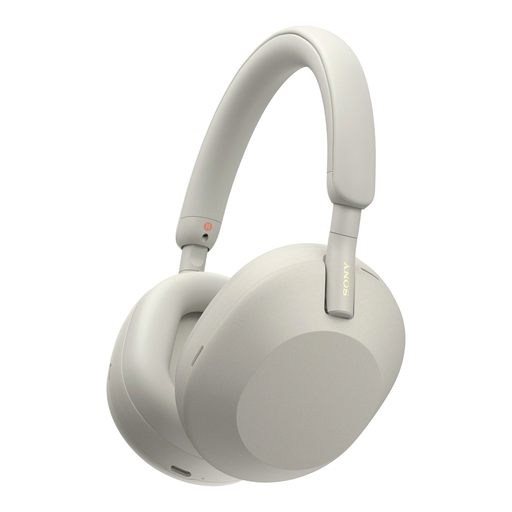
Sony WH-1000XM5, silver
May suit you if you want to compare noise cancelling and wireless listening; wireless features alone say nothing about how suitable the headphones are for studio monitoring.
The product information lists LDAC audio and battery life of up to 30 hours with noise cancelling switched on.
View at Joybuy
 No image available
Razer BlackShark V2 X 7.1
May be worth considering if you’re comparing a wired headset with a 3.5 mm connection, but the product name identifies this model as a gaming headset, not studio headphones.
The product information lists passive noise cancelling, memory foam ear cushions and a weight of 240 g.
View at Joybuy
 No image available
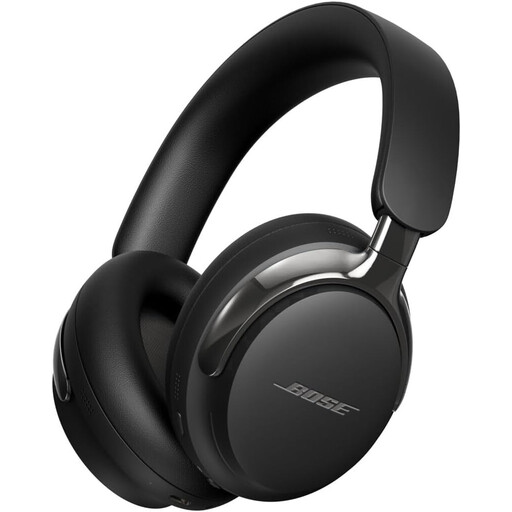
Bose QuietComfort Ultra (2nd Gen), black
Could be an option if you want to compare noise cancelling with wired listening; also check how the sound works with your percussion tracks.
The product information lists Bluetooth 5.4, active noise cancelling and a detachable cable with a 3.5 mm connection.
The description mentions a design intended for all-day comfort; fit is still a matter of personal preference.
View at Joybuy
Frequently asked questions
For editing percussion in a shared office, should you choose open-back or closed-back headphones?
Start with a closed-back model if colleagues are nearby: a closed-back design can help reduce ambient noise and sound leakage. Open-back headphones are more suitable for a quiet space where sound leakage is acceptable; with either type, check the fit and sound of the exact model.
What should you check before connecting your headphones at work?
Compare the output on your computer or audio interface with the plug and any adapter for the exact version. For example, don’t confuse the 32-, 80- and 250-ohm versions of the DT 770 PRO when comparing specifications.
Should you turn up the volume to hear subtle percussion details over office noise?
Not as a standard solution. First compare the fit and isolation, and consider finding a quieter place to listen. The World Health Organization recommends taking into account sound level, listening duration and how often you’re exposed to loud noise; the volume setting on your device doesn’t directly measure the level at your ear.
What can you do if the ear pads wear out or a product is faulty?
Check the exact model and version when looking for spare parts; for example, Sennheiser lists an ear pad set for the HD 280 PRO version from 2016 onwards. If a product is faulty, the seller must provide a solution under guidance from the Government of the Netherlands. There’s no fixed statutory warranty period in the Netherlands that applies to all products.
Do studio headphones automatically provide adequate hearing protection at work?
No. The Dutch Arboportaal guidance links employers’ obligations to daily exposure to workplace noise: above 80 dB(A), the employer must provide hearing protectors, and above 85 dB(A), employees must wear them. Without an assessment of actual exposure, you can’t treat studio headphones as a replacement for required hearing protection.


