
Detail-focused listener in a quiet room
You focus on timing, subtle background noises and stereo positioning, and can let sound leak out without disturbing anyone.


If you work in a quiet room and mainly assess stereo positioning and subtle details, start with open-back headphones. If you share your workspace or record with a microphone, a closed-back model is a more sensible choice. Then check the fit, connection to your computer or audio interface, and selected audio output: having two screens doesn’t automatically determine where the sound comes from.
You focus on timing, subtle background noises and stereo positioning, and can let sound leak out without disturbing anyone.
You want to hear less background noise or prevent playback from reaching a microphone.
You spend long hours at your screens and take fit, replaceable parts and connections to your audio source into account.
Choose this when: you’re assessing detail and spatial positioning in a quiet room.
Bear in mind: sound escapes more easily, and background noise gets in more easily.
Choose this when: background noise disrupts your work, you share your space or you use a microphone.
Bear in mind: a closed-back design doesn’t guarantee that the sound or fit will suit you.
Consider this when: you want to compare an alternative to fully open-back or closed-back headphones in a quiet workspace.
Bear in mind: don’t assume a semi-open model provides as much isolation as a closed-back one.
| What to consider | What should you check? | Who is this important for? |
|---|---|---|
| Detail and stereo positioning | Compare open-back and closed-back models using the same familiar sound effects and your usual audio source. | If you mainly assess subtle details and positioning in a quiet room, prioritise that listening task; around 36% of consumers say checking detail is their main buying concern. |
| Isolation and sound leakage | Consider background noise, a shared workspace and whether you’ll be using a microphone. | If you work alongside others or record with a microphone, you’ll want to hear less background noise or limit sound leakage; around 29% of consumers give isolation top priority. |
| Fit and maintenance | Check for pressure around your ears and headband, and see whether suitable replacement ear pads are available. | For long editing sessions, you’ll want comfortable headphones that are easy to maintain; around 21% of consumers prioritise comfort and maintenance. |
| Connection and audio output | Check the required plug, cable length and output settings on both your system and editing app. | If your workspace has multiple audio outputs or uses an audio interface, you’ll want a suitable connection and the correct output selected; around 14% of consumers say workspace compatibility is their main concern. |
In that situation, sound leakage may matter more than the spacious listening experience you’re looking for.
First consider how quiet and private your listening space is, and compare a closed-back model if needed.
According to beyerdynamic, the DT 770 PRO comes in 32, 80 and 250 ohm versions, which the manufacturer recommends for different uses. The DT 770 PRO X is a different model, too.
Before buying, check the full model name, impedance and audio source you’ll be using.
In Windows, the system and individual apps can use different audio outputs.
Check the cable, system output, app output and volume mixer before assessing the headphones.
Cable accessories vary by model and need to match the audio output on your computer or interface.
Before buying, compare the connections and cable specifications of both devices.
The open-back HD 400 PRO and closed-back HD 280 PRO offer different trade-offs for listening in a quiet or shared space.
The closed-back DT 770 PRO is available in different impedance versions; choose one to suit your audio source.
The closed-back ATH-M50x is worth comparing if a foldable design and multiple cables matter to you.
The closed-back, foldable MDR-7506 is a model to compare for a fixed or mobile workspace.
The closed-back K371 and semi-open K240 Studio offer different design options to compare within the brand.
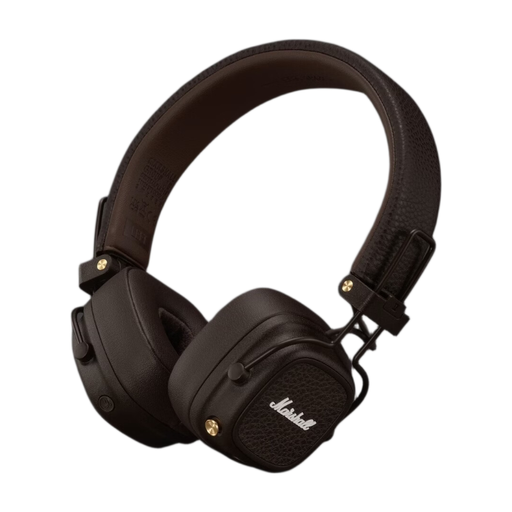
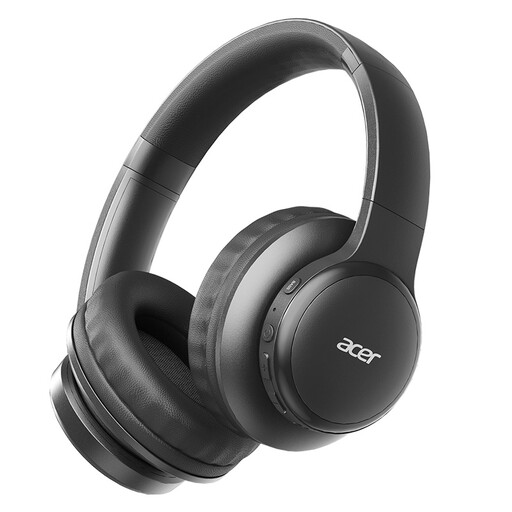
These Joybuy products are general-purpose headphones with the listed wired or wireless features; the product information doesn’t establish that they’re studio headphones for critical monitoring.
 No image available
The product information lists a 3.5 mm cable for wired listening; check that the connection matches your audio output.
The description lists a 42 mm transducer system, EQ settings and up to 60 hours of wireless playback.
 No image available
The description lists both Bluetooth and a 3.5 mm audio cable; check which connection you want to use with your workspace.
Listed specifications include Bluetooth 5.3, multipoint and over 100 hours of wireless playback.
 No image available
The product information describes this model as wireless; its listed Bluetooth features don’t prove that it’s suitable for studio monitoring sessions.
The title lists Bluetooth 5.3 and a foldable design. The description also mentions a low-latency mode.
 No image available
The description lists an audio cable for wired listening; check that the connection matches your computer or audio interface.
Listed features include a closed-back design and active noise cancellation. That doesn’t make it a proven studio reference for assessing sound.
 No image available
The description lists USB-C and 3.5 mm cables; check which connection suits the audio source you use.
Spatial audio and lossless audio playback are also listed. These product features alone don’t show that the model is suitable for critically assessing sound effects.
No, having two screens doesn’t in itself mean you need a special headphone model. In Windows, the system and an app can each use their own audio output, so check both settings and the physical connection on your computer or audio interface. These Windows instructions don’t necessarily apply to other operating systems.
Keep the volume low, take regular breaks and be mindful of how long you listen for. The World Health Organization gives an average of 80 dB for up to 40 hours a week as an example of safe listening; this isn’t a measurement of the sound levels produced by the headphones mentioned here.
Check the exact model and look for replacement parts designed for that version. Sennheiser lists replaceable ear pads for the HD 400 PRO, and beyerdynamic does the same for the DT 770 PRO; parts from another model won’t necessarily fit.
When you buy as a consumer, you’re entitled to a product that is fit for purpose, but there’s no fixed statutory warranty period in the Netherlands. Online purchases from a business generally come with a 14-day cooling-off period, with some exceptions; the Dutch government explains both rules. These consumer rules don’t necessarily apply to business purchases.