
Streamer using an open microphone
You want to hear your stream without unnecessary sound leaking into the microphone. So, compare closed-back models first: RTINGS says they’re better suited to monitoring where microphone bleed matters.


If you monitor a livestream with an open microphone in the same room, start with closed-back, wired headphones. According to RTINGS, they generally reduce sound leakage into the microphone compared with an open-back model. Then check the fit, cable length and which side the cable connects to, as well as whether your PC or audio interface can drive your chosen version. Closed-back headphones won’t eliminate leakage entirely.
You want to hear your stream without unnecessary sound leaking into the microphone. So, compare closed-back models first: RTINGS says they’re better suited to monitoring where microphone bleed matters.
You need a cable that won’t get in the way between your microphone arm, keyboard and audio interface. Check the cable length and which side it connects to for each model; RØDE and Sennheiser list models with connections on either side.
You wear your headphones for extended periods and want to consider the fit and replaceable wear parts. Beyerdynamic lists replaceable earpads for the DT 770 PRO, but fit and comfort are still personal.
| What to consider | What to look for | Who is this important for? |
|---|---|---|
| Sound leaking into the microphone | Check whether the model is closed-back, then test with your own microphone to see if the monitoring volume is picked up in a recording. | If I’m speaking live with an open microphone, I want as little sound as possible from my headphones to be picked up. Around 31% of consumers prioritise reducing sound leakage. |
| Comfort during long sessions | If possible, wear the headphones for a while; also check whether the earpads are replaceable. | If I stream for a long time, I want the headband and earpads to remain comfortable, even when I’m wearing glasses. Around 25% of consumers give long-term wearing comfort top priority. |
| Cable and desk space | Measure the route to the audio output and check the cable length, which side it connects to and whether shorter compatible cables are available. | If I have limited desk space, I want to avoid a long cable running across my worktop or getting in the way. Around 25% of consumers focus mainly on cable space and storage. |
| Connection and power requirements | Check the connection and impedance version against the output on your PC, mixer or audio interface. | If I want to use the headphones with my existing equipment, I want to know in advance whether the connection and version I’ve chosen are compatible. Around 19% of consumers put connection and power requirements first. |
Open-back headphones leak sound and block out less background noise. The fact that they can be an option for mixing separately doesn’t automatically make them suitable for live monitoring with an open microphone.
For live streaming, compare closed-back models first. Consider an open-back model separately for playback or mixing when microphone bleed isn’t an issue.
The DT 770 PRO is available in 32, 80 and 250 ohm versions. Beyerdynamic associates these versions with different audio sources and uses.
Check the exact version and compare it with the output on your PC, mixer or audio interface before ordering.
For the classic DT 770 PRO, beyerdynamic recommends having cable work carried out by a qualified technician. A compatible 1.2 m cable for the RØDE NTH-100 is available separately; the supplied cable is 2.4 m.
Before buying, check which cable comes with the exact version and how it connects to the earcup.
The closed-back NTH-100 is a wired monitoring headphone that RØDE also positions for streaming.
The closed-back ATH-M50x is foldable and comes with several detachable cables.
The closed-back DT 770 PRO comes in 32, 80 and 250 ohm versions, so you’ll need to check which audio source you’re using.
The closed-back, foldable K371 is worth comparing if you’re looking for a portable studio model.
The closed-back HD 480 PRO and foldable HD 280 PRO differ in areas including their cable design and storage.
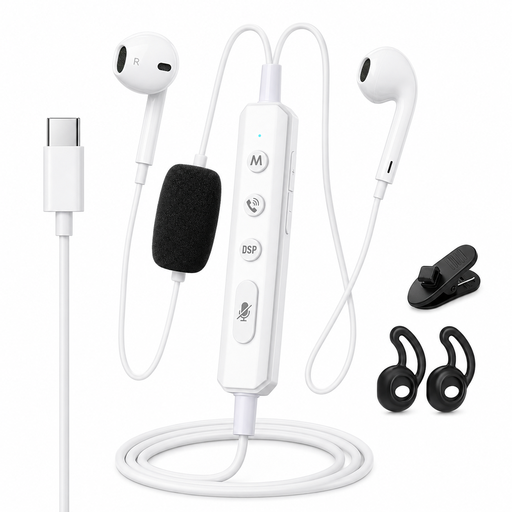
This Joybuy pick is a wired option for monitoring livestreams. Please note: the VoxorAI KM08 is a half in-ear model, not a studio over-ear headphone.
 No image available
Could suit a compact setup if you’re looking for a wired option for livestream monitoring, but its half in-ear design differs from studio over-ear headphones.
Type-C connection; 1.2 m cable; built-in sound card for real-time monitoring, according to the product description.
Start with closed-back headphones and don’t set the listening volume unnecessarily high. Make a test recording with your microphone in its usual position: closed-back headphones generally reduce leakage, but they can’t stop the microphone from picking up sound altogether.
No, not if you already use a separate microphone for streaming. Do check which monitoring output your PC, mixer or audio interface has, though. According to RØDE, the standard NTH-100 cable is a TRS cable and isn’t intended to be used as a microphone cable for the NTH-100M.
It varies by model. Beyerdynamic lists replaceable earpads for the DT 770 PRO and recommends having cable work on the classic DT 770 PRO carried out by a qualified technician. RØDE sells a compatible 1.2 m NTH-100 cable separately.
It depends on the output you’ll connect the headphones to. The DT 770 PRO is available in 32, 80 and 250 ohm versions; beyerdynamic says the 32-ohm version is suitable for sources including computer sound cards and audio interfaces. Check your equipment’s specifications and the exact version.
If you have an open microphone in the same room, a closed-back model is generally the more sensible first choice to compare, as open-back headphones leak sound. You could consider an open-back model separately for mixing or playback when microphone bleed isn’t an issue.