
Streamers monitoring their own voice
You want to hear yourself speaking without distracting delay. So assess the whole path from microphone to headphones, not just the headphones themselves.


For live monitoring, wired, closed-back studio headphones are a sensible starting point. A closed-back design can help limit sound leaking into a nearby microphone, while the monitoring path determines how much delay you hear. RØDE warns that Bluetooth can introduce latency when monitoring a microphone; Focusrite describes direct monitoring through a suitable audio interface as a way to hear the input signal back with virtually no delay. Headphones won’t solve screen glare: for that, Arboportaal recommends, among other things, positioning your viewing direction parallel to the window.
You want to hear yourself speaking without distracting delay. So assess the whole path from microphone to headphones, not just the headphones themselves.
You want to hear your stream audio without unnecessary sound leaking into the microphone. A closed-back fit is a relevant starting point, but how well the ear cushions seal will vary from person to person.
Consider the fit, any pressure caused by glasses, and whether the cable and ear cushions are practical for longer streaming sessions.
Choose this when: you’re speaking live and want to limit the sound from your headphones being picked up by a nearby microphone.
The trade-off: fit plays a part in how well the earcups seal, and wired headphones won’t automatically eliminate delay elsewhere in the signal chain.
Consider this when: freedom of movement matters more than hearing your own voice straight away, or you’ve tested the delay in your setup.
The trade-off: RØDE specifically warns that Bluetooth can cause audible delay when monitoring a microphone during a livestream; this isn’t a measurement for every Bluetooth model.
Consider these when: listening or editing outside a live broadcast, when isolation and sound leakage into the microphone are less important.
The trade-off: for speaking live with a nearby microphone, a closed-back design is more relevant for limiting sound leakage.
| What to consider | What should you check? | Who is this important for? |
|---|---|---|
| Sound leakage and isolation | Check whether the model is closed-back and whether the ear cushions seal around your ears; assess comfort separately from isolation. | If my microphone is nearby, I want to stop sound from my headphones reaching it. Around 31% of consumers put limiting sound leakage first. |
| Delay when monitoring your voice | Check where your microphone signal is monitored and whether your interface supports direct monitoring. Also check which stream audio you hear through that route. | If I want to hear my own voice while speaking, I pay attention to the whole path from microphone to ears. Around 31% of consumers prioritise hearing their own voice without distracting delay. |
| Comfort during streams | If possible, try them on with your own glasses and pay attention to the ear cushions and headband. Check whether the ear cushions are replaceable if easy maintenance matters to you. | If I’m streaming for a long session, I want my headphones to feel comfortable, including when I’m wearing glasses. Around 25% of consumers prioritise long-wearing comfort. |
| Connection and cable | Compare the headphone connector with your computer or interface, check the location of the output and work out how long a cable you need. Check which cable comes with the version you’re considering. | If my headphones need to work with a specific computer or interface, I want to know in advance how the cable connects and runs. Around 13% of consumers put connection convenience and cable routing first. |
Delay can occur along the path between the microphone and headphones. Direct monitoring is a feature of a suitable setup, not of every pair of headphones.
Before buying, map out where your microphone signal is monitored and check the features offered by your current interface and software.
A model range can include different versions. For example, the manufacturer lists DT 770 PRO versions at 32, 80 and 250 ohms.
Check the full version, connection and contents of the box against the headphone output you’ll be using.
Headphones affect what you hear; distracting daylight calls for an adjustment to your workspace.
Assess lighting and audio monitoring as two separate issues. For screen-based work, Arboportaal recommends, among other things, positioning your viewing direction parallel to the window.
The wired, closed-back ATH-M50x is worth considering if you want to compare cable options and a swivelling earcup.
The closed-back DT 770 PRO is worth considering if you want to match a version to your playback device and value replaceable ear cushions.
The HD 280 PRO and HD 480 PRO are different ranges to compare for their cable and cushion features.
The MDR-7506 is a professional pair of headphones worth comparing if a long cable could be useful.
The closed-back, foldable K371 is worth considering if you want to assess its design and the included cable lengths.
This Joybuy selection includes wired headsets and headphones, a wireless model and a half-in-ear model. Check the connection and fit of each product before using it to monitor your voice live.
 No image available
The product name identifies this as a wireless over-ear pair of headphones. Test the delay in your own monitoring setup before choosing them for that purpose.
The product name lists noise cancelling, a 60-hour battery life and four microphones.
 No image available
The product name describes a wired stereo headset; check that the connection is compatible with your computer or audio interface.
The product name lists a wired connection and stereo audio.
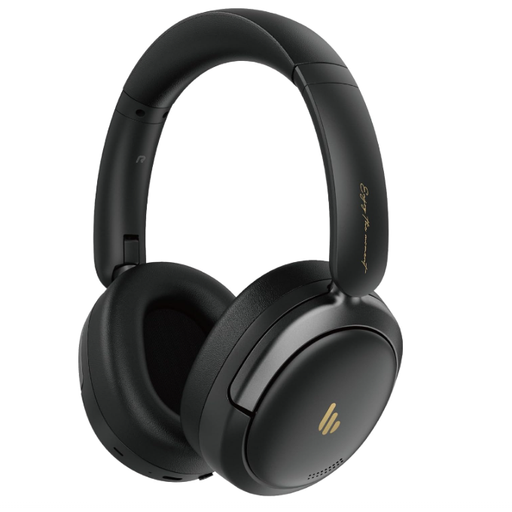 No image available
This foldable over-ear model may suit you if you’re looking for a foldable design; assess its wireless connection separately for live voice monitoring.
The product name lists Bluetooth 5.4, hybrid active noise cancelling and Hi-Res audio.
 No image available
The product name lists USB headphones with a microphone; check that the USB connection is compatible with your equipment and monitoring setup.
USB and a microphone are mentioned in the product name.
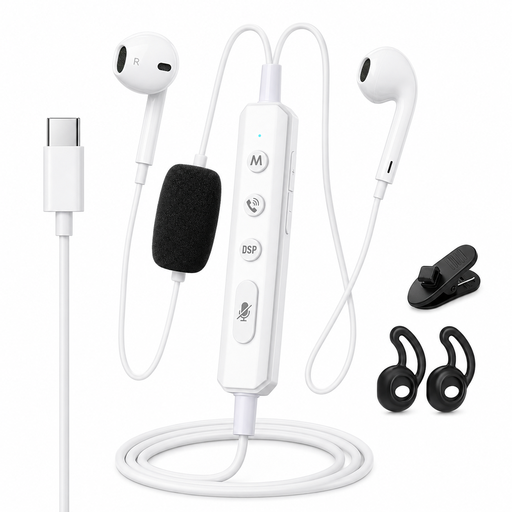 No image available
The product name describes a wired model for real-time monitoring; the product information specifies a half-in-ear design, not over-ear studio headphones.
The product name lists a Type-C connection and a sound card for real-time monitoring. Check that this connection works with your equipment.
The monitoring path can introduce delay. Focusrite describes direct monitoring through a suitable interface as a way to send the input signal straight to the headphone output. Check how your microphone, interface and streaming software are connected, and make sure you aren’t hearing the same signal twice.
No, headphones won’t change the light falling on your screen. For screen-based work, Arboportaal recommends, among other things, positioning your viewing direction parallel to the window. So assess your screen setup and audio monitoring separately.
Check whether parts are replaceable for the exact version you’re considering. beyerdynamic lists replaceable cushions for the DT 770 PRO, Sennheiser for the HD 280 PRO, and Audio-Technica lists detachable cables for the ATH-M50x.
If possible, try the headphones on with your own glasses and check how the arms sit under the ear cushions. Sennheiser mentions grooves for glasses on the HD 480 PRO, but that doesn’t necessarily mean the fit will feel comfortable for you.
Consider both the listening volume and the length and frequency of your listening sessions. The World Health Organization lists all three as factors that matter for hearing health.