
Streamer using a microphone
You want to hear your stream audio while speaking, without unnecessary sound leakage towards the microphone. A closed-back design and a compatible connection are worth considering.


If you speak into a microphone during a livestream, wired, closed-back headphones are a sensible first choice for reducing sound leakage. Just check that the connector is compatible with your computer or audio interface. If you’ll mainly be listening back to recordings, semi-open headphones may also work, provided sound leakage isn’t an issue in your setup. Changing your headphones won’t, by itself, fix latency in the monitoring signal path.
You want to hear your stream audio while speaking, without unnecessary sound leakage towards the microphone. A closed-back design and a compatible connection are worth considering.
You hear your own voice with a delay and also need to assess the audio interface’s monitoring signal path. Focusrite describes direct monitoring as a way to listen to the input signal with virtually no latency.
You want to consider fit, ear pads and replaceable parts for extended wear. Assess the fit for your own needs, even if a model seems suitable on paper.
A good fit if: you speak during livestreams and want to limit how much monitor audio your microphone can pick up.
Bear in mind: fit and connections vary between models, so check both for your setup.
A good fit if: you mainly listen or review audio afterwards, and sound leakage to your microphone or other people isn’t a problem.
Bear in mind: if you also speak while listening, test for sound leakage in your own setup.
| What to consider | What should you check? | Who is this important for? |
|---|---|---|
| Sound leakage while speaking live | Check whether the model is closed-back and test for sound leakage with your own microphone position and listening volume. | If I can hear monitor audio while speaking, I want to avoid my microphone picking it up unnecessarily. Around 36% of consumers say sound leakage is their main concern when buying. |
| Connection and voice delay | Check the output on your computer or interface, the plug or adapter you need, and whether your interface has a direct monitoring function. | If I hear my own voice with a delay, I want to know whether the cause lies in the signal path and whether the plug is compatible. Around 29% of consumers prioritise connection and monitoring. |
| Comfort during long sessions | Assess the fit, including whether you wear glasses, and check that replacement ear pads are available for the exact model variant. | For long streams, I want my headphones to stay comfortable, with parts I can replace if needed. Around 21% of consumers put comfort first. |
| Listening back and assessing sound | Decide whether you’ll mainly speak live or listen back to recordings. If possible, test familiar voice recordings and check for sound leakage. | If I want to assess recorded speech or a mix critically, that matters more than isolation while speaking live. Around 14% of consumers say listening back is their main concern when buying. |
Even in a quiet room, a microphone can pick up monitor audio if you speak while listening.
For live speech, compare closed-back models first and test a recording using your own microphone position and listening volume. Consider a semi-open model if sound leakage isn’t a concern.
beyerdynamic offers 32, 80 and 250 ohm versions. The version you choose needs to suit the headphone output on your equipment.
Before buying, check the full model variant and the output you plan to connect your headphones to.
Changing your headphones won’t necessarily fix latency in a software monitoring signal path. Focusrite says that direct monitoring through a suitable interface can send the input to your headphones with virtually no latency.
Check your interface and monitoring software settings, and make sure you can still hear the rest of your stream audio at the same time.
The closed-back, wired ATH-M40x is worth comparing if both live monitoring and listening back later matter to you.
The closed-back DT 770 PRO is an option to compare if you want to match the version to the headphone output you use.
Shure positions the closed-back SRH440A for uses including podcasting, home recording and monitoring.
Sony presents the closed-back MDR-7506 for uses including broadcasting and studio work.
The semi-open K240 Studio is an alternative to compare if, alongside livestreams, you mainly play back or mix audio afterwards.
This Joybuy selection includes headphones whose product information mentions a wired connection or USB audio. That doesn’t automatically make them suitable as studio monitors, so check the connections and features against your monitoring setup.
 No image available
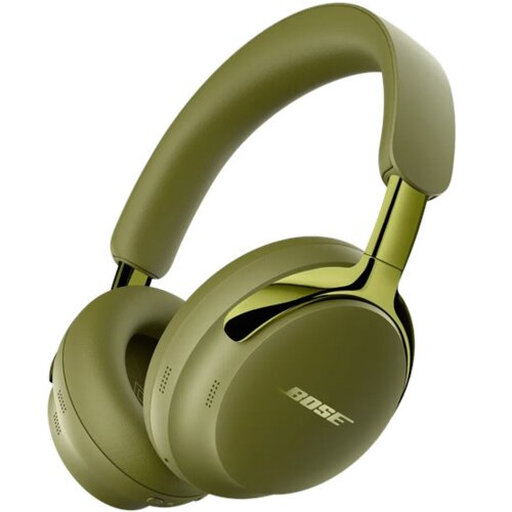
The listed 3.5mm audio cable and passive operation may be useful if you want to listen using a wired connection. Check that it’s compatible with your interface or computer.
The product information lists Bluetooth, a 3.5mm audio cable and listening without battery power in passive mode. It also mentions deep, soft ear pads and a padded headband.
 No image available
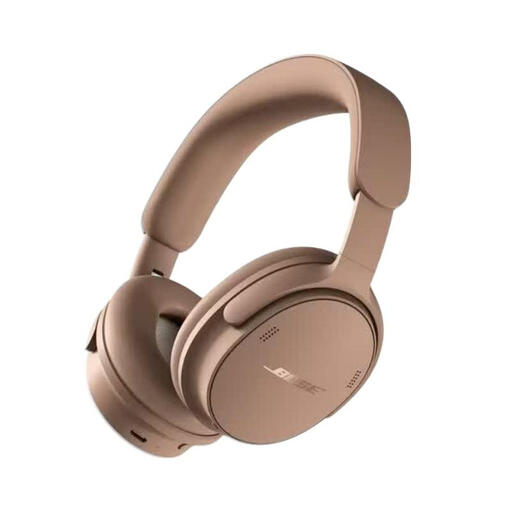
The listed wired connection options may be useful if you want to listen without Bluetooth. Check which connection works with your monitoring equipment.
The product information lists Bluetooth, a detachable cable with USB-C and 3.5mm connections, and active noise cancellation.
 No image available
The product information mentions wired audio via USB. Check whether this connection works with your computer or interface.
The headphones are also described as having Bluetooth, an adjustable headband and a lightweight design.
 No image available
The closed-back design and audio cable described may be useful if you want to listen using a wired connection. Check the connection and test for sound leakage with your own microphone.
The product information lists an over-ear design, active noise cancellation and a cable for listening when the battery runs out. Leather ear pads are also mentioned.
 No image available
The USB connection may work if your computer or interface has a suitable USB port. Check this before buying.
The product information lists USB audio, stereo sound and an adjustable microphone boom. It also mentions an adjustable, padded headband.
Not necessarily. If your audio interface supports direct monitoring, Focusrite says it can send the input signal to your headphones with virtually no latency. Check the settings and make sure you can also hear your stream audio.
First check the headphone output on your computer or interface. Audio-Technica lists a 3.5mm plug for the ATH-M40x; Shure says a 6.3mm adapter is included with the SRH440A. Also check what comes with the exact model variant.
Assess the fit before buying and check whether replacement ear pads are available for the exact model. beyerdynamic lists replaceable ear pads for the DT 770 PRO. The World Health Organization links hearing risks to both sound level and listening duration, and recommends taking regular breaks.
For many online purchases from a business, you generally have a 14-day cooling-off period, although exceptions apply. The Dutch government also states that you’re entitled to a product that works properly, and that the Netherlands has no fixed statutory two-year guarantee period. If there’s a fault, contact the seller to arrange a solution.