Who is this choice relevant to?

Streamers who want to hear their voice in real time

You want to hear your microphone signal without distracting latency or hearing it twice, and you already have a suitable headphone output. Focusrite explains that direct monitoring sends the input signal straight to the headphone output.

Streamers with a microphone close by

You want to hear speech, music and alerts without unnecessary sound from your headphones feeding back into the microphone. RTINGS describes closed-back headphones as an option that lets less sound leak into the microphone during recording than open-back models.

Streamers who move around during a broadcast

You want to be able to get up, but also need to factor in charging if you use a wireless model. Audio-Technica lists an optional audio cable and battery life of up to 50 hours for the ATH-M50xBT2. That quoted figure doesn’t tell you how long the headphones will last in your streaming setup.

What should you look for in studio headphones?

Wired and closed-back

Choose this if: you speak close to an open microphone and your existing equipment has a suitable headphone output.

Bear in mind: the cable limits how far you can move, while isolation and comfort also depend on the fit.

Wireless with a cable option

Choose this if: freedom of movement matters to you and you can test the latency of your own listening setup in advance.

Bear in mind: wireless use requires charging. A low-latency mode on a model doesn’t prove how fast the entire streaming signal path is.

Open-back studio headphones

Choose this if: you mainly assess a mix without an open microphone nearby and sound isolation is less important to you.

Bear in mind: an open-back design lets more sound escape, which is worth considering when speaking live beside a microphone.

What to consider What should you check? Who is this important for?
Monitoring and connection Check the plug and output on your equipment. Decide whether you want to hear direct monitoring, software monitoring or the final stream mix. If I want to hear my voice in real time without using an extra socket, I check that the output provides the right mix. Around 36% of consumers prioritise this monitoring route and avoiding an extra socket.
Sound around the microphone Check whether the model is closed-back and test whether the microphone picks up sound from the earcups at your listening volume. When I speak beside an open microphone, I want to avoid unnecessary headphone sound getting into my recording. Around 29% of consumers prioritise reducing sound leakage into the microphone.
Comfort and maintenance If possible, try the headphones for as long as a typical stream. Check the earpads and cable on the exact version. During long broadcasts, I want a comfortable fit that lasts and to know which parts I can maintain. Around 21% of consumers prioritise long-wearing comfort and maintenance.
Movement and charging Check the cable option and connections on the exact model. Test latency in your own stream and plan when to charge it. If I want to move around during a broadcast without an audio cable, I also need to factor in charging and test the listening route. Around 14% of consumers prioritise freedom of movement.

Common buying mistakes

  • Buying headphones to fix software latency

    Latency can occur along the route through your computer and software. If direct monitoring and software monitoring both send the same signal back, you may hear your voice twice.

    Before buying, decide which mix you want to hear and test direct and software monitoring separately.

  • Assuming all DT 770 PRO versions have the same connections

    beyerdynamic offers the DT 770 PRO in 32, 80 and 250 ohm versions, designed for different listening sources.

    Check the full version name, plug and output on your own equipment.

  • Assuming wireless headphones are automatically suitable for live monitoring

    A low-latency mode on a pair of headphones doesn’t, on its own, tell you how much latency there is across the entire route from microphone to headphones.

    Test the route with your microphone and streaming software, and check the cable option and charging plan for the exact model.

Brands to consider

Audio-Technica

The wired ATH-M40x is a closed-back monitoring model; the ATH-M50xBT2 also offers Bluetooth and an optional audio cable.

  • Audio-Technica says the ATH-M40x comes with two detachable cables and a 3.5 mm connection.
  • Audio-Technica lists a low-latency mode and battery life of up to 50 hours for the ATH-M50xBT2. These figures don’t measure latency or battery life in your streaming setup.

beyerdynamic

The closed-back, wired DT 770 PRO is available in 32, 80 and 250 ohm versions. Choose the full version to suit your listening source.

  • beyerdynamic lists replaceable earpads.
  • The manufacturer recommends the different versions for different sources. The specifications for the selected 80-ohm version don’t automatically apply to the other versions.

Sennheiser

The wired, closed-back HD 280 PRO and HD 480 PRO are separate monitoring options.

  • Sennheiser describes the HD 280 PRO as a closed-back monitoring model. The manufacturer says the detachable cable on the HD 480 PRO can be connected on either the left or right side.
  • Assess comfort and sound quality in your own setup; a model description can’t tell you how the headphones will fit you personally.

AKG

The K361 is a closed-back, foldable pair of studio headphones to include in your comparison.

  • AKG lists a weight of 219 grams and a closed-back design.
  • The manufacturer’s claims about isolation and long-term comfort aren’t an independent fit test for an individual buyer.

Products at Joybuy

This selection includes headsets and headphones for wired or wireless listening, including gaming models and general-purpose headphones. Check each model to make sure its connection, the mix you want to monitor and its latency suit your livestream; the product names don’t identify every model as studio headphones.

Razer Kraken V3 X headset in black

Razer Kraken V3 X

The product name identifies this as a headset; check whether its connections suit the headphone output and monitoring mix in your streaming setup.

View at Joybuy

Razer Blackshark V2 X 7.1 wired gaming headset

Razer Blackshark V2 X 7.1 wired gaming headset

The product name describes this as a wired gaming headset with 7.1 sound; check whether the connection and monitoring mix you want are suitable for your livestream.

View at Joybuy

Sennheiser MOMENTUM 4 Wireless over-ear headphones in white

Sennheiser MOMENTUM 4 Wireless, white

The product name identifies these as wireless over-ear headphones. Check whether the wired listening option and wireless connection suit your equipment and monitoring needs.

View at Joybuy
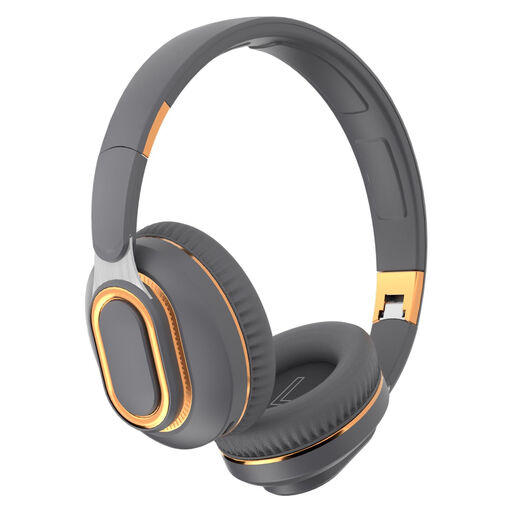
Foldable wireless headphones with Bluetooth 5.0

Foldable wireless headphones with Bluetooth 5.0

The product name mentions a foldable design, Bluetooth 5.0 and a wired connection. Check which connection your equipment requires and test your chosen monitoring route.

View at Joybuy
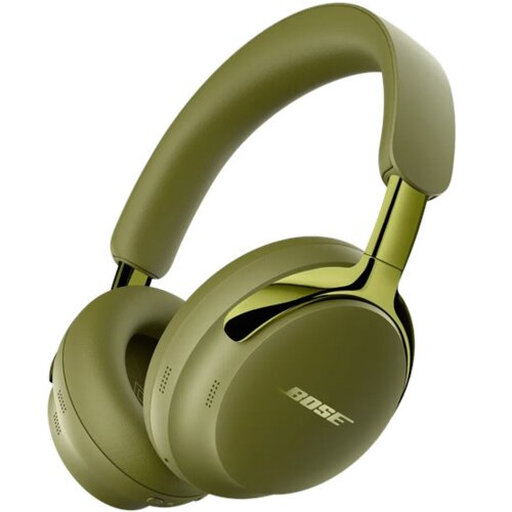
Second-generation Bose QuietComfort Ultra Headphones in olive green

Bose QuietComfort Ultra Headphones (2nd Gen), Olive Green

The product name identifies these as the second generation in Olive Green. Check whether the connections and use of a cable suit your livestream and equipment.

View at Joybuy

Frequently asked questions

Will wired studio headphones use another one of my sockets?

A suitable pair of wired headphones plugs into the headphone output on equipment you already use, so the headphones themselves don’t need to be charged separately. Check that the plug fits and that the output gives you the microphone and stream mix you want.

Why can I hear my voice twice?

You may hear your voice twice if your interface uses direct monitoring and your software also sends the same signal back. For this combination, Focusrite recommends switching off software monitoring for the recording input; check separately that the broadcast is still receiving the intended audio.

How can I reduce the risk to my hearing during long streams?

Keep the volume moderate and take listening breaks. The World Health Organization links safe listening time to sound level: at 80 dB, it advises up to 40 hours a week, and at 90 dB, four hours a week. This doesn’t prove that a particular volume setting on your equipment corresponds to a known dB level.

What are my rights when buying online in the Netherlands regarding the cooling-off period and guarantees?

For eligible distance sales to consumers, there is generally a 14-day cooling-off period; the Dutch government lists some exceptions. There is no fixed statutory guarantee period in the Netherlands: you’re entitled to a product that works properly, and the seller is your point of contact if something goes wrong. Check the terms of the specific purchase.

What should I know about EU product rules for a wireless model?

Bluetooth equipment is classed as radio equipment under the EU regulatory framework for radio equipment, which includes requirements relating to safety, electromagnetic compatibility and spectrum use. Check the applicable product information and conformity details for the exact version.
