Who is this choice relevant to?

Editor who also monitors recordings

You’re editing a live session and sometimes listen while microphones are still live. In that case, limited sound leakage and the right monitoring signal matter. RTINGS describes closed-back headphones as better suited to recording because they leak less sound into a microphone.

Editor in a quiet editing room

You mainly listen back critically after recording, with no recording taking place at the same time, so you could also compare an open-back model. The manufacturer describes the HD 490 PRO as an open-back model; an open design doesn’t offer the same isolation as a closed-back one.

Editor with a busy dual-monitor workstation

You want the headphone plug and cable to work with your audio output and workstation. Two screens don’t tell you which connection or audio source you need; check your interface or computer.

What should you look for in studio headphones?

Closed-back, wired

A good fit when: you’re monitoring during a recording session close to a live microphone, or want to hear less background noise.

Bear in mind: isolation and fit vary from model to model and from person to person; a closed-back design doesn’t guarantee silence or neutral sound.

Open-back, wired

A good fit when: you mainly listen back in a quiet room and there isn’t a live microphone nearby.

Bear in mind: sound can leak out and background noise can get in more easily; this isn’t an equivalent choice if isolation is your priority.

What to consider What to look for when buying Who is this important to?
Isolation and sound leakage Compare a closed-back design and assess the fit for yourself; bear in mind that sound may leak when using an open microphone. If you sometimes monitor beside a live microphone or want to reduce background noise, isolation is a priority. Around 33% of consumers rank this as their main buying priority.
Critical listening Compare open-back and closed-back models in a quiet room and listen to familiar clips; don’t treat manufacturers’ claims about sound as proof that you’ll make better editing decisions. If you mainly listen back in a quiet room, you could also consider an open-back model. Around 25% of consumers give critical listening their top priority.
Connection and monitoring signal Check that the plug fits the output, whether you need an adapter and whether the cable reaches your workstation. Also decide whether you want to hear the direct input, DAW playback or both. If you want to hear the right source at your editing desk and have a suitable cable route, check your interface and output. This is the top priority for around 25% of consumers.
Fit and maintenance Try the headphones on if possible; check whether the cables or ear pads are replaceable for the exact model. For long editing sessions, personal fit and ease of maintenance can matter more than an individual model specification. Around 17% of consumers put these points first.

Common buying mistakes

  • Choosing an open-back model while a microphone is still live

    An open-back design can leak more sound into a microphone. RTINGS says closed-back headphones are better suited to recording because they generally have less sound leakage.

    If you’re monitoring beside microphones, compare closed-back models first. Consider open-back models separately for listening back in a quiet room.

  • Assuming two screens take care of audio monitoring

    Your audio output and signal route determine what you hear; the number of screens won’t fix an incorrect connection or routing setup.

    Before buying, check the output on your computer or interface. During a recording, also test whether you can hear the monitoring source you want.

    Depending on the connection, you may need a suitable adapter or a different cable.

  • Treating impedance or comfort information as proof that a model is suitable

    A model specification or the manufacturer’s description won’t automatically tell you how the headphones sound or fit, nor does it prove what volume you’ll get from your own output.

    Check how they work with your own audio output and, if possible, try the model during a typical listening session.

Brands and models to compare

beyerdynamic

The closed-back DT 770 PRO X is a model to compare for recording and monitoring; that doesn’t mean every model from the brand is closed-back.

  • beyerdynamic lists a detachable mini-XLR cable, 48 ohms and a 3.5mm plug with a 6.3mm adapter for the DT 770 PRO X.
  • Check the fit and sound for yourself. Manufacturer specifications aren’t an independent performance test.

Audio-Technica

The closed-back, wired ATH-M50x is an alternative to compare if you’re looking for isolation and a detachable cable.

  • Audio-Technica lists three detachable cables, swivelling ear cups and a foldable design for the ATH-M50x.
  • The manufacturer’s claims about sound isolation and sound quality don’t prove it outperforms other models.

Sennheiser

The open-back HD 490 PRO is an option to compare for critical listening in a quiet room without a live microphone nearby.

  • Sennheiser lists two sets of ear pads and a detachable cable that can be connected on the left or right.
  • Because of its open-back design, it won’t provide the isolation that can matter when monitoring beside a microphone.

Sony

The MDR-7506 is a wired studio headphone to compare if a 3 m cable suits your editing desk.

  • Sony Netherlands lists a weight of 230 g and a 3 m cable for this model.
  • Plan the cable route carefully so it runs safely around your workstation and the two screens. A manufacturer’s description of comfort isn’t a personal fit test.

Joybuy product picks for this editing workstation

This Joybuy selection includes headphones for different uses, including wireless models and gaming headsets. Check that each model’s connection and intended use suit your monitoring setup.

Sennheiser MOMENTUM 4 Wireless

Sennheiser MOMENTUM 4 Wireless

The supplied 3.5mm audio cable and passive wired listening may be useful if you want to listen back with a wired connection; check that this model suits your studio setup.

The product description lists a supplied 3.5mm audio cable and passive use via a cable.

View at Joybuy
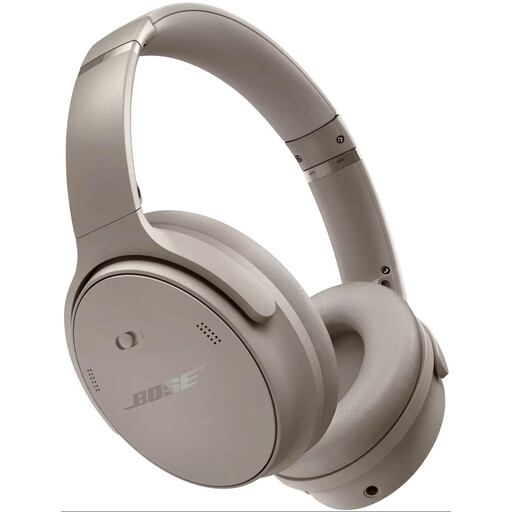
Bose QuietComfort Headphones in Sandstone

Bose QuietComfort Headphones, Sandstone

Before choosing this model for editing, check which audio connection and listening mode will work with your equipment.

View at Joybuy

Logitech G G432 7.1 Surround Sound wired gaming headset

Logitech G G432 7.1 Surround Sound Wired Gaming Headset

This is a wired gaming headset; check that its connection works with your audio output before considering it for live-session editing.

The product description lists connection via a 3.5mm jack or USB DAC.

View at Joybuy

Sony INZONE H3 wired gaming headset, black

Sony INZONE H3 Wired Gaming Headset, Black

Check that this gaming headset’s wired connection and intended use suit your audio setup.

The product description lists connection via a USB audio box and a 3.5mm cable.

View at Joybuy
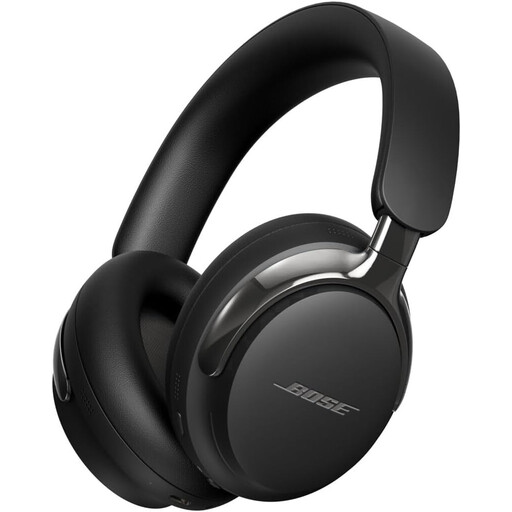
Bose QuietComfort Ultra Headphones, 2nd Gen, black

Bose QuietComfort Ultra Headphones (2nd Gen), Black

If you want to listen with a wired connection, check that the supplied or a compatible cable suits your workstation and audio output.

The product description lists wired listening with a detachable cable and a 3.5mm connection.

View at Joybuy

Frequently asked questions

Do you need headphones with two connections for two screens?

No, not just because you use two screens. Check which audio output your editing software or interface uses, which plug fits it and whether the cable reaches where you sit.

Will new headphones fix delay when you’re recording during a live session?

Not automatically. Focusrite describes direct input monitoring with very low latency on supported interfaces. Check the features and routing on your own interface, and decide whether you also want to hear DAW playback.

How can you manage long listening sessions and maintenance?

Keep the volume at a sensible level and take breaks. According to the World Health Organization, hearing risks are linked, among other things, to sound level, listening time and how often you’re exposed to loud sound. Try the headphones on if possible and check whether the cable and ear pads are replaceable for each model.

What Dutch noise regulations apply if you use these headphones at work?

According to Arboportaal, an employer must provide hearing protection when daily exposure exceeds 80 dB(A); above 85 dB(A), employees must wear it and the employer must take action. These are workplace noise exposure rules, not a measured level or automatic approval of ordinary studio headphones as hearing protection.

What cooling-off period and warranty do you get when buying online?

For many online purchases from a business as a consumer, you have a 14-day cooling-off period, according to the Dutch government; check whether these terms apply to your purchase. In the Netherlands, there is no fixed statutory warranty period: you’re entitled to a product that works as it should, and the seller is your point of contact if there’s a fault. Don’t assume the same consumer rules apply to a business purchase without checking.
