If you’re recording your guitar with a microphone, wired, closed-back headphones are a sensible starting point for keeping sound leakage to a minimum. Check that the plug, cable and headphone output are compatible with your interface too. Latency mainly depends on your monitoring setup. Open-back headphones may be another option for checking a mix, but they’re less suitable as your only pair for recording with a microphone.
Who is this relevant for?
Guitarist recording with a microphone
You want to monitor the recording without sound from your headphones getting into the microphone. RTINGS.com describes closed-back headphones as more suitable for recording because they leak less sound. Check the fit and listening volume too.
Guitarist with an interface on a small desk
You’re recording directly and need to make sure your monitoring setup, headphone socket and available cable space all work together. Focusrite explains that direct monitoring sends the input signal straight to the headphone output.
Guitarist who also mixes
You want to monitor recordings and assess your sound choices later. RTINGS.com distinguishes between closed-back models for recording and open-back models that may be more suitable for mixing. Open-back headphones do leak sound and offer less isolation.
What should you look for when buying?
Closed-back, wired headphones for recording
Choose this option: if you’re recording your guitar with a microphone and want to keep sound leakage to a minimum.
Bear in mind: fit and listening volume matter. Closed-back headphones won’t prevent leakage in every situation.
Open-back headphones for checking a mix
Choose this option: mainly for assessing recorded parts when sound leakage into a microphone isn’t an issue.
Bear in mind: open-back headphones leak sound and offer little isolation, making them less suitable as your only pair for recording with a microphone.
| What to consider |
What should you check? |
Who is this most important for? |
| Sound leakage |
Check that the exact version is closed-back and that the ear cups fit snugly. |
If I’m recording guitar with a microphone, I want to stop the headphones from unnecessarily bleeding into the recording. That’s why around 29% of consumers make sound leakage their top priority. |
| Latency-free monitoring |
Check which monitoring options your interface offers, and avoid hearing the same signal through direct and software monitoring at the same time. |
If I want an immediate response while playing, I start by checking the interface and DAW settings. Around 24% of consumers prioritise this playing response. |
| Cable and desk space |
Measure the distance to the headphone output and compare it with the cable length for the exact version. Check where the cable connects too. |
With a small workspace, I want to use my guitar and interface without an awkward cable run. Around 18% of consumers make limited desk space their top priority. |
| Comfort |
If possible, try them on with your usual glasses and assess the pressure, seal and whether the ear cushions are replaceable. |
During longer recording sessions, I want the fit to stay comfortable and the headphones to sit securely. Around 18% of consumers prioritise comfort. |
| Checking a mix |
Decide whether you’ll mainly use the headphones for recording or for mixing too. If possible, check important mix decisions on a second listening system. |
If I mainly want to assess recorded guitar parts and the mix, open-back headphones may be an option if sound leakage isn’t a concern. Around 11% of consumers make checking a mix their top priority. |
Common buying mistakes
-
Choosing open-back headphones as your only pair for recording with a microphone
Open-back headphones leak sound and offer little isolation. This can be inconvenient when monitoring a microphone recording.
Choose headphones to suit the recording task, and consider open-back headphones for checking a mix if sound leakage isn’t an issue.
-
Blaming the headphones for latency
A delayed or doubled signal may be caused by the interface and software monitoring setup. A different pair of headphones won’t necessarily fix it.
Check your interface’s monitoring settings. If you hear the same signal directly and through the DAW, avoid monitoring it twice.
-
Assuming model variants and cables are interchangeable
The DT 770 PRO versions differ in details such as impedance, while the DT 770 PRO X has a different cable connection. A long cable can also get in the way on a small desk.
Before buying, check the full model name, impedance, plug, included accessories and cable length.
-
Buying an additional warranty without comparing it with your existing rights
The Government of the Netherlands states that there is no fixed statutory warranty period in the Netherlands. Your rights depend on what you can reasonably expect from the product.
Compare what an additional warranty offers with your statutory rights against the seller.
Brands to compare
Audio-Technica
The ATH-M50x is a wired, closed-back option to consider if interchangeable cables and easy storage matter to you.
- Audio-Technica Netherlands lists three detachable cables and a foldable design for the ATH-M50x.
- Check which included cable length suits your desk. The manufacturer’s descriptions of sound and isolation aren’t independent assessments.
beyerdynamic
The DT 770 PRO and DT 770 PRO X are separate closed-back monitoring models with different impedance ratings and cable configurations.
- For the specified DT 770 PRO version, beyerdynamic lists 80 ohms and a cable with a 3.5mm plug and 6.35mm adapter. The DT 770 PRO X has 48 ohms and a detachable mini-XLR cable.
- Check the exact version and make sure it’s compatible with your interface’s headphone output.
Sony
The MDR-7506 is a wired recording model to compare if weight and cable routing are important to you.
- Sony Netherlands lists the MDR-7506 as weighing 230 g, with a 3 m cable.
- The stated weight doesn’t tell you how comfortable the headphones will feel. A 3 m cable may need managing on a small desk.
Sennheiser
The HD 280 PRO and HD 480 PRO are separate closed-back monitoring models with different cable options.
- Sennheiser lists replaceable ear pads and a single-sided coiled cable for the HD 280 PRO. The detachable cable on the HD 480 PRO can be connected on either the left or right.
- RTINGS.com describes the HD 480 PRO’s isolation as suitable for tracking, not as complete sound isolation.
Devine
The closed-back, wired PRO 2000 and PRO 4000 are separate models to compare for their cable configurations.
- Bax Music lists a fixed 3 m straight cable for the PRO 2000, and detachable straight and coiled cables for the PRO 4000.
- The PRO 2000 page gives conflicting information about folding and rotating ear cups, so don’t rely on a single specification field for these features.
Joybuy products
The products below are quite different: a USB computer headset and open-ear Bluetooth earbuds. Check whether each model’s connection and design suit guitar monitoring. The open-ear earbuds aren’t closed-back, wired studio headphones.
 No image available
Kingston USB Hi-Fi Headphones with Microphone
The USB connection may suit listening from a computer with USB, but the available product information doesn’t confirm that this is a closed-back studio headset for recording with a microphone.
The product description lists a 1.8 m USB cable, stereo playback and an adjustable, padded headband. Check that the cable length and connection suit your desk and recording setup.
View at Joybuy
 No image available
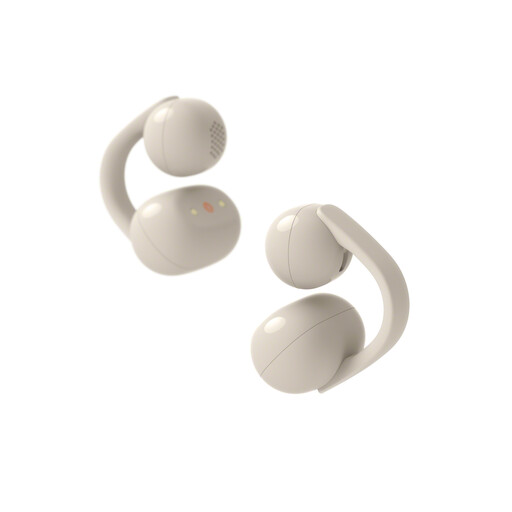
Sony WFLC900C.CE7
These open-ear Bluetooth earbuds aren’t closed-back, wired studio headphones for recording guitar with a microphone.
The product description lists a clip-on, open-ear design, Bluetooth and a 10-band EQ in the Sony Sound Connect app. Make sure this is the type you want: the open-ear design is different from the recording-focused option discussed in this article.
View at Joybuy
Frequently asked questions
Will buying a different pair of studio headphones get rid of latency?
Not necessarily. Focusrite explains that direct monitoring sends the input signal straight to the headphone output through a suitable interface. Check your monitoring settings and avoid double monitoring through software if you hear the same signal twice. Direct monitoring won’t automatically include your DAW effects.
How can I avoid an awkward cable across my small desk?
Measure the distance to the headphone output and compare it with the cable length for the exact version. Check the plug and any adapter too. Whether the cable is detachable or can connect to either ear cup varies by model.
What should I do if the ear pads wear out?
Check whether replacement ear pads are available for your exact model and follow the manufacturer’s care instructions. Sennheiser lists replaceable ear pads for the HD 280 PRO; this doesn’t automatically apply to other models.
When buying online in the Netherlands, am I always entitled to exactly two years’ statutory warranty?
No. The Government of the Netherlands says there’s no fixed statutory warranty period in the Netherlands: you’re entitled to a product that works properly for as long as you could reasonably expect it to. If a product is faulty, contact the seller.
Can I return headphones bought online within 14 days?
When you buy online from a business, you’ll often have 14 days to change your mind. The Government of the Netherlands lists exceptions and distinguishes these purchases from buying from a private seller. Check the terms of the specific purchase before relying on your right to return it.


