Who is this for?

Detail-focused rehearsal editor

You want to assess speech, instruments and unwanted background noise in the recording. Shure describes accurate listening as one purpose of studio headphones; the noise levels in your workspace will help determine whether an open- or closed-back model is right for you.

Editor working in a shared space

You want to hear less background noise while editing and avoid letting others hear your audio unnecessarily. Shure explains that closed-back ear cups can reduce sound coming in and escaping; fit is important too.

Editor who often adjusts desk height

You switch between sitting and standing and want the connection, cable and fit to remain practical. So check your whole workstation setup, not just the headphones.

What should you look for when buying?

Closed-back, wired studio headphones

Choose this option if: you want to reduce background noise while editing or stop others from hearing your audio as easily.

Bear in mind: fit and isolation vary from person to person; also check that the cable moves freely at both desk heights.

Open-back, wired studio headphones

Choose this option if: you mainly want to listen critically in a quiet, private space and don’t mind sound escaping.

Bear in mind: you’ll hear more of your surroundings, and others may hear your audio.

Factor to consider What should you check? Who is this important for?
Recording detail Compare open- and closed-back models using familiar rehearsal clips at a similar listening volume; listen for speech and interference. When editing, I want to assess which details in a recording need attention. Around 28% of consumers prioritise hearing detail in recordings.
Background noise and sound leakage Consider whether your workspace is quiet and private, and check the fit on your own ears. In a shared space, I want to hear less background noise and avoid disturbing others unnecessarily. Around 22% of consumers give top priority to a quiet listening experience with minimal sound leakage.
Cable and connection Check the plug and any adapter against your audio source; try the cable routing with the desk both low and raised. When I change desk height while editing, I want to move around without pulling on the connection. Around 22% of consumers prioritise the cable and connection.
Comfort Assess the pressure from the headband and ear cups, including when wearing glasses; weight alone doesn’t predict fit. During a longer editing session, I don’t want uncomfortable pressure around my head or ears. Around 17% of consumers prioritise long-wearing comfort.
Parts and maintenance Check whether replacement ear pads and cables are available for the exact model. I want to know in advance which parts can be replaced when they wear out. Around 11% of consumers give top priority to maintenance and running costs.

Common pitfalls

  • Assuming ‘studio’ or a wide frequency range proves the sound is neutral

    A specification and what you hear for yourself answer different questions. Fit also affects what you experience when listening.

    Compare familiar recording clips at a similar volume and assess speech, bass and audible interference for yourself.

  • Choosing an open-back model without considering your space

    Open-back headphones let in more background noise and do less to prevent sound escaping than closed-back models.

    Choose an open-back design mainly if your workspace is quiet and private. Otherwise, compare a closed-back model and check the fit.

  • Checking only the plug size

    If you adjust your desk height, the whole connection between your audio source and headphones needs to remain practical. A detachable cable isn’t automatically compatible with cables from other models.

    For the exact version, check the connection, any accessories and the cable routing at both desk heights.

    You may need a suitable adapter or a model-specific replacement cable; check this for the model you choose.

  • Listening for longer or turning the volume up to pick out quiet details

    The World Health Organization says that the risk to your hearing is linked to sound level, listening duration and repeated exposure to loud sounds.

    Start at a low volume and take listening breaks. Studio headphones are not automatically a substitute for hearing protection in a noisy workplace.

Brands to consider

beyerdynamic

The closed-back DT 770 PRO 80 Ohm and DT 770 PRO X are separate versions to compare if you’re looking for wired monitoring headphones.

  • beyerdynamic specifies the DT 770 PRO X at 48 ohms, with a locking mini-XLR cable; the DT 770 PRO 80 Ohm is specified at 80 ohms and has replaceable ear pads.
  • Impedance alone doesn’t guarantee that your audio source will provide enough volume. Check how the headphones work with your own equipment.

Audio-Technica

The closed-back ATH-M50x is worth considering if you’re looking for passive isolation and detachable cables.

  • Audio-Technica lists a foldable design and three detachable cables included with the ATH-M50x.
  • These product features don’t tell you whether the fit and sound are right for you; assess them using recordings you know well.

Sennheiser

Sennheiser says the open-back HD 490 PRO is designed for mixing and critical listening in a suitable, quiet space.

  • According to the manufacturer, this model has a detachable cable and two interchangeable sets of ear pads.
  • The open-back design is less suitable if you want to reduce background noise or sound leakage.

Shure

The closed-back SRH840A is a monitoring option with replaceable parts.

  • Shure lists a locking cable, replaceable ear pads, a 6.3 mm adapter included in the box and a 3 m cable.
  • The cable length doesn’t prove that it will reach comfortably around your sit-stand desk setup without being pulled taut.

Sony

Sony Netherlands offers the wired MDR-7506 for recording and studio use.

  • Sony lists the MDR7506.EU as weighing 230 g, with a 3 m cord.
  • Check that the cord length and fit suit your workspace; these specifications aren’t an independent assessment of comfort.

Products at Joybuy

Joybuy product picks related to this topic. Check that each model’s connection and features suit your editing setup.
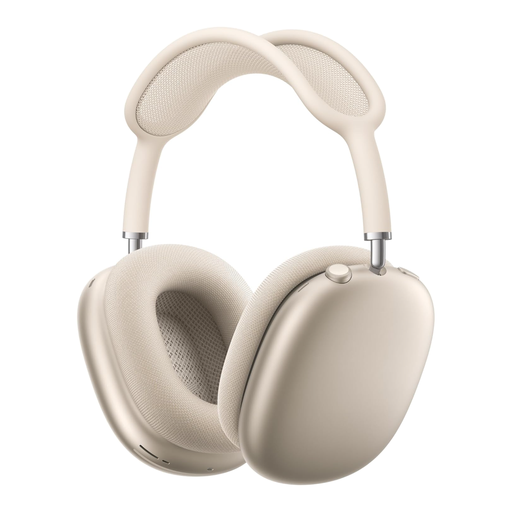
AirPods Max 2, Starlight

AirPods Max 2 – Starlight

Over-ear listening may be a good option if you’re looking for headphones that cover your ears; check the fit for longer editing sessions.

The product information lists active noise cancellation and a mesh headband.

Joybuy

Sennheiser MOMENTUM 4 Wireless, black

Sennheiser MOMENTUM 4 Wireless, black

An over-ear model may suit you if that’s the type of listening setup you’re after; check that the connection is compatible with your audio source.

The product information lists a 42 mm transducer system and a 3.5 mm audio cable for wired listening.

Joybuy

Bose QuietComfort Ultra Bluetooth headphones, black

Bose QuietComfort Ultra Bluetooth headphones, black

Check whether this model suits your need for a closed-back listening setup and wired use while editing.

The product information lists a closed-back design and an audio cable included in the box; check that the connection is compatible with your audio source.

Joybuy
Sony WH-CH720N wireless Bluetooth headphones, black

Sony WH-CH720N wireless Bluetooth headphones, black

Check that the connection and controls suit the audio source you use to edit recordings.

The product information lists a closed-back, over-ear design and active noise cancellation.

Joybuy

Razer BlackShark V2 X 7.1 wired gaming headset, black

Razer BlackShark V2 X 7.1 wired gaming headset, black

Check that the cable is long enough to reach between your audio source and your head at both desk heights.

The product information lists a 1.3 m cable and a 3.5 mm connection.

Joybuy

Frequently asked questions

Should you choose open- or closed-back studio headphones for editing rehearsal recordings?

Closed-back models are better if you want to reduce background noise or prevent others from hearing your audio; open-back models are better for critical listening in a quiet, private space. Check the fit of either type and listen to recordings you know well.

Can you connect studio headphones directly to your laptop or audio interface?

Check the output on your device and the plug on the exact model. The DT 770 PRO X and SRH840A, among others, are listed with a 3.5 mm plug and 6.3 mm adapter; plug size alone doesn’t tell you whether your setup will provide enough usable volume.

How can you stop the cable getting in the way when you raise your desk?

Try routing the cable with the desk at both heights before you start editing. Leave yourself room to move and avoid putting tension on the connection; also check the cable length and whether any detachable cable is compatible with the exact model.

How can you stay comfortable and protect your hearing during long sessions?

Assess the fit during longer listening sessions, start at a low volume and take breaks. The World Health Organization notes that sound level, listening duration and repeated exposure to loud sounds are important factors in hearing risks.

What UK noise regulations apply if you edit rehearsal recordings as part of your job?

When you’re exposed to noise at work, both employers and employees have responsibilities. Arboportaal states that if daily exposure exceeds 80 dB(A), the employer must provide hearing protection, and employees must wear it when exposure exceeds 85 dB(A). These are rules for workplace exposure, not an automatic volume limit or product certification for every headphone buyer; studio headphones are not automatically hearing protection.
