
Dialogue editor in a shared space
You listen for subtle speech details while background noise or sound leakage is a practical concern. Audio-Technica and beyerdynamic describe isolation as a key difference between closed-back and open-back designs.


If you work alongside others or can hear background noise, start with a closed-back model. In a quiet room of your own, an open-back model may also be worth considering as a listening reference. Check the fit, connection and cable routing while sitting and standing, and compare edited dialogue with the original: a specification doesn’t prove that you’ll hear every editing artefact.
You listen for subtle speech details while background noise or sound leakage is a practical concern. Audio-Technica and beyerdynamic describe isolation as a key difference between closed-back and open-back designs.
You could also consider an open-back listening reference if you want to listen critically for differences between the original and cleaned-up dialogue. Sennheiser describes the HD 490 PRO as an open-back model; iZotope notes that audio editing can leave audible artefacts.
What matters most is a suitable connection, practical cable routing and a comfortable fit for longer listening sessions. Model information from Shure, Audio-Technica and beyerdynamic shows that cables and connections vary by version.
A good fit when: you work in a shared or noisy space and want to hear subtle details without background noise easily masking them.
Trade-off: isolation also depends on fit; a closed-back design doesn’t prove that the sound is neutral or that you’ll hear every artefact.
A good fit when: you work in a quiet room of your own and want to consider an open-back listening reference.
Trade-off: an open-back model lets more sound pass between you and your surroundings, so it’s less suitable if isolation or minimal sound leakage is a priority.
A good fit when: you’re deliberately looking for a middle ground and can assess the specific model in your own workspace.
Trade-off: the semi-open label doesn’t guarantee a particular level of isolation or sound leakage.
| What to consider | What should you check? | Who is this more important to? |
|---|---|---|
| Background noise and sound leakage | Decide whether you work in a shared or quiet space, and assess the fit of the specific model. | If soft dialogue gets lost in other people’s noise, I want to know how much isolation the fit really provides in my workspace. Around 31% of consumers give isolation top priority. |
| Checking for editing artefacts | Compare the same speech passages before and after editing at a controlled volume. | When checking cleaned-up dialogue, I want to compare changes to the voice and any remaining noise with the original. Around 25% of consumers give checking for editing artefacts top priority. |
| Comfort during longer sessions | Assess the fit during a representative listening session and check whether the ear pads are replaceable. | When I listen for a long time without a break, I want to know how the headphones feel on my head and whether worn pads can be replaced. Around 25% of consumers give long-wearing comfort top priority. |
| Connection and cable routing | Check the connection, any adapter and the cable length at both desk heights you use. | If my desk moves up and down, I want a cable that doesn’t pull tight and fits the output on my device. Around 19% of consumers give connection and cable routing top priority. |
A stated frequency range isn’t a listening test using your dialogue. Audio editing software can leave audible artefacts.
Compare representative passages before and after editing, and don’t base your choice on a single frequency-range figure.
Open-back and closed-back designs differ in isolation and sound leakage. That can matter if you work alongside others or want to hear subtle details.
Before choosing a design, consider how much background noise you can hear in your workspace and whether other people can hear your audio.
The cable length you need depends on your setup. A cable that works at one desk height may pull tight at another.
Check the plug, adapter, cable length and space for cable management at both desk heights.
According to ACM ConsuWijzer, your statutory rights depend on what you could reasonably expect from the product; the seller remains responsible for resolving a fault.
Keep your proof of purchase and contact the seller if a fault occurs unexpectedly.
The closed-back DT 770 PRO and DT 770 PRO X are separate models. This distinction matters when matching the impedance or cable to your equipment.
Shure describes the closed-back SRH840A as designed for monitoring and equipped with a detachable cable.
According to Audio-Technica, the closed-back ATH-M50x comes with three interchangeable cables. This may be useful if you switch between workspaces or cable routes.
The open-back HD 490 PRO is a listening option to consider in a quiet room of your own.
AKG describes the closed-back K371 as suitable for uses including podcasting and studio monitoring. It’s a compact model to compare if isolation matters to you.
This selection includes headphones and headsets with product information covering wired listening, connections or reducing background noise. These features don’t automatically make a model a studio reference; check the fit and listen using your own dialogue.
 No image available
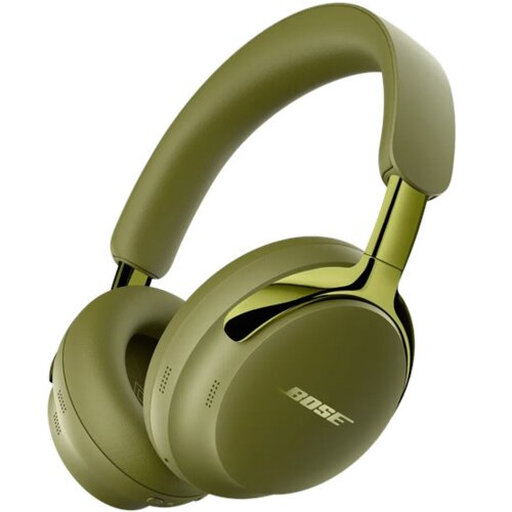
The product information lists a detachable cable and active noise cancelling; this doesn’t establish how well you’ll hear editing artefacts with this model.
According to the product information, no charger is included and PD fast charging isn’t supported. The information also mentions magnets and advises anyone with a medical implant to consult a doctor.
 No image available
If you want to listen using a cable, the product information lists an audio cable for use without a battery; the stated noise cancelling and closed-back over-ear design don’t determine how well you’ll hear dialogue artefacts.
The product information lists 2.5 mm and 3.5 mm connections.
 No image available
This wired stereo headset may suit you if you’re looking for a 3.5 mm connection; check that the 0.95 m cable reaches the output on your desk.
The product information also lists a USB controller. Whether the cable is long enough at both desk heights depends on your setup.
 No image available
This wired headset may suit a setup with an analogue 3.5 mm input; check that the cable route works when sitting and standing.
The product information lists a 1.3 m cable, passive noise cancellation and a weight of 240 g.
 No image available
The product information lists noise cancelling and stereo playback; these features don’t show how suitable the headset is for checking editing artefacts.
The stated weight is 260 g. The description mentions a USB-C adapter for a low-latency connection.
If you can hear background noise or work alongside others, a closed-back model may be practical because of its isolation. In a quiet room of your own, you could also consider an open-back model, which lets more sound through. Check the fit and compare it using your own dialogue material.
Check the connection and route the cable so it doesn’t pull tight or catch on moving parts at either the lowest or highest desk position you use. The length you need depends on your setup.
Listen to the same passage before and after editing, including sections with little or no speech. Audio editing software can leave audible artefacts; a headphone’s stated frequency range doesn’t test the results of your editing.
Consider both the volume and how long you listen, and take breaks. The World Health Organization gives a guideline of up to 40 hours per week at an average of 80 dB; this isn’t a fixed safe volume setting for a computer or personalised listening advice.
For a standard online purchase, consumers generally have 14 days from delivery to change their mind, subject to statutory exceptions, according to ACM ConsuWijzer. The product must also meet what you could reasonably expect during normal use; if there’s a fault, contact the seller. This isn’t necessarily the same as a fixed two-year warranty.