First, check the connection by the router and in your room. A repeater won’t fix a slow internet connection or congestion on a shared line. For one room, a wireless repeater may work if it still gets a good signal from the router in a midway position. If you can run a cable, a wired access point is another option; if several rooms have problems, you could consider mesh together. Check that the device is compatible with your router and confirm the exact version on offer. The Dutch Authority for Digital Infrastructure says the required CE marking indicates compliance with the applicable requirements.
Who is this guide for?
Student with one room that gets poor signal
You want to download a large game update, but notice that the connection is better closer to the router. A repeater will only help if you can place it somewhere it still gets a strong enough signal from the router.
Student who can run a cable
You download from a fixed spot and, with permission, can run a cable to the shared router or connect a wired access point.
Housemates with several rooms that get poor signal
You’re looking for better coverage in several areas and need to agree on router compatibility, placement and how to manage extra Wi-Fi points.
What should you look for?
First find out what’s slowing the download, then choose between extending Wi-Fi to one room, a wired solution or coverage for several rooms.
Check first and improve your existing Wi-Fi
Choose this if: downloads are slow even near the router or over Ethernet, or the router is poorly positioned.
Trade-off: moving the router or switching to a less congested Wi-Fi channel may help locally, but won’t add capacity to your internet connection.
Standalone wireless repeater
Choose this if: just one room gets a poor signal, running a cable isn’t practical and there’s a midway spot that still gets a good signal.
Trade-off: the wireless connection between the repeater and the router remains a key factor. Also check that any mesh features are compatible with your existing router.
Ethernet cable with a wired access point
Choose this if: you have permission to run a cable to or near the room with poor signal and want to provide Wi-Fi there.
Trade-off: agree on the cable route and access to the shared router. Check that the device has an access point mode.
Mesh for several rooms
Choose this if: housemates get poor signal in several areas and can agree on placement and management.
Trade-off: a mesh system requires more devices and shared management than a single repeater. Wired backhaul requires a cable between compatible points.
| Concern |
What to check before buying |
Who is this most relevant to? |
| Usable signal in one room |
Test a midway position for the repeater; check that the mesh feature you want works with your existing router. |
If my student room gets a poor signal, I want to know whether a midway position will still get a strong enough signal. Around 33% of consumers are primarily concerned about coverage in one room. |
| Fixed download spot |
Check whether running a cable and accessing the router are practical; see if the device has an Ethernet port and access point mode. |
For a fixed download spot, I want to check whether running a cable to the room or access point is possible. Around 25% of consumers prioritise a fixed wired connection. |
| Coverage for several housemates |
Map out the rooms with poor signal and the existing router; agree on who will manage placement and settings. |
If several rooms get a poor signal, I want to agree with my housemates on how extra Wi-Fi points will be placed and managed. Around 25% of consumers prioritise coverage in several areas. |
| Cause of slow downloads |
Compare a test over Ethernet by the router with one in the problem area; note when the slowdown happens. |
Before buying equipment, I want to rule out the internet connection or congestion on the shared network as the cause of the slowdown. Around 17% of consumers want to identify the cause first. |
Wi-Fi pitfalls when downloading games
-
Assuming a higher Wi-Fi speed figure means a faster game update
Manufacturer specifications aren’t the same as measured download speeds in your room. Signal strength, the connection back to the router and the shared internet connection all play a part.
Before choosing an extender, compare the connection by the router with the one in your room.
-
Putting a repeater somewhere it can’t get a signal from the router
A wireless repeater needs to receive a signal from the router at its own location.
Test a midway position first. If that doesn’t work, find out whether you can use a cable with an access point instead.
A different cable route may involve extra installation work.
-
Assuming every mesh device works with your current router
Some mesh features are tied to a particular router system. TP-Link describes OneMesh for the RE705X when used with a OneMesh router; FRITZ! describes the integrated mesh functionality of the FRITZ!Repeater 1200 AX with a FRITZ!Box.
Make a note of your exact router model and check which mesh feature works with it before buying.
Depending on your router, you may need additional or different network equipment.
Brands to consider
TP-Link
The RE705X is a standalone repeater with access point mode; the Deco X50 is a separate mesh range designed for use with multiple points.
- TP-Link says the RE705X has a gigabit port. The manufacturer describes optional Ethernet backhaul for the Deco X50.
- According to TP-Link, the RE705X’s OneMesh feature requires a OneMesh router. Advertised Wi-Fi speeds aren’t measured download speeds in student accommodation.
FRITZ!
The FRITZ!Repeater 1200 AX is worth considering if your home already uses a FRITZ!Box.
- FRITZ! lists a gigabit LAN connection for this model and says it can be used with other routers.
- The integrated FRITZ! mesh functionality described is for a network with a FRITZ!Box. This is a product specification, not an independent performance test.
NETGEAR
The EAX15 is a standalone Wi-Fi 6 extender for an existing Wi-Fi network.
- NETGEAR lists a gigabit Ethernet port for the EAX15.
- An advertised maximum Wi-Fi speed doesn’t predict the download speed you’ll get in a particular room.
devolo
The WiFi 6 Repeater 3000 is a standalone repeater that may be suitable for wireless use or access point mode.
- According to devolo, the model has a gigabit LAN connection and access point mode.
- devolo describes mesh functionality with other devolo Wi-Fi products; this doesn’t confirm mesh compatibility with every existing router.
Joybuy product picks
The Joybuy picks below include wired access points, a wireless repeater and mesh systems for coverage in several areas.
 Image unavailable
TP-Link Omada EAP653
A good fit for a fixed spot where you can run an Ethernet cable to the access point.
The description lists dual-band Wi-Fi 6, gigabit Ethernet and PoE. You’ll need a suitable wall or ceiling position for installation; power can be supplied via PoE or DC.
View at Joybuy
 Image unavailable
TP-Link Omada EAP673-Extender
Designed to extend an existing network. For wireless use, the device needs to be within range of that network.
The description lists dual-band Wi-Fi 6 and an Ethernet port.
View at Joybuy
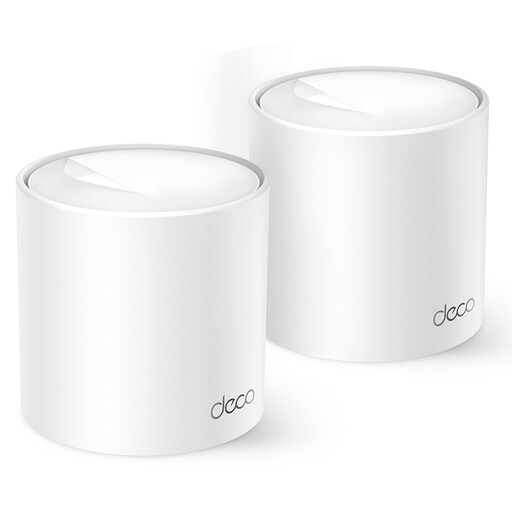 Image unavailable
TP-Link Deco X10
A mesh option for providing Wi-Fi in several areas of your home.
The description lists dual-band Wi-Fi 6, OFDMA, MU-MIMO and Ethernet ports. It also mentions management through the Deco app.
View at Joybuy
 Image unavailable
TP-Link Deco X50 (2-pack)
A good fit for a shared setup covering several rooms; the product description lists a mesh system with two points.
The description lists dual-band (2,4 GHz/5 GHz) Wi-Fi 6 and gigabit Ethernet ports. Ethernet backhaul is optional and requires cabling between the mesh points.
View at Joybuy
 Image unavailable
TP-Link TL-WA801N
Worth considering if you need both access point and extender functionality and can use a cable connection.
The product description lists 2,4 GHz only and Ethernet at 10/100 Mbit/s. The title mentions passive PoE.
View at Joybuy
Frequently asked questions
Where should you put a wireless signal booster?
Place it somewhere it can still get a good signal from the router, not in the room where the signal has already dropped out. Test the connection in a midway position and watch out for obstacles.
Can you connect a games console to a repeater’s Ethernet port?
For the TP-Link RE705X and FRITZ!Repeater 1200 AX, the manufacturers list an Ethernet port for wired devices. If the repeater connects to the router wirelessly, that link remains wireless. For a fully wired connection, check the access point mode and cable route.
What costs and rights should you consider when buying online?
Allow for any cables or extra Wi-Fi points you may need. According to ACM ConsuWijzer, consumers generally have a statutory 14-day cooling-off period for online purchases, starting from delivery; check the applicable exceptions there too. The statutory guarantee applies separately from the cooling-off period if a product doesn’t do what you could reasonably expect.
Do I need a licence to use Wi-Fi at home in the Netherlands?
According to the Dutch Authority for Digital Infrastructure, you don’t need a licence for home use if you use the designated frequencies and comply with the conditions of use.


