If you work close to a housemate, look for quiet buttons first, then check whether your laptop has Bluetooth or a free USB port. If you often navigate between documents, the shape of the mouse and your working posture matter more. A wired mouse means you don't need to maintain batteries, but it does need space and a suitable port. None of these features makes one mouse the right choice for every student.
Who is this guide for?
Student with a housemate
Wants to make as little clicking noise as possible while writing and checking sources. Also check the connection type and whether the shape suits your hand. Logitech and Trust describe quiet mice with different connection options.
Student with long study sessions
Prioritises a comfortable fit and varying their working posture while navigating between documents and sources, without assuming that a mouse will prevent discomfort. CHERRY describes a vertical design, while Arboportaal also emphasises varying your posture during screen work.
Student with multiple devices
Wants to switch between devices with one mouse, so checks which Bluetooth and USB connections are available. Trust and Rapoo describe models with multiple connection options.
What should you look for when choosing?
First, consider what your workspace calls for: quieter clicks, a shape that suits your hand, a connection that works with your devices, or as little battery maintenance as possible.
| What to consider |
What to look for when buying |
Who might find this more important? |
| Click noise |
Check whether the buttons are described as quiet and whether the connection works with your laptop. |
If someone is sitting nearby while I write, I want to reduce clicking noise without expecting every background sound to disappear. Around 31% of consumers put quiet clicks first. |
| Hand comfort |
Compare the mouse with your hand size, whether it's designed for left- or right-handed use, and the space available on your desk. |
If I often navigate between documents, I want a shape that suits my hand and workspace. Around 25% of consumers put hand comfort first. |
| Connection |
Check Bluetooth support, available ports and the connection type of the version you choose. |
If I switch between my laptop and other devices, I want to know whether the mouse connects to each one. For around 25% of consumers, connectivity and switching between devices are the top priority. |
| Power and maintenance |
Check whether the mouse is wired, rechargeable or uses replaceable batteries, and what charging or connecting it involves. |
If I don't want to replace or charge a battery while I'm working, easy maintenance matters most to me. Around 19% of consumers say this is their main priority. |
Common buying mistakes
-
Assuming ‘quiet’ means completely silent
Logitech describes the M240 Silent as having quieter clicks, not as making no noise at all. That doesn't automatically make it inaudible in a quiet room.
Choose based on how the buttons are described, and don't promise your housemates a completely silent mouse.
-
Not checking the connection
Bluetooth, a USB receiver and a wired connection each require different features on your laptop. A mouse with a receiver or cable may therefore need a suitable free port.
Before buying, check Bluetooth support, available ports and the exact model version.
-
Thinking an ergonomic shape will solve every wrist problem
A vertical mouse changes your hand position, but CHERRY's claims about reducing fatigue are the manufacturer's claims, not a guaranteed outcome for every user. Your workspace and varying your posture also matter.
Check that the fit and handed version are right for you, and vary your posture and activities.
Brands to consider as a guide
Logitech
The M240 Silent is a Bluetooth option for quieter clicks; the M185 is a compact mouse with a receiver.
- According to Logitech, the M240 uses Bluetooth without a dongle and one AA battery. The M185 is designed for both left- and right-handed use, according to the brand.
- For the M240, check that your device supports Bluetooth. For the M185, make sure the receiver connection is compatible with your device.
Trust
The Basi is a wired option with quiet buttons; the Ozaa Compact is designed for quiet use with multiple wireless devices.
- Trust lists a 160 cm cable for the Basi. For the Ozaa Compact, the brand specifies Bluetooth, a USB receiver and a rechargeable battery.
- The models have different connection options, so check which one suits your laptop and workspace.
CHERRY
The MW 4500 is a vertical option, with a separate LEFT version; the GENTIX SILENT is wired.
- CHERRY lists a 45° angle and a nano receiver for the MW 4500. According to the manufacturer, the GENTIX SILENT has a 1.8 m USB cable.
- Check which handed version is right for you. CHERRY's claims about reducing fatigue are not a guaranteed outcome for every user.
Rapoo
The M100 Silent is an option to consider if you want to compare quiet clicks and different connection modes.
- Rapoo lists multiple connection modes and a battery life of up to nine months for this model.
- The stated battery life is the manufacturer's maximum; actual battery life may vary depending on use.
Joybuy product picks
These Joybuy product picks are aimed at writing and research, with quiet operation, connections and navigation in mind.
 Image unavailable
Logitech MX Master 4 for Mac, Space Black
Worth considering if you switch between devices while working on projects; check that this Mac version is compatible with your devices.
The product name specifies Bluetooth and USB-C charging, and mentions MacOS, iPadOS and Windows.
View at Joybuy
 Image unavailable
Logitech MX Master 4 Graphite
A model to compare if you switch between devices while writing.
Before buying, check which connection and devices are right for your workspace.
View at Joybuy
 Image unavailable
NAXSIR Rechargeable Wireless Mouse, 6-level DPI Adjustment
An option to compare if you're looking for different ways to connect your devices.
The product name specifies Bluetooth, 2.4G, a Type-C cable connection and six DPI levels.
View at Joybuy
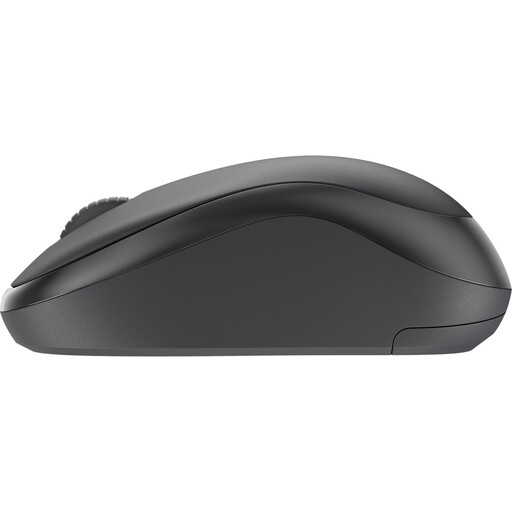 Image unavailable
Logitech Mouse M240 Silent Wireless Black
Worth considering if quieter clicks matter to you while you work.
Logitech describes the M240 Silent as a Bluetooth mouse that doesn't need a dongle; check that your device supports Bluetooth.
View at Joybuy
 Image unavailable
HP 285 Silent Wireless Mouse
An option to compare if quieter operation is a priority while you're writing.
The listed 2.4 GHz connection requires a USB dongle; check that you have a suitable free port.
View at Joybuy
Frequently asked questions
How do you choose between Bluetooth and a USB mouse?
First, check which connection your laptop supports and which ports are free. According to Logitech, the Logitech M240 Silent uses Bluetooth without a dongle; the Trust Basi has a USB cable. A mouse with a receiver also needs a suitable free port.
What can help when you're working on an assignment for a long time?
Check whether the mouse shape suits your hand, and pay attention to your workspace and varying your posture and tasks. For screen work, Arboportaal recommends taking microbreaks, among other things. No particular mouse model guarantees that you won't experience discomfort.
What if a mouse you bought online isn't suitable or breaks quickly?
According to ACM ConsuWijzer, online purchases generally come with a 14-day cooling-off period after delivery, subject to legal exceptions. If a product is faulty, the seller is responsible for the statutory guarantee; in the Netherlands, this is not simply a fixed two-year period.
What safety rule applies to a wireless mouse in the Netherlands?
Radio equipment must meet requirements for wireless devices. The Dutch Authority for Digital Infrastructure states that the manufacturer applies the CE marking when the device meets the relevant requirements. A statement on a product page is not, by itself, an independent safety test of the individual product.


