
Housemates looking to watch a specific match
Want to find out which service and access they need for the match before choosing a device. Ziggo Sport and Eurosport publish information about their broadcasts and tournaments.


First check which service is showing the specific tennis match and whether your existing TV supports it. Only then consider buying a separate player. A stick or box may offer a different connection or way to control your TV, but a 4K output won’t give you access to a broadcast or guarantee 4K live pictures.
Want to find out which service and access they need for the match before choosing a device. Ziggo Sport and Eurosport publish information about their broadcasts and tournaments.
Want to watch live on the shared TV and are weighing up a Wi-Fi stick against a box that can also connect via Ethernet. The Google TV Streamer and STRONG LEAP-S3+V2 both list Ethernet.
Don’t want to rely on one person’s phone all the time, so they check whether their existing TV has the right app or whether a separate player comes with a remote control.
First find out how to watch the match and what access you need. Then check the app, connections and controls on your TV or player.
| What to consider | What should you check? | Who is this important for? |
|---|---|---|
| Access to the match | Check the match, the broadcasting service, any account or package access you need, and whether the app is available on your chosen TV or player. | I want to know before buying that I can watch this particular match through my service; around 36% of consumers prioritise access to the match. |
| Connection by the TV | Check your Wi-Fi signal, whether devices used for casting are on the same network, and whether an Ethernet connection is available. | If I want to watch live over a shared network, the connection by the TV matters most to me; around 29% of consumers prioritise this. |
| Total cost | First check whether your existing TV has the app. Also check any sports access you may need, and which cables and power supply come with the exact device. | I want to avoid buying a player when my existing TV will do, or overlooking the access I need; around 21% of consumers put total cost first. |
| Sharing control | Check whether the TV has the app built in and whether a separate player comes with a remote control. | If several housemates want to control the TV without having to use the same phone every time, that matters most to me; around 14% of consumers prioritise shared control. |
Ziggo lists ATP tournaments and Wimbledon among the tennis events in its offering; Eurosport described its US Open 2026 broadcasts via Eurosport and HBO Max. The access you need depends on the match. Ziggo Sport’s announced ATP agreements run until the end of 2026, so check the latest information again for matches taking place later.
Ziggo describes Ziggo Sport Free for people without Ziggo as providing access to certain UEFA football matches, not general access to tennis.
Look up the specific tennis match first and check which service and access you need to watch it.
A device’s output doesn’t determine the broadcast’s picture quality on its own. Ziggo says that casting from Ziggo GO via Chromecast or AirPlay is limited to 720p.
Check the picture quality offered by your chosen app and viewing method, as well as the capabilities of your TV and player.
For the versions of the Google TV Streamer and Apple TV 4K reviewed, Google and Apple respectively say that an HDMI cable is sold separately.
Before buying, check your TV’s connection and what’s included with the exact model.
A product listing for a Fire TV Stick 4K (2024) also mentions a Fire TV Stick 4K Select, so it’s not clear which exact version is being offered.
Check the full model name and specifications. Don’t assume that a similar name means it’s the same version.
The Google TV Streamer (4K) is a box to consider if you want Google TV and a wired connection.
The TV Stick 4K (2nd Gen) is a compact Google TV stick that connects via Wi-Fi.
The LEAP-S3+V2 is a Google TV box with Ethernet.
The Apple TV 4K version reviewed is an HDMI box to consider if you want Apple controls.
This selection includes projectors and a portable Android TV device. Check that the exact model supports the tennis service and app you want, as well as the connection you plan to use with your TV. Product specifications don’t give you broadcast rights.
 No image available
For anyone considering a projector with a built-in TV platform; check whether this model has the tennis app you need.
Native 1080p; 4K support; 1000 ANSI lumens; 2GB+16GB; 90° rotation.
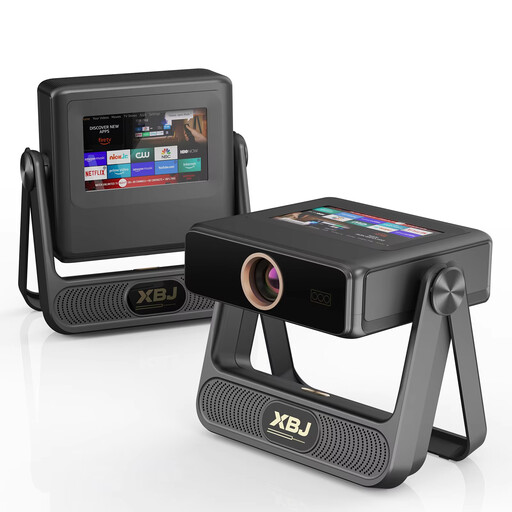 No image available
For anyone considering a projector with Android OS and Wi-Fi; check that the exact model supports the tennis service you want.
Native 1080p; 4K decoding; 900 ANSI lumens; Wi-Fi 6; projection up to 300 inches.
 No image available
For anyone who wants to use built-in apps on a projector; check that your chosen sports service and broadcast work on this device.
Wi-Fi 6; 50–200-inch projection size; 180° rotation; automatic picture correction.
 No image available
For anyone considering a portable Android TV device with its own remote control; check that it works with the viewing setup you have in mind.
The product name describes a Google-certified Android TV device with a remote control.
 No image available
For anyone considering Google TV on a projector; check that the exact model supports the tennis app and broadcast you want.
Native 1080p; 4K support; Wi-Fi 6; automatic focus and keystone correction; JBL sound and Dolby Audio.
No. A streaming stick doesn’t automatically give you access to every tennis match. First check the match and broadcasting service, then find out what access you need and whether the app is available on your device. Ziggo Sport lists ATP tournaments and Wimbledon among its offerings; for the US Open 2026, Eurosport described broadcasts via Eurosport and HBO Max.
To cast via Ziggo GO, Ziggo says your phone or tablet and your Chromecast or Apple TV need to be on the same Wi-Fi network. Check the power supply too; Ziggo recommends using the power adaptor supplied with Chromecast.
Not on its own: your TV, the broadcast and the way you watch must also support the picture quality you’ve chosen. Ziggo specifically says that casting from Ziggo GO via Chromecast or AirPlay is limited to 720p; a 4K output on the player won’t change that limitation.
Ziggo Sport says its broadcasts may be shown in a private setting, but you need permission to show them publicly. Consider your situation separately if the broadcast is accessible to the public, and check the terms of the subscription you’re using too.
According to ACM ConsuWijzer, ordinary online product purchases generally come with a cooling-off period of up to 14 days after delivery, subject to legal exceptions. If a product doesn’t meet what you could reasonably expect when used normally, the seller must put things right free of charge, for example by repairing or replacing it, or issuing a refund.