
Viewer with a favourite film service
You mainly want to know whether you can watch short films from your chosen service on your TV; how you play them matters more than a long list of devices.


Start with the service where you’ll find the short films: check whether it has a suitable TV app or can stream to your chosen player. A stick is a good fit if you have little space around your TV, while a box with Ethernet is an option if you have room and want a wired connection. You could also try an existing TV app or casting option first; 4K and HDR only matter if both your TV and the film support them.
You mainly want to know whether you can watch short films from your chosen service on your TV; how you play them matters more than a long list of devices.
You want as little extra equipment as possible in your small living room, and need to consider the HDMI port and power supply.
You have a network connection near your TV or prefer wired internet, and can make room for a box.
A good fit if: you want as little visible equipment as possible and can access the film you want through a supported app or casting method.
Bear in mind: check the space around your HDMI port, the power supply and the Wi-Fi signal near your TV. Xiaomi lists Wi-Fi and HDMI for the TV Stick 4K (2nd Gen), but no built-in Ethernet port.
A good fit if: you have space beside your TV and want to use an Ethernet connection.
Bear in mind: Google lists gigabit Ethernet for the Google TV Streamer (4K); Apple lists Ethernet for the Apple TV 4K (4th generation) reviewed here. You’ll need to make room for the box.
A good fit if: the films you want are already available through a suitable TV app, or the service you use can stream to your TV.
Bear in mind: Eye Film Player explains how to stream to a TV, but that doesn’t confirm that every film service works with every player.
| What to consider | What should you check? | Who should consider this most? |
|---|---|---|
| Access to the short films you want | Check the TV app or casting method for the specific player. Eye describes the Korte Film Poule as a service for cinemas, not a home streaming service. | If I want to watch a particular short film, I first check whether the service works on my TV. Around 36% of consumers put access to the films they want at the top of their list. |
| Compact placement and connections | Check the space around the HDMI port, whether there’s room for a box, and what’s included in the box. | In a small living room, I want to keep extra equipment to a minimum and make sure there’s enough space around the TV. For around 29% of consumers, compact placement is their top buying priority. |
| Connection near the TV | Check whether Wi-Fi works well where the TV is, or whether the exact model has an Ethernet port. | If there’s a network connection near my TV, I want to know whether the player has Ethernet or needs Wi-Fi. Around 21% of consumers mainly choose based on the connection they want. |
| Picture quality to suit your TV and films | Compare the resolution and HDR support of your TV, the exact player model and the content you want to watch. | I want the picture features to suit my TV and the films I watch. Around 14% of consumers put compatibility with their preferred picture quality first. |
Eye describes the Korte Film Poule as a service for cinemas; Eye Film Player is a separate service for home viewing.
Before you buy, check which service offers the films you want and how you can play them on your TV at home.
Xiaomi says that 4K and HDR depend on compatible content and devices. The label on a player alone doesn’t tell you what picture quality a particular film will offer on your TV.
Check support for your TV, player and chosen films separately.
Google and Apple state that an HDMI cable is sold separately for the boxes reviewed here.
Compare what’s included with the exact model against the connection cables you already have.
According to Xiaomi, the Xiaomi TV Stick 4K (2nd Gen) is a compact, wireless Google TV stick for a screen with HDMI.
The Google TV Streamer (4K) is a standalone box with Google TV.
The Apple specifications reviewed here are for the Apple TV 4K (4th generation), a box with HDMI and Ethernet.
STRONG describes the LEAP-S3 as a compact Google TV box.
The Joybuy products below are projectors whose product information mentions built-in streaming features. They’re an alternative to a streaming stick or box if you want to project films; check whether the film service you want is available on the exact model.
 Image unavailable
A good option if you want to play films through built-in apps and project them onto a screen; check whether the service you want is available on this model.
The product name lists WiFi 6, HDMI and a projection size of 50–200 inches. The product information also mentions 180° rotation and digital zoom of 50%–100%; check that the projection distance suits your room before you buy.
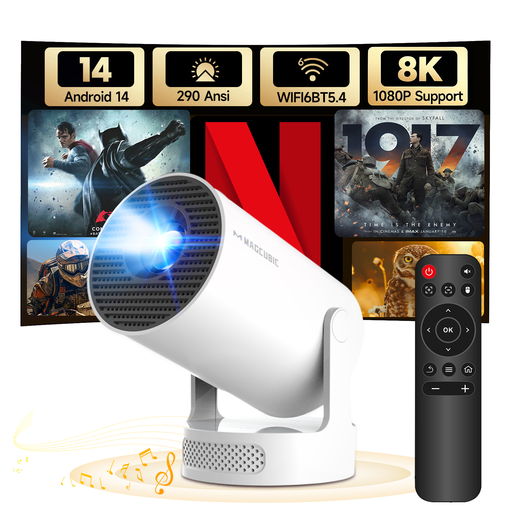 Image unavailable
An option if you want to project from a short distance; check that the film service you want works on the exact model.
The product title lists Android 14, WiFi 6 and Bluetooth 5.4. The product information specifies a native resolution of 720P, projection from 0.6 metres and a 180° rotatable stand. Keep the ventilation clear and don’t look directly into the lens.
First find out which service offers the films, then check whether there’s a suitable TV app or casting method for the exact player. Eye Film Player mentions streaming to a TV; that doesn’t confirm that every player has its own Eye app. Eye describes the Korte Film Poule as a service for cinemas.
Check the HDMI port, power supply and connection where your TV is. Xiaomi lists a power adapter and HDMI extension cable in the box for the TV Stick 4K (2nd Gen). Google and Apple say the HDMI cable is sold separately for the boxes reviewed here.
Film rentals or a streaming subscription may cost extra; Eye Film Player offers both free films and films for rent. In the Netherlands, statutory protection applies for as long as the product meets what you could reasonably expect, according to ACM ConsuWijzer. For online purchases, you generally have up to 14 days after delivery to change your mind; ACM ConsuWijzer explains the exceptions.
The Dutch government says you need the creator’s permission to use copyrighted films. You may not distribute or make a private copy available to others, and downloading from an illegal source is prohibited. This doesn’t, in itself, tell you anything about the rights and terms of a particular streaming service or film.