Who is a streaming device for?

Housemates with different viewing preferences

If you want to find your series on one TV without mixing up recommendations, check the device profiles and the profiles in each streaming app. Google TV Help explains how to set up multiple user profiles on Google TV.

Housemates with unreliable Wi-Fi by the TV

If you’re unsure about your wireless connection, compare a Wi-Fi stick with a box that has Ethernet, if you can run a network cable to the TV. Google and STRONG list Ethernet on their respective boxes, while Xiaomi says the TV Stick 4K (2nd Gen) requires a wireless connection.

Viewers with an older TV or one with limited app support

If you want to add a series app that’s missing without replacing your TV straight away, first check which apps your existing TV still offers. The Dutch Consumers’ Association explains how to stream using apps on a smart TV and notes that the available selection can change.

What should you look for when choosing?

What to consider What should you check? Who is this important for?
Apps and viewing profiles Check that the apps you want are available and that they offer suitable profiles and subscription terms. If I watch series with housemates, I want to use my own viewing space and the right apps. Around 36% of consumers give apps and a personalised viewing space top priority.
Connection by the TV Check Wi-Fi reception where you watch, and whether a network cable and power socket are available for a box. If the Wi-Fi by the TV is unreliable, I want to know whether a wired connection is possible before choosing a device. Around 29% of consumers prioritise the connection by the TV.
Cost of adding a device Try the apps on your existing TV first. Then check which cables are included and which streaming subscriptions you’ll need. If my TV already plays the series I want, I don’t want to buy a device I don’t need. Around 21% of consumers give avoiding unnecessary device and additional costs top priority.
Picture and sound Check that your TV, the series and the service support the resolution and HDR you want. If picture quality matters to me, I want the capabilities of my screen to match the content available. Around 14% of consumers give suitable picture and sound top priority.

Avoid common buying mistakes

  • Buying a player before checking the apps on your TV

    Your smart TV may already offer the streaming apps you want, although the available selection can change. In that case, you may not need an extra device.

    Check whether you can watch the detective series you want using the apps available on your TV.

  • Confusing a device profile with a profile on every streaming service

    Google TV supports multiple device profiles, but these don’t automatically manage viewing profiles or subscription terms within individual services.

    Check the profiles and terms for each service before housemates share a subscription. A streaming subscription may also come with a cost.

  • Assuming 4K or Wi-Fi 6 guarantees a better picture

    A 4K or HDR label on a device doesn’t, on its own, mean a series will look better. Your TV and the content must also support the picture format you choose, and a wireless stick depends on the connection by the TV.

    Choose a device that suits your screen, the series you want to watch and the connection where you watch.

  • Confusing an older Apple TV model with an announced generation

    Apple announced the fourth-generation Apple TV 4K, with availability from 13 November 2026. A Joybuy listing is for the 2022 model and shouldn’t be mistaken for the new generation.

    Before buying, check the full model name and generation. Don’t assume the specifications announced for the new model also apply to an older one.

Brands to consider

Google

The Google TV Streamer (4K) is a box for anyone looking to combine Google TV profiles, Ethernet and space for apps.

  • Google lists 32 GB of storage and gigabit Ethernet for the Google TV Streamer (4K).
  • Google says you’ll need a certified HDMI 2.1 cable, sold separately. Also check that the apps you want are available.

Xiaomi

The TV Stick 4K (2nd Gen) is a compact stick for a TV with an HDMI port and a reliable Wi-Fi connection.

  • For this generation, Xiaomi lists a remote control, HDMI extension cable and 8 GB of storage.
  • Xiaomi says a wireless connection is required. Check that you’re looking at the second generation, not an older model.

STRONG

The LEAP S3 is a Google TV box for anyone looking for Ethernet and extra physical connections.

  • STRONG lists Ethernet, USB and 16 GB of storage for the LEAP S3.
  • STRONG describes different Android versions for the LEAP S3, so check the software version of the model on offer.

Apple

Apple TV 4K may suit households that value Apple controls or Apple Home. The generation determines which specifications apply.

  • On 13 October 2026, Apple announced a fourth generation with an A19 chip, and gave 13 November 2026 as its availability date.
  • The announced generation isn’t available yet on the date of this article. Apple says an HDMI cable is required separately, so check which generation and model you’re looking at.

Products for streaming via a projector

This Joybuy product selection focuses on streaming via a projector with Android TV built in. It’s for anyone who’d rather watch on a projection screen than on the shared TV.
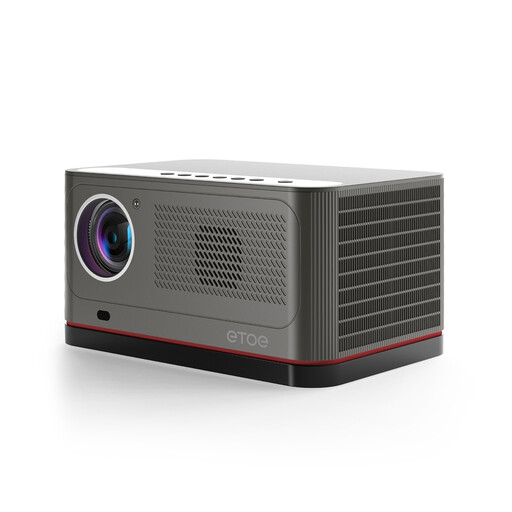
ETOE Whale Pro 800 Android TV projector

ETOE Whale Pro 800 Android TV projector

For anyone who’d rather watch series on a projector: the product description lists Android TV built in and streaming services such as Netflix, HBO, YouTube and Disney+. Check that the apps and profiles you want suit the way you watch.

The product name specifies 800 ANSI. The description lists native 1080p resolution, 4K decoding and dual-band Wi-Fi at 2.4 and 5 GHz. 4K decoding doesn’t mean native 4K resolution.

View at Joybuy

Frequently asked questions

Do housemates on Google TV automatically get their own viewing history in Netflix or other apps?

No, don’t assume they do. Google TV supports multiple device profiles, but you should also check the profiles and account terms for each streaming service separately.

What should you check before connecting a streaming device?

Check the HDMI connection, power supply and connection by the TV. Google says the Google TV Streamer (4K) requires a certified HDMI 2.1 cable, sold separately. Xiaomi says the TV Stick 4K (2nd Gen) requires a wireless connection.

What if a streaming device breaks too soon during normal use?

In the Netherlands, you’re entitled to a legal guarantee covering what you could reasonably expect from the product. ACM ConsuWijzer advises contacting the seller for an appropriate solution, such as a repair, replacement or refund. A two-year commercial guarantee doesn’t automatically limit your legal rights.

Can you return a streaming stick bought online after it arrives?

According to ACM ConsuWijzer, for a standard online consumer purchase you’ll generally have up to 14 days from delivery to change your mind. Check the applicable terms and exceptions before returning it.

Does a streaming box make all app content legal to watch?

No, the presence of an app or device doesn’t prove that the content is copyright-free. The Dutch government says copyright-protected material requires the creator’s permission and that downloading from an illegal source is prohibited. Check that the service you use has the necessary rights.
