First check whether the shared TV can already play the documentary service and title you want. If it can, you may not need an extra device. If not, choose a stick or box based on the apps available, independent control and network connection. 4K only matters if the TV, service and title all support it.
Who is this relevant to?
Housemates sharing a TV
You want to watch a documentary together without one housemate having to hand over their phone every time. Check whether the TV or a device with a remote supports the service you want. Ziggo notes that not every smart TV has all the apps you might want.
Viewers looking for a particular science series
Choose the title and service first, then see which device can play it. NPO Start, for example, lists Focus Documentaries; that doesn’t necessarily mean the app is available on your TV or stick.
Housemates sharing Wi-Fi
If you want to match the network connection to your home, compare the ports on the exact version. An Ethernet port may vary by model and version.
What should you look for?
Your existing smart TV
Choose this option: if the TV already plays the documentary you want through the right service, and the controls work for everyone in the household.
Bear in mind: not every smart TV has all the apps you want, so check the title and app on your own device.
A streaming stick
Choose this option: if the TV has a suitable HDMI port and housemates want to open the apps they need directly using a remote.
Bear in mind: check the exact generation and app. For Netflix, don’t assume you can cast from every phone using any method.
A streaming box
Choose this option: if independent control is important or you want a built-in Ethernet port.
Bear in mind: a box needs space, power and an HDMI port. Check whether the necessary cable is included.
| What to consider |
What to look for when buying |
Who is this important for? |
| Documentary and app you want |
Find the title on the service, then check whether the app is available on the exact TV or player. |
If I want to watch a particular documentary, I want to know whether that specific title is available on my TV or player. Around 40% of consumers give access to the service and title they want top priority. |
| Independent control |
Check whether the app works directly on the device and whether a remote is included. |
If several housemates want to start or pause something themselves, I don’t want to rely on one phone. Around 30% of consumers say independent control for housemates matters most. |
| Network connection |
Check the Wi-Fi and Ethernet options on the exact version, and whether running a cable is practical. |
If the Wi-Fi in our shared home doesn’t offer the connection I need, I want to know whether I can plug in a cable. Around 15% of consumers prioritise a suitable network connection. |
| Picture and subtitles |
Check the TV, service and title before weighing up 4K, HDR or subtitle availability. |
If I want to follow the documentary easily, I want to check which picture and subtitle options the title actually offers. Around 15% of consumers prioritise picture quality and clear dialogue. |
Common pitfalls
-
Focusing only on ‘4K’
A player may support 4K output even if the TV, service or title you choose doesn’t meet the requirements for that format.
First check the title and app, then the TV, and only then the output specification.
-
Assuming every version has the same ports
Ethernet specifications can vary between versions in the same product range. Apple lists Ethernet for the Apple TV 4K (3rd generation) Wi‑Fi + Ethernet with 128 GB.
Compare the generation, storage capacity and ports of the exact version on offer.
-
Assuming an HDMI cable or service access is included
Google and Apple state that an HDMI cable for the models mentioned is sold separately; Xiaomi lists an HDMI cable as included with the TV Box S (3rd Gen). Buying a device doesn’t automatically give you access to every service or title you want.
Check the box contents and the service’s access terms separately.
You may need to buy an HDMI cable separately or pay for access to a subscription service.
-
Assuming a product title proves it’s the same version
A product name alone doesn’t confirm that its generation and ports match the version you’re looking for.
Check the exact model name, generation and key specifications before comparing an offer with a different product listing.
Brands to consider
Google
The Google TV Streamer (4K) is a box with its own remote and built-in Ethernet.
- Google lists 4K HDR output and 32 GB of storage for this model.
- The required certified HDMI 2.1 cable is sold separately. These are product specifications, not measurements of documentary playback.
Xiaomi
The TV Box S (3rd Gen) is a Google TV box with its own remote.
- Xiaomi lists 4K output and an HDMI cable included in the box.
- Check the ports on the exact version if you need an Ethernet connection.
Apple
The Apple TV 4K (3rd generation, Wi‑Fi + Ethernet, 128 GB) is a box with its own remote and Ethernet.
- Apple lists Ethernet for this specific version.
- The HDMI cable is sold separately. Check the generation and version before comparing specifications.
Joybuy product pick
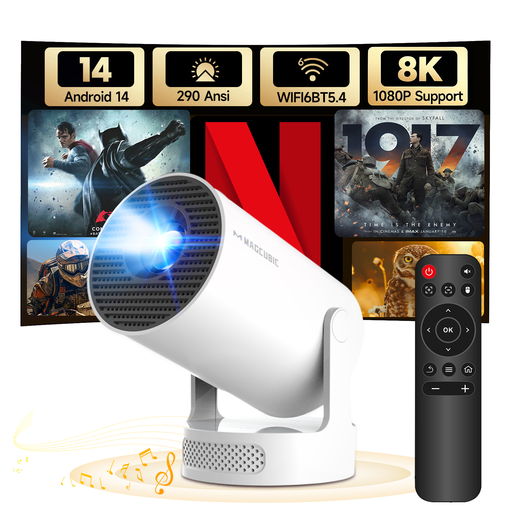
This option is a projector with built-in streaming features, not a standalone streaming stick or box. Consider it only if you’re also looking for a projector, and check that the service and title you want work on this model.
 No image available
MAGCUBIC HY300Pro+ mini projector (Android 14)
A possible choice if you’re looking for a projector with built-in streaming features rather than a standalone stick or box.
The product title lists Android 14, Wi‑Fi 6 and Bluetooth 5.4. The product information states native 720p and support for 1080p; check which picture format suits your viewing needs.
Check whether the app and title you want are available on this model and whether the device carries the required CE marking.
View at Joybuy
Frequently asked questions
Do we need to buy a player to watch Focus Documentaries?
Not if your existing TV can already play the service and title you need. NPO Start lists Focus Documentaries; check on your own TV whether the app and episodes are actually available.
Can everyone cast from a phone to the TV?
Not without checking the app and method you’ve chosen. Netflix lists certain devices for casting from its mobile app and doesn’t support AirPlay from an iPhone or iPad. Opening the app directly with a remote is another option.
Does buying a player include access to a documentary service?
Don’t assume that buying a player gives you access to a paid subscription. NPO Start describes its basic platform as free and offers extra content through Plus; check what access you need for each title and service you want.
Does a wireless streaming device need a CE marking?
Radio equipment placed on the market in the Netherlands must meet the applicable European requirements and carry the correct CE marking. Check the marking on the exact device; a product title doesn’t prove that a specific item meets the requirements.
What are your rights when buying online in the Netherlands?
According to ACM ConsuWijzer, when you buy a product online you generally have 14 days from delivery to change your mind, although exceptions apply. You’re also covered by the legal guarantee if a product used normally doesn’t meet what you could reasonably expect; the seller must put the problem right.


