First, decide how you’ll get the film onto your TV: Eye Film Player describes watching in a browser, connecting a computer via HDMI and casting from Chrome, but that doesn’t mean every streaming box has an Eye app. For a compact HD setup, an HD stick may be enough if it has the apps you want. A 4K box is mainly worth considering if your TV and other content are suited to it, or if you need specific connections. If possible, try a free Eye film first using your chosen playback method.
Who is this choice relevant to?
Eye viewers who want to cast films to their TV
Your choice is about finding a working way to get Eye Film Player onto your TV, not relying on an unconfirmed Eye app. Eye Film Player describes watching in a browser and casting; Google Streaming Help explains how to cast a Chrome tab to the Google TV Streamer (4K).
Viewers with a small HD setup
You’re looking for a compact solution and don’t want to pay for 4K specifications your TV can’t make use of. Amazon lists Full HD and apps from the Amazon Appstore for the Fire TV Stick HD; check that your film source works using a suitable method.
Viewers with a 4K TV and multiple services
You watch other content as well as silent films, and want to compare connections and controls. Google Store Netherlands, Xiaomi Netherlands and Apple Netherlands describe different connections and versions for their TV devices.
What should you look for when choosing?
Eye Film Player describes watching in a browser, connecting a computer via HDMI and casting via Chromecast. Google Streaming Help confirms that you can cast a Chrome tab to the Google TV Streamer (4K). Check which method works for your film and device.
Google TV Streamer (4K)
Choose this option: if you want to cast from Chrome and also want a standalone TV interface or ethernet.
Consider: Google says an HDMI cable is required separately; having a TV interface doesn’t prove that a standalone Eye app is available.
Fire TV Stick HD
Choose this option: if Full HD is enough and you mainly use apps confirmed as available in the Amazon Appstore.
Consider: Amazon lists apps from the Amazon Appstore; Eye doesn’t confirm a standalone Fire TV app here.
Xiaomi TV Box S (3rd Gen)
Choose this option: if you want a separate Google TV box with an HDMI cable included and also watch 4K content.
Consider: Xiaomi lists Wi-Fi; ethernet isn’t included in the specified ports. 4K output doesn’t tell you the resolution of a particular film.
Apple TV 4K (3rd generation)
Choose this option: if you want to use Apple TV and, for a wired connection, are considering the 128GB version with ethernet.
Consider: Apple says an HDMI cable is available separately; Eye’s reference to ‘Apple TV3’ doesn’t confirm that every current version will work directly.
| What to consider |
What should you check? |
Who is this important to? |
| Playing the film source |
Check how you’ll play your chosen title: in a browser, by casting from Chrome or by connecting a computer to the TV via HDMI. If possible, try a free film first. |
I want to be sure the silent film I choose will play on my TV; around 36% of consumers prioritise access to the film source. |
| A suitable fit for your TV and room |
Check whether your TV supports HD or 4K, how much HDMI space is available and whether the stick or box will fit your setup. |
If my living room is small, I want a device that suits my TV setup without paying for unnecessary resolution; around 29% of consumers prioritise a compact setup that fits their needs. |
| Total viewing and connection costs |
Check whether an HDMI cable is included and whether your chosen Eye film is free or needs to be rented. |
I want to know what other costs to expect on top of the device, such as a cable or film rental; around 21% of consumers prioritise the total cost. |
| Connectivity and extra features |
Check the exact model version and whether you need Wi-Fi or ethernet; Apple lists ethernet for the 128GB version, but not for the 64GB Wi-Fi model. |
If I also use other services or need a wired connection, connections and features matter; around 14% of consumers prioritise these points. |
Buying pitfalls
-
Assuming every box has an Eye app
Eye Film Player describes specific browser, HDMI and casting options. An app store or 4K label doesn’t confirm that Eye will work directly on the device.
Check how you’ll get the film from your phone or computer to the TV, and try a free Eye film first if possible.
-
Confusing 4K output with 4K films
A device with 4K output won’t automatically turn an HD film or HD TV into 4K.
Choose 4K if your TV and other content can make use of it; check the resolution of your chosen film separately.
-
Overlooking cables and model versions
What’s in the box and which connections are available vary by device, and sometimes by version. For example, Apple’s 64GB Wi-Fi model and 128GB model differ in whether they have ethernet.
Check the full model name, connections and what’s included with the device before comparing options.
Google and Apple say an HDMI cable is available separately; Xiaomi lists an HDMI cable in the box. If you don’t already have a suitable cable, you’ll need to arrange one separately for the first two devices.
Brands to compare
Google
The Google TV Streamer (4K) is worth considering if you want to cast from Chrome and also want a standalone TV interface.
- Google Streaming Help explains how to cast a Chrome tab to this model; Google Store Netherlands lists 4K output and ethernet.
- Google says the HDMI cable is sold separately. Casting doesn’t guarantee that every Eye rental film will work.
Amazon
The Fire TV Stick HD is a compact Full HD option for viewers using apps available in the Amazon Appstore.
- Amazon lists Full HD and apps from the Amazon Appstore for this model.
- This information doesn’t confirm a standalone Eye Film Player app or Eye casting support.
Xiaomi
The Xiaomi TV Box S (3rd Gen) is a Google TV box for anyone looking for 4K playback and an HDMI cable included in the box.
- Xiaomi Netherlands lists 4K output, 32 GB of storage and an HDMI cable in the box.
- Wi-Fi is listed in the specifications; ethernet isn’t included in the list of ports. Check your preferred playback method separately.
Apple
The Apple TV 4K (3rd generation) is worth considering if you want to use the Apple TV interface and apps.
- Apple Netherlands lists ethernet for the 128GB model with Wi-Fi and ethernet.
- Apple describes the 64GB model as a Wi-Fi model; the HDMI cable is sold separately. Eye’s reference to ‘Apple TV3’ doesn’t confirm that it will work directly with every current version.
Joybuy product selection
This product selection covers a conditional computer-to-TV setup using a specialist iiyama dongle. Check the equipment you need and compatibility before considering this option.
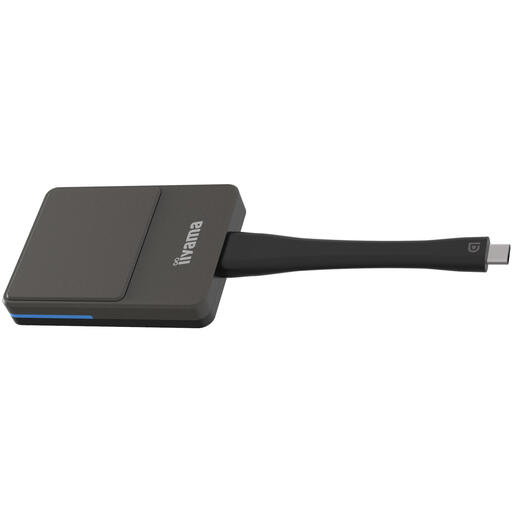 No image available
iiyama WP D002C Smart TV dongle, USB, 4K Ultra HD, black and silver
This may only be relevant if you use a computer with a browser and have a compatible iiyama display with an Android receiver and EShare; it isn’t a general-purpose streaming interface.
The product information lists Wi-Fi, support for up to 4K and a weight of 81 g. The computer must support USB-C with DP Alt Mode.
The specified screen-mirroring method requires a compatible iiyama display and the EShare app. This alone doesn’t confirm that every Eye film will play with this setup.
Joybuy
Frequently asked questions
Do I need an app on my streaming box to use Eye Film Player?
Not for the browser option described by Eye: you can connect your computer via HDMI or cast from Chrome. Check separately whether a standalone Eye app is available for the device you’re considering.
Why isn’t Eye’s Cast button appearing?
Eye Film Player recommends checking that your transmitter and casting device are connected to the same Wi-Fi network. Eye describes using Chromecast via Chrome on a desktop computer or Android device, but not via Chrome on iOS.
Do I need a subscription to watch silent films from Eye?
No. Eye Film Player lists free films that you can watch without an account. According to Eye, you need an account to rent films; check which option applies to each title.
How can I keep a streaming device working well and safely?
Install any available software updates and ask about updates for the exact model before buying. ACM ConsuWijzer warns that smart devices may not continue to work properly or safely without updates, and that apps may become unavailable.
What cooling-off period applies to an online purchase in the Netherlands?
According to ACM ConsuWijzer, online purchases generally come with a cooling-off period of up to 14 days after delivery, subject to exceptions and conditions. Check the seller’s returns information before making your purchase.


