
People looking for a specific concert film
If you want to watch a particular performance, first check which service has it and whether its app works on your TV or player. The film catalogue is not a feature of the hardware.


Don’t buy a stick or box straight away. First, check whether the specific concert film and its app work on your current TV. If the film plays well there, you may not need an extra player. Then choose based on your connection and the picture and audio formats that the film, your screen and your sound system actually support.
If you want to watch a particular performance, first check which service has it and whether its app works on your TV or player. The film catalogue is not a feature of the hardware.
If you want to tailor the picture to the concert recording and your screen, compare the supported HDR formats and available playback settings. Google and Apple describe these features for their own devices.
Check which audio track the recording offers and whether the player, TV and sound system can process it together. The format details published by Xiaomi Netherlands and NVIDIA describe device support, not the availability of a specific concert film.
First check that the title and app are available, then compare picture, sound, connectivity and set-up.
| What to consider | What to look for | Who is this most important for? |
|---|---|---|
| Access to the concert film | Search for the exact title on your preferred service and check that the app works on your TV or player. | If I want to watch a specific performance, I want to know where it’s available and whether my device supports the app first. Around 28% of consumers put film availability and app access first. |
| Picture quality | Check the title’s HDR format, your screen’s capabilities and any settings for dynamic range and frame rate. Apple describes separate settings for this on Apple TV. | If I’m watching in a dark room, I want the picture to suit the recording and my screen. Around 22% of consumers put picture settings that suit their needs first. |
| Concert sound | Check which audio track the title offers and whether the player, TV and audio system support the chosen format. | If I’m listening through a soundbar or receiver, I want to know whether the recording and every device in the playback chain can handle the same audio format. Around 22% of consumers prioritise concert sound. |
| Connection | Check whether Wi-Fi is stable where you’ll use the player, or whether you can connect it via Ethernet. For Netflix in 4K, Netflix recommends a stable connection of at least 15 Mbps. | If I want to watch a long concert film, I want to avoid interruptions and know whether Wi-Fi will do or a cable would be more convenient. Around 17% of consumers put connectivity first. |
| Set-up and additional purchases | Check which cables are included and whether you need an account or subscription for your preferred service. | If I want to get connected quickly, I want to know in advance whether I’ll need to arrange another cable or access to a service. Around 11% of consumers prioritise ease of set-up and additional purchases. |
The formats supported by a player, those available for a specific title and the capabilities of your screen and audio system are separate things. A logo on the device doesn’t guarantee that the concert recording is available in that format.
Check the title and its available picture and audio options, then compare these with your subscription, TV and sound system.
The 2022 Apple TV 4K varies by version: the 128 GB model has Ethernet, while the 64 GB Wi-Fi model does not. Xiaomi Netherlands’ list of ports for the Xiaomi TV Box S (3rd Gen) does not include a built-in Ethernet port.
Check the exact version and its list of ports before choosing a device on the assumption that it offers a wired connection.
The Google TV Streamer (4K) is worth considering if you’re looking for Google TV and built-in Ethernet.
The 2022 Apple TV 4K is worth considering if you want Apple controls and adjustable settings for dynamic range and frame rate.
The TV Box S (3rd Gen) is a Google TV box worth comparing if listed HDR formats and an included HDMI cable matter to you.
The Fire TV Stick 4K Max is a compact stick option worth comparing if Wi-Fi is reliable where you watch.
The SHIELD TV Pro is worth looking into if you want to use your own video files and specific audio formats as well as stream.
This selection includes projectors with listed apps or streaming features for a big-screen experience. Check that your preferred concert film and service are available for each model. A projector won’t replace a streaming stick or box in every set-up.
 Image unavailable
The listed built-in apps and access to the Play Store make this model worth considering if you want to stream directly on the projector.
The product title lists WiFi 6, Bluetooth, automatic screen correction, 180° rotation and a projection size of 50–200 inches.
The title also mentions 50%–100% digital zoom and connections for HDMI, a TV stick, USB stick, iOS, Android and laptop. Do not look directly into the projector lens.
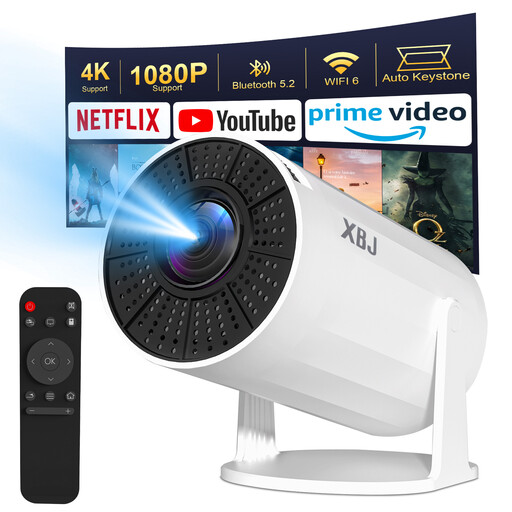 Image unavailable
The product description lists Android TV and apps. Check that the concert-film app you need works on this model.
The title lists WiFi 6, Bluetooth 5.2, Android 11, 180° rotation, 200 ANSI and a projection size of 40–200 inches. It also mentions 1080p and 4K decoding.
According to the description, direct wireless streaming from a phone is not supported due to HDCP restrictions. Keystone correction is vertical and focus is manual; autofocus is not supported. Some apps may not work properly until the system has been updated, according to the description. Do not look directly into the projector lens.
 Image unavailable
The product title lists support for Netflix and Disney+. Check whether the concert film you want is available on your chosen service.
The title lists Wi-Fi, Bluetooth, wireless projection, autofocus and 4K support. FHD is also included in the product title.
The product description mentions automatic focus and picture correction. Do not look directly into the projector lens, and make sure there is good ventilation around the device.
Not if your current TV already plays the app and the film you want without any problems. First, check the specific title and app on your TV. A concert film being available on one service tells you nothing about what’s available on another.
Apple describes separate options for dynamic range and frame rate under ‘Settings’ > ‘Video and Audio’ > ‘Match Content’. According to Apple, the screen may briefly go black or flicker when switching.
Netflix recommends a stable connection of at least 15 Mbps for UHD streams. For 4K on the Google TV Streamer, Netflix also lists a suitable subscription and a compatible TV and HDMI connection, among other requirements. These are not universal requirements for every concert film.
Many distance purchases come with a 14-day cooling-off period, as explained by the Dutch government. Faulty products are also covered by statutory guarantees; according to the Dutch government, the Netherlands has no fixed statutory guarantee period. The exact rules depend on the individual purchase.
According to the Dutch Authority for Digital Infrastructure, equipment subject to this requirement must carry a CE marking. Check the marking on the actual device; a webshop listing is not an inspection of the item delivered.