What should you consider when choosing?
First, test a dark scene using your existing TV’s picture settings. Only consider a separate stick or box if an app is missing, the controls don’t suit you or you need a different network connection.
| What to consider |
What should you check? |
Who is this important for? |
| Dark scenes in daylight |
First, try adjusting your TV’s picture mode and brightness. Then check whether the TV, title, subscription and player all support the same HDR format. |
If dark scenes are hard to see during the day, first find out what you can adjust on your current TV; around 33% of consumers say visibility in daylight is their main reason for buying. |
| Access to the series you want |
Check that the app and title are available on the exact player model and in the Netherlands, and that your subscription includes access. |
If your main aim is to access a missing app or series, first check which services and titles are available; around 27% of consumers put access to the series they want first. |
| Reliable network connection |
Check the Wi-Fi signal by your TV and the device’s connections. Netflix recommends a stable connection of at least 15 Mbps for 4K streaming. |
If you experience buffering during longer episodes, check whether the Wi-Fi signal is strong enough where your TV is or whether you can use a network cable; around 20% of consumers name connection stability as their top priority. |
| Setup and controls |
Check whether your TV’s apps already meet your needs, whether you have a free HDMI port and power socket, and whether the exact model includes an HDMI cable. |
If you want a device that’s easy to set up and want to avoid unnecessary purchases, first check the connections and what’s in the box; around 20% of consumers put setup and controls first. |
Joybuy products
These products are projectors with streaming apps or app features listed in the product information; they are not standard streaming sticks or TV boxes. They’re most relevant if you want to watch content on a projector. Check that the app and title you want work on the exact model and that the projection is suitable for the lighting in your room.
 No image available
Video projector with built-in apps and Play Store
An option if you’re looking for a projector with built-in apps rather than a standard separate streaming stick.
The product name lists Wi-Fi 6, automatic screen correction, digital zoom and 180° rotation. Check that the app and title you want are available on this version.
The product information warns against looking directly into the projector lens.
View at Joybuy
 No image available
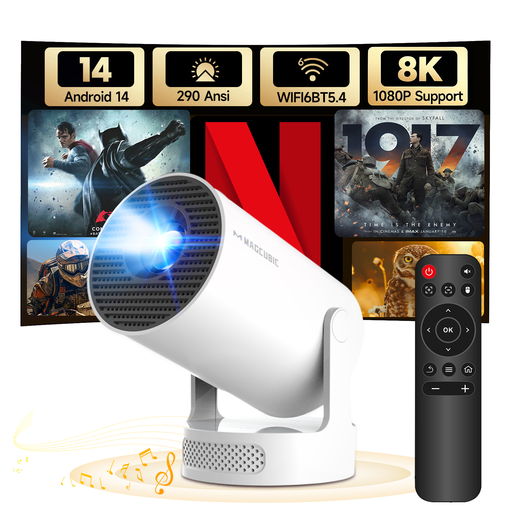
MAGCUBIC HY300Pro+ mini projector
This compact projector could be a good fit if you want streaming features and flexible placement in one device; check first that it’s suitable for your room.
The product name lists Android 14, Wi-Fi 6, Bluetooth 5.4, 180° rotation and support for 8K content. The stated brightness is 290 ANSI.
The product information warns against looking directly into the lens and advises keeping the ventilation openings clear.
View at Joybuy
 No image available
Yaber K2s projector with Google TV
An option if you’re looking for a projector with Google TV and autofocus. Check that the apps and titles you use are available on this version.
The product name lists native 1080P, 4K support, Wi-Fi 6 and autofocus with keystone correction. The product information mentions Netflix and 7000+ apps; check that the service and title you want are available.
The product information warns against looking into the lens, advises keeping the ventilation openings clear and says to protect the device from rain and moisture. It recommends leaving at least 30 cm of clear space around the ventilation openings.
View at Joybuy
 No image available
MAGCUBIC HY350Max smart projector
This projector could be a good fit if you want built-in apps and automatic picture correction; check app availability and whether it’s suitable for the lighting in your room.
The product name lists native 1080P, support for 8K content, 900 ANSI, Android 14, Wi-Fi 6, Bluetooth 5.4, 180° rotation and automatic keystone correction. The description mentions pre-installed apps.
The product information warns against looking directly into the projector lens and advises keeping the ventilation openings clear.
View at Joybuy
Frequently asked questions
Will dark scenes automatically look clearer with a 4K streaming device?
No, a 4K streaming device won’t automatically make your TV screen brighter. First, check your TV’s picture mode and brightness. Samsung describes a mode for bright viewing environments, while Netflix advises checking your device’s brightness or HDR settings if the picture looks too dark.
What internet speed does Netflix recommend for 4K?
Netflix recommends a stable connection of 15 Mbps or higher for 4K UHD streaming. Also check that the title, subscription, player and TV support the quality you want; this isn’t a general speed requirement for every streaming service.
Do I need a separate HDMI cable?
It depends on the exact model. Google lists a cable as sold separately for the TV Streamer, while Xiaomi lists an HDMI cable in the box for the TV Box S (3rd Gen). Also check that your TV has a spare HDMI port.
Do I have to pay for series as well as buying a streaming device?
You may do: buying a player doesn’t automatically give you access to the title or picture quality you want. Xiaomi says that a subscription, download or purchase may be needed for content; Netflix also links the picture quality available to your subscription.
What can I do if a player doesn’t work properly after I buy it?
When you buy as a consumer in the Netherlands, your purchase is covered by the statutory guarantee. If the product breaks during normal use sooner than you could reasonably expect, the seller must offer an appropriate solution. There is no single fixed guarantee period for all devices. Online purchases from a business generally also come with a 14-day cooling-off period, subject to legal exceptions.


