
Creator with limited desk space
You want recording controls and a few regular actions within easy reach, alongside the controller you’re demonstrating. A compact control panel or a phone you already own could suit your limited space.


Start with the actions you need at your fingertips during the demonstration: recording, switching scenes and, if needed, muting audio. For a few regular actions, you could first try keyboard shortcuts or a phone you already own. A compact physical panel makes sense if you want dedicated buttons, while extra buttons or dials are most useful if you use those functions often. Before you buy, check the software you need, the connection options and how much free desk space you have.
You want recording controls and a few regular actions within easy reach, alongside the controller you’re demonstrating. A compact control panel or a phone you already own could suit your limited space.
You want to find your configured visuals or source actions quickly while explaining how they work. Think about how many actions you want visible at once, and whether you’re happy to switch between pages.
During the tutorial, you may want to do more than mute the audio, such as adjusting supported audio controls. Check that the specific action works with the control panel you’re considering in your recording software.
First, count the actions you want to control straight away during a single tutorial. If a few actions are enough, start with existing keyboard shortcuts or a phone. Choose a physical panel only if you want dedicated, easy-to-recognise buttons.
| What to consider | What should you check? | Who is this important for? |
|---|---|---|
| Controls for a small desk | Measure the available space, including room for cables, and count how many actions you want visible at once. | If I’m filming alongside the controller I’m demonstrating, I want to keep my workspace clear. Around 40% of consumers put compactness first. |
| Recording and scenes | Make a note of the recording, scene and source actions you use in a single tutorial; check that they work with your software. | If I’m switching between visuals while explaining something, I want to find the scene and recording actions I need straight away. Around 30% of consumers give top priority to direct access to these actions. |
| Microphone and audio | Decide whether muting is enough or whether you want to adjust levels; check that your software supports the control you want. | If I want to adjust my voice or other audio sources while filming, I want to know whether the specific action works. Around 20% of consumers prioritise audio controls. |
| Using what you already have | Test the actions you need with keyboard shortcuts or a phone; if you use an app, check which features and computer connections it requires. | If a few recording actions are enough, I want to try using my keyboard or phone first. Around 10% of consumers mainly want to avoid spending more on hardware or software. |
A compact panel may be enough for a few regular tasks, while extra actions may need to be spread across pages or folders. The number of buttons alone doesn’t tell you how much space your workflow needs.
Before you buy, list the actions you need to access at the same time during your demonstration.
Elgato says that not all Stream Deck plug-ins support dial actions. So a dial isn’t automatically suitable for every audio control you might want.
Before choosing a model with dials, check the specific action for your audio source and software.
Loupedeck stopped selling its product range directly in March 2025. Support for legacy software version 5.8 and its marketplace ended on 30 March 2026; Loupedeck says it will continue to provide product support.
If you’re looking at remaining stock, check which software version you need, who the seller is and what support is available.
The Stream Deck range includes everything from compact models to panels with more buttons and dials, to suit different numbers of OBS actions.
The Stream Controller X is an option if you want several buttons immediately to hand and use Loupedeck software.
The MX Creative Console combines a keypad with a separate dialpad, and could suit you if you also want to control creative editing tasks.
According to Loupedeck, the Live S offers touch controls and two analogue dials. If you’re considering remaining stock, pay close attention to the software version.
These product picks are desktop controls with customisable or macro keys for streaming tasks. Before you buy, check that the actions you want work with your recording software.
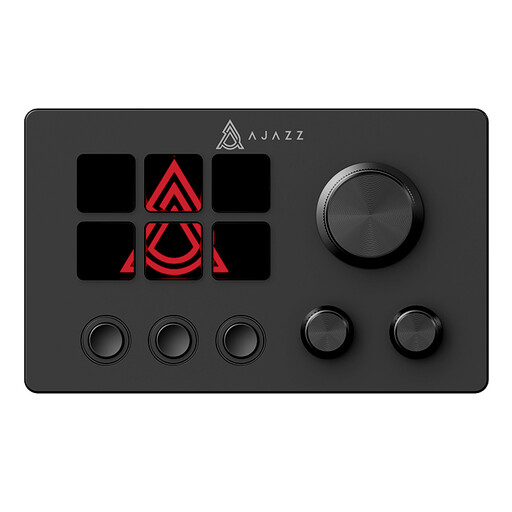 No image available
Could suit you if you want to use customisable keys for regular streaming tasks.
The product name mentions an LCD display and one-key control. Check that the actions you want work with your software.
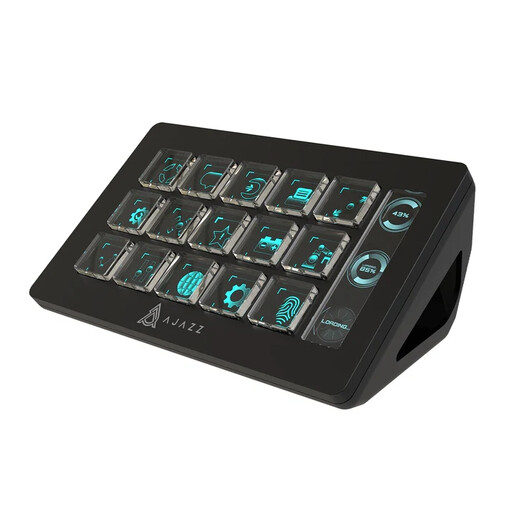 No image available
Could suit you if you want to trigger several macro actions straight away during a stream.
The product name mentions 15 macro keys and control of apps and software such as OBS. Check that the specific actions you need work with your setup.
Make a note of the actions you need to access straight away during a test recording, such as recording, switching scenes and muting. Elgato lists six free virtual buttons for Stream Deck Mobile; you’ll need desktop software and a connection to your computer to use them.
Elgato documents an action for pausing a recording, but it doesn’t work with every recording format. Check your recording settings and test the action before recording your tutorial.
Razer says the Stream Controller X uses Loupedeck software. On 19 August 2026, Loupedeck said that support would continue and recommended version 6.4.1 or later if a device isn’t recognised because of the software conflict it described.
For many online purchases from a business, the Dutch government says consumers have 14 days to change their mind; exceptions may apply. Faulty products are also covered by the statutory guarantee: the Netherlands has no fixed statutory guarantee period, and you should contact the seller.