First, check whether the comedies you want to watch are available from a streaming service in the Netherlands, and whether the relevant app works on your current TV. You may not need a separate player at all. If you do choose one, look at app support, subtitles, controls and connections. 4K output won’t make your screen bigger, nor does it guarantee that an older film is available in 4K.
Who is this guide for?
Watching from a distant seat
You want to follow dialogue and subtitles from the sofa, and understand that screen size and a player’s output resolution are two different things. The Consumers' Association explains how viewing distance and screen size are related.
Looking for classic comedies
You have specific films in mind and want to check first that they’re available in the Netherlands from a service with an app for your chosen device. Netflix Help Centre explains that film availability can vary by region and change over time.
Using an existing TV
Your TV works, but you’re considering a separate player for its controls, apps that your TV doesn’t have, or the network connection you need. The features you need depend on your TV, streaming service and setup.
What should you look for?
Start with the film you want to watch and the app you need for it. Then check whether your current screen and controls meet your needs, and only after that compare separate players for their connections and features.
| Buying concern |
What should you check? |
Who is this important to? |
| Access to the comedies you want to watch |
Search for the title in the Dutch catalogue and check that the exact version of the player supports the app you need. |
If I want to watch a particular comedy, I want to know where it’s available and whether the app works on my device first. Around 34% of consumers put access to the titles they want first. |
| Readability from your seat |
Measure your viewing distance and test the subtitles in the film app. The Consumers' Association uses viewing distance divided by 2.4 as a starting point for screen size in centimetres; it’s not a required minimum. |
From my usual seat, I want to follow the dialogue and subtitles without immediately buying another player. Around 33% of consumers prioritise readability from their seat. |
| Controls and cost |
Compare the controls you’ll use and check which cables and accessories are included with the exact version. |
If I mainly want to search and pause easily, I don’t want to choose a device for features I don’t need. Around 20% of consumers prioritise easy controls and avoiding unnecessary purchases. |
| Network and TV connections |
Check that you have a spare HDMI port, how Wi-Fi works by your TV, and whether you can connect an Ethernet cable there. |
For my TV, I want to know whether the connection will work with its ports and the router’s location. Around 13% of consumers put connectivity first. |
Avoiding common buying mistakes
-
Assuming a 4K logo will solve the problem of sitting far from the screen
A player’s resolution rating won’t change the physical size of your screen. For 4K viewing, your TV and the available source also need to support it.
First, test your TV and subtitles from your usual seat. Then choose a player based on the features you’ll actually use.
-
Assuming every classic comedy is available on every player
Film availability can vary by region and change over time. A player won’t automatically give you access to the title or streaming service you want.
Before buying, check the title, the Dutch streaming service and the app for the exact version of the player.
-
Assuming system settings control subtitles in every app
Netflix says that not all display options are available on every connected TV device. Google warns that system subtitle preferences don’t apply in certain apps.
Try the subtitles in the film app you use and check whether you can adjust how the text appears there.
-
Overlooking a cable or model generation
What’s in the box and which accessories you need can vary by model. It’s also worth checking a product’s generation rather than judging it by the model name alone.
Compare the full model name, what’s included in the box and the availability of the version you want to buy.
Brands to consider
Google
The Google TV Streamer (4K) is an option if you’re looking for a separate Google TV box with a remote and built-in Ethernet.
- Google lists 32 GB of storage, built-in Ethernet and a feature for finding the remote.
- Google says the HDMI cable is sold separately. Subtitle settings may not apply in every app.
Xiaomi
The TV Box S (3rd Gen) is an option if you’re comparing Google TV boxes for a Wi-Fi setup.
- Xiaomi lists 32 GB of storage and an HDMI cable in the box.
- The list of connections includes Wi-Fi and USB, but no built-in Ethernet port. Check that you’re comparing the third generation, not an older Mi Box or TV Box version.
Apple
Apple TV 4K is worth considering if Apple controls and accessibility features matter to you; just be sure to check the generation.
- For the fourth generation, Apple lists features including zoom, larger text and support for captions.
- Apple announced that this generation will be available from 13 November 2026. An HDMI cable is sold separately for this version.
Products for watching from a distance
These Joybuy products include screens and a projector for watching from a distance. A larger screen or a built-in TV platform is different from a separate streaming stick or box.
 No image available
XGODY N7 Cine Smart Projector
This projector could suit you if you’re looking for a large projected image and streaming features built into the device.
Product title: 1000 ANSI Lumens, Native 1080P, 4K Supported, Netflix, Whale TV OS and 2 GB + 16 GB.
View at Joybuy
 No image available
METZ 55MNE8000Z QD-Mini LED Google TV
This 55-inch TV is an option if you’re looking for a larger screen with Google TV built in; check readability from your own seat.
55 inches (140 cm), 4K, 144 Hz and Google Cast.
View at Joybuy
 No image available
METZ 50MUF7000Z UHD Smart TV
This 50-inch TV is an option if you’re looking for a screen with Google TV built in; check the picture size from where you’ll be watching.
50 inches (127 cm), UHD, HDR10 and Google TV.
View at Joybuy
 No image available
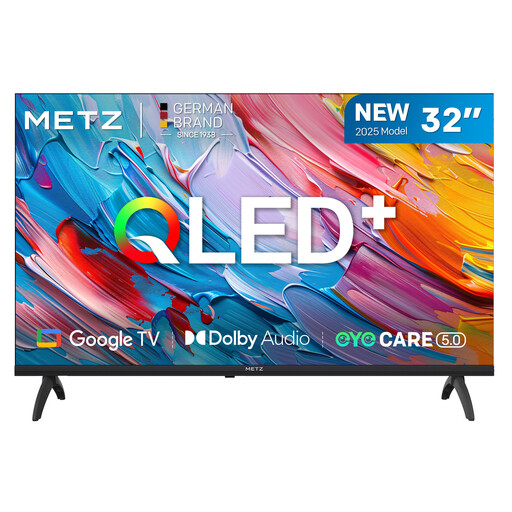
METZ 32MQF7000Z QLED HD Google TV
This 32-inch TV has Google TV; test from your seat whether the screen size suits your viewing distance.
32 inches, QLED, HD and Google TV.
View at Joybuy
Frequently asked questions
Can a 4K streamer make a small TV easier to see from across the room?
No, the player won’t change the screen size. First, assess your TV from your seat; the Consumers' Association uses viewing distance divided by 2.4 as a starting point for estimating screen size. For 4K viewing, your TV and the available source also need to support it.
How do you set subtitles for a classic comedy?
While the film is playing, open the audio and subtitle options in the film app and check which languages are available for that title. Netflix Help Centre says that not all display options are available on every connected TV device or in every language; Google warns that system preferences don’t apply in every app.
Which cables and connections should you check before installation?
Check that your TV has a spare HDMI port and that the required cable and power supply are included with the version you’ve chosen. Google says the HDMI cable for the Google TV Streamer is sold separately; Xiaomi lists an HDMI cable and power adapter in the box with the TV Box S (3rd Gen).
Are films and streaming services included with a streaming device?
Don’t assume that a film or subscription is included with the player. Availability can vary by title and region and change over time, so check separately whether the comedy you want is available and what the streaming service’s terms are.
Can you use a free source for copyrighted comedies in the Netherlands?
Choose a legally provided streaming service and don’t rely on the word ‘free’ alone. The Government of the Netherlands states that downloading from an illegal source is prohibited.


