
Organiser with a permanent viewing space
You want to play an astronomy programme on a connected large screen and get a reliable network connection ready for your event.


First, choose a playback option that works with the specific astronomy programme on your screen. Then check the HDMI connection, network connection and controls. A player with ethernet may suit a permanent set-up where you don’t want to rely on Wi-Fi, while a stick or an existing smart TV may be all you need if it can play your chosen source. For 4K playback, the source and screen must also support it.
You want to play an astronomy programme on a connected large screen and get a reliable network connection ready for your event.
You take your playback set-up to different rooms and want to check the HDMI connection, power supply and controls in advance.
You’re using a suitable large TV or projector and want to check that the source, player and screen all support the picture quality you’re after.
| What to consider | What to check | Who this matters to |
|---|---|---|
| Access to the programme | Check whether your chosen video or broadcast plays through an available app, browser or Cast option. | If I want to show a specific astronomy video, I check the playback option first; around 33% of consumers prioritise access to the programme. |
| Connection in the room | Check the Wi-Fi at the venue and, for a wired connection, whether the player has an ethernet port. For Google Cast, Google says the phone and receiver must be on the same Wi-Fi network. | If you don’t want the event to depend on a connection that might drop out, check the network options; around 27% of consumers put a reliable connection top of their list. |
| Picture on the big screen | Check the screen’s resolution and HDMI connection, as well as the picture quality of the source. Apple says a suitable TV is required for 4K HDR. | If I want to show details on a big screen, I look at the whole picture chain; around 20% of consumers prioritise picture quality over other considerations. |
| Equipment and accessories | First check whether your existing smart TV can play your chosen source, then see which cables are included with the player. | If you want to reuse existing equipment and avoid buying unnecessary extras, check the complete set-up; around 20% of consumers prefer to keep additional purchases to a minimum. |
The player’s output capability doesn’t automatically mean that the video and connected screen also support 4K.
Check the source, screen and HDMI connection together before choosing a product based on a 4K claim.
Your phone must be able to find the Cast receiver on the local network. A network or access issue could interrupt your chosen playback option.
Test your phone, network and receiver at the venue in advance. If necessary, choose an option you can control directly with the remote.
If your existing TV can already play the programme, you may not need a separate player. The cables included vary by model.
First check your TV’s apps and connections, then check what’s in the box for the exact device you’re considering.
Rights depend on the specific material and the circumstances of the screening. ESA material may have conditions, and third-party material may be subject to separate rights.
Before showing something to a group, check the licence, any attribution requirements and the rights of other copyright holders.
The Google TV Streamer (4K) is an option for a Cast set-up with a built-in ethernet port.
Apple TV 4K may suit you if you want to use Apple controls and have checked in advance that your astronomy source plays through this option.
The TV Box S (3rd Gen) is a Google TV box that connects via Wi-Fi and HDMI.
The LEAP-S3 is a Google TV box that the manufacturer lists as supporting Google Cast and ethernet.
This selection features projectors with built-in apps or a smart TV interface. They may be an alternative to a separate streaming box, as long as the device can play your chosen astronomy source.
 No image available
An option if you want to use apps directly on the projector; check that your astronomy source is available on it.
The title lists Wi-Fi 6, Bluetooth, automatic picture correction, digital zoom and rotation. The stated projection range is 50–200 inches. The title lists HDMI as a connection.
Don’t look directly into the lens while the projector is in use.
 No image available
An option if your chosen astronomy source is available through Google TV; check the app before choosing this projector for an event.
The title lists native 1080p and 4K support, not native 4K. Automatic focus and keystone correction are also listed.
Protect the device from rain and moisture, and don’t look directly into the lens.
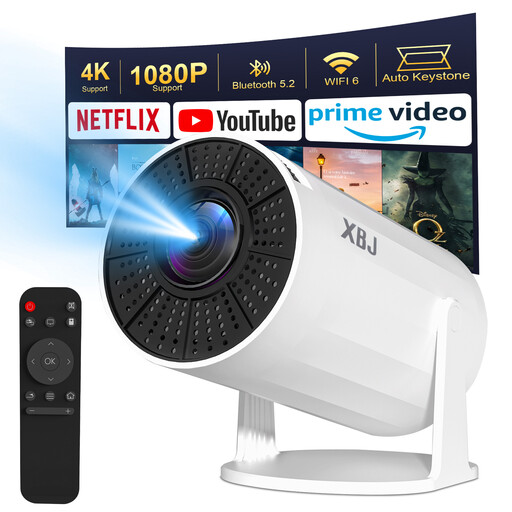 No image available
An option if you want to use apps on the projector and move it between rooms; make sure there’s a power socket nearby.
The title lists Android 11, 1080P and a projection range of 40–200 inches. Automatic keystone correction and 180° rotation are also listed.
The description says that wireless streaming from a phone isn’t supported because of HDCP restrictions. The projector has no battery and must be connected to mains power.
 No image available
An option if the built-in streaming apps support your astronomy source and you want to adjust the projection direction easily.
The title lists Full HD 1080P and 360° rotation. The description mentions 4K decoding; this doesn’t mean native 4K output.
Don’t look directly into the lens, and protect the device from water and moisture.
You can if your chosen video plays on your device through a compatible app, browser or supported Cast option. The European Space Agency offers astronomy videos and Web TV; check the playback option for the specific broadcast and device.
Check the HDMI input, power supply and Wi-Fi at the venue in advance. Google says the mobile device and Cast receiver must be on the same Wi-Fi network; test the connection before the group arrives.
It varies by model. Google says a certified HDMI 2.1 cable for the Google TV Streamer is sold separately, and Apple also lists a cable as a separate purchase. Xiaomi says an HDMI cable is included with the TV Box S (3rd Gen). Check the packaging for the exact model.
According to ACM ConsuWijzer, the seller is responsible if a product doesn’t do what you could reasonably expect during normal use. Online purchases generally come with a 14-day cooling-off period from the day after delivery; check the terms and exceptions that apply to your purchase.
It depends on the rights to the specific programme and the circumstances of the screening. The Dutch government says permission may be required to make copyright-protected work available to the public. The European Space Agency allows certain public screenings of ESA material subject to conditions; separate permission may be needed for material owned by other rights holders. Check the applicable licence and any attribution requirements.